
Google Just Revealed the Full Android Sideloading Process for Power Users – Including a 24-Hour Wait
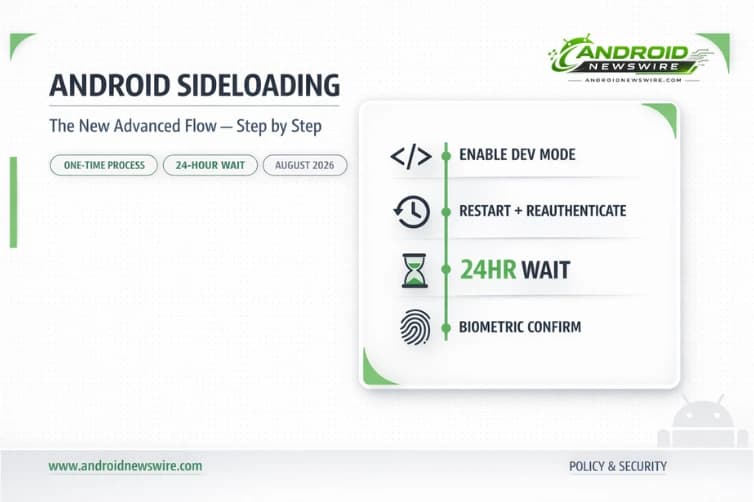
Breaking today – Google has published the complete technical details of its “Advanced Flow”: the multi-step process that will allow Android power users to continue installing apps from unverified developers once mandatory developer verification takes effect. The headline detail is a mandatory one-day waiting period built deliberately into the process to break the urgency manipulation tactics used in social engineering scams. Here is the complete step-by-step breakdown, what it means for developers, and when all of this actually goes live.
The Context: Why Google Is Changing Sideloading at All
Before walking through the new process, it is worth understanding what is driving it. Google’s own analysis found 50 times more malware from internet-sideloaded sources than from the Play Store – making it hard to argue the change won’t do some good.
Globally, 57% of adults experienced a scam in 2025, according to Global Anti-Scam Alliance data cited by Google. What makes this particularly troubling is how fraudsters have evolved beyond simple trickery to sophisticated psychological manipulation techniques.
The specific attack pattern Google is targeting is the social engineering phone call – a scammer posing as a bank, government agency, or tech support representative who keeps a victim on the line while coaching them through enabling sideloading and installing malicious software. Google says the advanced flow was “designed carefully to prevent those in the midst of a scam attempt from being coerced by high pressure tactics to install malicious software.” In these scenarios, scammers exploit fear – using threats of financial ruin, legal trouble, or harm to a loved one – to create a sense of extreme urgency. They stay on the phone with victims, coaching them to bypass security warnings and disable security settings before the victim has a chance to think or seek help.
Every step of the Advanced Flow is an answer to a specific tactic in that playbook.
The Advanced Flow: Every Step Explained
Here are the four steps Android users will need to go through to sideload apps from unverified developers on their devices.
Step 1: Enable Developer Mode and Confirm You Are Not Being Coached
The process starts by enabling Developer mode. Go to Settings → About phone and find the Build number. Tap that line seven times until you see “You are now a developer!” Afterwards, “Developer options” will appear under the System menu or in search.
This first step serves as an immediate friction gate. Developer mode is a setting that the vast majority of Android users have never touched. Requiring it as the entry point to the unverified sideloading flow means casual users encountering the feature accidentally – or being coached toward it in a moment of panic – face an immediate barrier that requires prior knowledge to navigate.
After enabling Developer mode, there is a quick check designed to make sure that no one is coaching the user to turn off their security protections. This is a direct anti-manipulation confirmation – a prompt that explicitly asks whether someone else is guiding you through this process.
Step 2: Restart the Phone and Reauthenticate
Users will then restart their phone and reauthenticate – a process that cuts off any remote access or active phone calls that a scammer may be using to watch what their potential victim is doing.
This step is specifically designed to sever the communication channel that makes social engineering attacks work. A scammer who has a victim on the phone and is watching their screen via a remote access tool – a common technique in sophisticated fraud operations – loses that access when the device reboots and reauthenticates. By the time the phone comes back up and the user logs back in, the scammer’s leverage is broken.
Step 3: Wait 24 Hours – The Mandatory Security Delay
This is the step that has generated the most discussion. After restarting and reauthenticating, there is a required one-time, one-day protective waiting period. Since scammers often rely on manufactured urgency, this waiting period gives users time to think.
The 24-hour wait cannot be shortened, skipped, or bypassed. It is architectural. The entire premise of social engineering scam urgency – “you must do this NOW or your account will be suspended / you will be arrested / your money will be lost” – collapses against a system that enforces a full day between intent and action. A user who has been pressured into enabling sideloading will, after a full day, have had time to talk to a family member, search the situation online, or simply realize the urgency was manufactured.
For power users and developers acting from genuine intent, waiting a day is a minor inconvenience. For a scam victim being driven by manufactured fear, it is a circuit breaker.
Step 4: Biometric Confirmation and Choosing Your Mode
When the waiting period is up, device owners can use biometric authentication, like fingerprint or face unlock, or use their device PIN to confirm the change.
Users then choose between enabling the installation of unregistered apps temporarily or indefinitely. The temporary option runs for 7 days – useful for specific testing or installation scenarios. The indefinite option grants ongoing access without needing to repeat the process. You only have to complete the process once on a phone, and you can turn Developer options off again afterward.
Even after completing the flow, the install prompt still shows a warning that the app is from an unverified developer, but you can tap “Install Anyway.” The warning never fully disappears – it is a persistent reminder that the user is operating outside the verified ecosystem, visible at every installation regardless of which mode they enabled.
What This Means for Developers – The Verification Side
The Advanced Flow only matters if you are trying to install apps from developers who have not completed Google’s new verification process. Understanding the verification side is essential context.
Developers releasing apps outside of Google Play will have to provide identification, upload a copy of their signing keys, and pay a $25 fee. Through the new Android Developer Console, developers will need to provide their legal name, address, email, and phone number. Organizations will additionally need to provide their website and a D-U-N-S number.
For most independent developers and small studios, this is manageable – the $25 fee mirrors what Play Store developers already pay, and the identity information required is not dramatically different from what any developer publishing on a major platform already provides. But for the community of privacy-conscious developers, hobbyists who want to remain anonymous, and open-source projects that distribute outside the Play Store, the requirement to provide real-world identity to Google is precisely the concern that drove the Keep Android Open coalition’s letter earlier this year.
Google’s answer to that concern is the limited distribution account:
Google offers limited distribution accounts for students and hobbyists that allow sharing apps with up to 20 users without requiring government ID verification or registration fees.
Limited distribution accounts that allow you to share apps with up to 20 users without needing to pay the registration fee or government ID will be available at the same time as the Advanced Flow in August. Under the limited distribution model, users will need to share a device identifier with the app developer, who then enters that ID into Google’s console and provides download instructions – creating a traceable connection that discourages misuse while keeping legitimate sharing alive.
F-Droid and the Unresolved Criticism
Not everyone is satisfied with Google’s framing of these changes as pro-openness. F-Droid has called Google’s assurances that “sideloading isn’t going anywhere” misleading, arguing that the new process effectively puts independent app stores and developers under Google’s control.
The concern is structural rather than procedural. The Advanced Flow preserves the ability of individual users to install unverified software – but it places Google as the identity authority for every developer who wants to distribute software on Android outside the Play Store. An app store like F-Droid that distributes hundreds of open-source apps from developers who have not registered with Google’s system becomes, under the new regime, a source of “unverified” software – meaning users who want to use it without completing the Advanced Flow will not be able to install its apps.
Requiring verification to distribute software extends Google’s influence outside of its own apps and app store, which is why some developers and digital rights organizations have publicly pushed back on the company’s plan.
That tension – between genuine security improvements and genuine ecosystem control – is the central unresolved question of Google’s 2026 Android security push. The Advanced Flow is a genuinely clever piece of anti-scam design. Whether it also concentrates too much platform power in Google’s hands is a question the developer community will be debating well past the September 2026 enforcement date.
Timeline: When Everything Goes Live
The new advanced installation flow will become available in August 2026 – a month before Google’s new developer verification program becomes mandatory in select markets in September.
In September 2026, the requirements go into effect in Brazil, Indonesia, Singapore, and Thailand – markets specifically chosen because they are experiencing higher rates of fraudulent app scams. A global rollout is planned to continue through 2027.
The advanced flow system launches in August 2026 for all Android versions through Google Play services – arriving strategically before verification requirements begin enforcement. This sequencing gives users time to understand and adapt to the new system without being caught off guard.
For developers distributing outside the Play Store, the practical deadline is clear: apps from developers who have not completed verification steps by the September 2026 deadline will be unavailable for new installation on certified Android devices in applicable countries. The verification program is already open – early access opened in October 2025, and the program expanded to all developers in March 2026, creating a six-month window for verification completion before enforcement begins.
If you distribute an Android app outside the Play Store and have not yet opened the Android Developer Console, now is the time to start.
Developer Action Summary
If you distribute apps via the Play Store: Nothing changes. Verification is already handled through the Play Console. Your users are unaffected.
If you distribute apps outside the Play Store and are willing to verify: Register via the Android Developer Console now. The system is open. Your users will see no friction installing your apps after September 2026.
If you are a student or hobbyist sharing with fewer than 20 people: Apply for a limited distribution account when it becomes available in August. No government ID, no registration fee, no Advanced Flow required for your users.
If you distribute apps and prefer not to verify: Your users in enforcement regions will need to complete the Advanced Flow before installing your apps after September 2026. That is a significant friction increase. Evaluate whether verification is actually incompatible with your situation, or whether the limited distribution path covers your use case.
If you are a power user who installs unverified APKs: Complete the Advanced Flow once in August when it becomes available. Choose “indefinitely.” You will not need to repeat the process.