
Google Is Rolling Out Android Contextual Suggestions – An AI That Quietly Learns Your Habits and Predicts What You Need Next
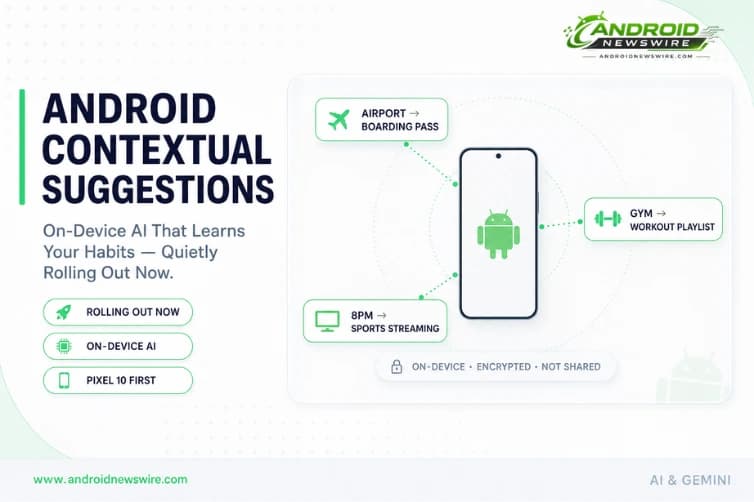
Google is rolling out a new Android AI feature called Contextual Suggestions – and it is doing so without any official announcement. Not mentioned at last week’s Android Show I/O Edition. Not listed in the May 2026 Google System Update changelog. Just quietly appearing in the stable channel on Pixel 10 series devices and, in some cases, Galaxy S26 units enrolled in the Play Services beta. Contextual Suggestions uses on-device AI to learn your routine – your location patterns, your app usage sequences, your daily habits – and surface relevant actions before you think to ask for them. Your boarding pass when you reach the airport. Your gym playlist when you arrive at the gym. Your sports streaming app when your regular match window begins. Here is everything confirmed about the feature, how it works, where to find it, and what it means for the direction Android is heading.
What Contextual Suggestions Actually Does
A new Android feature called Contextual Suggestions can predict the next steps you might take based on where you are or what you are doing. It uses AI to suggest actions and stores the information on your device in an encrypted form.
The new system is designed to anticipate actions users may want to perform depending on their location, schedule, or repeated behaviour patterns. For example, Android may automatically suggest opening a preferred music playlist when a user arrives at the gym, or prompt casting sports content to a TV at a time when the user usually watches matches.
What Contextual Suggestions does is provide AI-generated suggestions for actions you can take based on activities you frequently engage in – like when you arrive at the airport and your confirmation code pops up so you can easily check your bag in, or bring up your boarding pass.
The feature is not a notification, not an alert, and not an interruption. It is a contextual layer – suggestions that surface at relevant moments based on the intersection of where you are and what you typically do there. The AI is not waiting for you to ask. It is anticipating.
Contextual Suggestions are essentially a more mature version of Android’s App Actions, which suggest actions for a particular app, but instead combine cues from different apps. The distinction is important. App Actions are per-app suggestions – Gmail might suggest composing an email, Maps might suggest navigating home. Contextual Suggestions cross-reference multiple apps simultaneously to surface multi-app workflows that match your current context. Arriving at the airport triggers a suggestion that combines your calendar (the flight booking), your email (the confirmation code), and your airline’s app (the boarding pass) – a cross-app contextual action that no single App Actions implementation could produce alone.
The Privacy Architecture: On-Device, Encrypted, and Opt-Controllable
The privacy implementation of Contextual Suggestions is the feature’s most technically important aspect – and the detail that makes it possible for Google to ship something this personally sensitive without triggering the kind of backlash that cloud-based behavioural tracking would invite.
Google says all processing happens entirely on-device inside an encrypted environment. The company notes in a support page that the data used for contextual suggestions is not shared with apps or Google itself unless users explicitly grant permission for another purpose. While apps and services cannot directly access the underlying data, they can still use the AI-generated predictions to surface timely recommendations and shortcuts.
Google says it builds predictions from device activity and location inside an encrypted, on-device space so apps only receive suggestions, not raw data.
The architecture separates raw behavioural data from the outputs that apps can see. The AI model runs entirely on your device. It has access to location history, app usage patterns, calendar data, and activity sequences – but none of that raw data leaves the device. What apps receive through the Contextual Suggestions API are the predictions themselves: “the user is probably at the gym, suggest the workout playlist” rather than “here is the user’s complete location and usage history.”
Users will have the option to disable location access for the feature or delete all stored contextual data at any time. The feature is enabled by default but the controls are transparent and accessible. Users can control how much information the feature can access, including the ability to disable location-based suggestions.
On-device AI processing of this nature requires meaningful compute resources – which explains why the initial rollout is limited to the Pixel 10 series, where Google’s Tensor G5 chip provides the dedicated AI processing capacity to run behavioural inference models in the background without impacting battery life or performance.
How to Find It – and Why You Might Not See It Yet
If you are looking to use Contextual Suggestions on your phone, find them under Settings → Google Services → All services → Others. On a Pixel, tap your profile picture at the top of Settings, then tap All services → Others. It is entirely possible your device does not have the feature yet.
The feature is gradually rolling out on the stable channel to later Pixel devices. Contextual Suggestions lives in Settings under All services and is enabled by default.
The feature is also available on some Galaxy S26 units running the latest version of One UI and enrolled in the Google Play Services beta.
The staged rollout pattern is consistent with how Google deploys significant new AI features – beginning with the newest Pixel hardware where Tensor AI capabilities are strongest, expanding to other recent Pixels as the model is validated at scale, then broadening to other Android devices through Play Services updates over subsequent months. Details remain unclear about whether Contextual Suggestions will expand to Android devices beyond Pixel smartphones – but the Galaxy S26 sighting on Play Services beta suggests broader Android availability is the eventual target.
The Relationship to Magic Cue – and What Makes This Different
To understand Contextual Suggestions in the Android AI feature ecosystem, it helps to understand its relationship to Magic Cue – the Pixel 10 exclusive feature that launched in 2025.
Back in December 2025, reports surfaced that Google was working on a toned-down version of the Pixel 10’s Magic Cue feature that would be available across a broader range of Android devices.
Contextual Suggestions is a scaled-back version of Magic Cue, which debuted on the Pixel 10.
Magic Cue offers predictive suggestions such as addresses, contact details, or copied information that users may want to paste into conversations or apps. Magic Cue is more tightly integrated with the Pixel 10’s hardware capabilities and Tensor G5’s specific AI acceleration features. Contextual Suggestions takes the same behavioural prediction concept and packages it in a form that can run across a broader range of hardware – trading some depth of integration for accessibility at scale.
The distinction matters for users upgrading to Pixel 10 or choosing between Pixel models: Magic Cue remains the deeper, more capable Pixel-exclusive implementation. Contextual Suggestions is the democratised version that brings the core concept to the broader Android ecosystem through Play Services delivery.
Google Now, Rebooted With AI
Features like Contextual Suggestions can be very useful. It is also something that Google has been doing for years, going all the way back to Google Now in the early 2010s. It is a bit surprising that it took Google this long to do this with AI.
That observation is worth sitting with. Google Now – launched in 2012 – was one of the most forward-thinking smartphone features of its era. It surfaced contextual cards proactively: your flight boarding pass before departure, the weather at your destination before you asked, sports scores for your tracked teams, package tracking for recent purchases. It was predictive and contextual before those terms were attached to AI.
Google Now was deprecated in 2017, replaced by Google Assistant’s more conversational model and Google Feed’s interest-based content stream. Both were excellent at what they did – but neither preserved Now’s proactive, anticipatory quality. The AI Cards feature in Google Assistant carried some of this forward, but with a narrower scope and less aggressive contextual inference.
Contextual Suggestions is the attempt to bring that Google Now magic back, rebuilt on a foundation of on-device large model inference rather than the cloud-based rules engine that powered Now. The result should be more personalised, more private, and capable of surfacing suggestions that cross-reference more data sources simultaneously than Now’s card system could manage.
For long-time Android tinkerers the idea is surprisingly similar to what IFTTT, Tasker, and MacroDroid answered for years – “when this happens, do that” – but implemented through AI inference rather than manual trigger-and-action configuration. The difference is that you never had to set anything up. The AI infers the “when this happens” from your observed behaviour and configures the “do that” accordingly.
Why Google Did Not Announce It
Google did not mention Contextual Suggestions at The Android Show I/O Edition earlier this week.
That absence is notable. The Android Show I/O Edition on May 12 was Google’s pre-I/O developer showcase – a dedicated broadcast covering what is new in Android ahead of the May 19-20 Google I/O keynote. A significant new AI feature quietly rolling out to stable devices the same week as the Android Show, without an announcement, suggests one of two things.
The first possibility is that Contextual Suggestions is being intentionally soft-launched – a staged rollout without a formal announcement, allowing Google to validate the feature’s behaviour at scale on real devices before making it a headline commitment. This approach lets Google course-correct if the feature has unexpected performance or privacy implications without having to walk back a public announcement.
The second possibility is that a broader Contextual Suggestions announcement is being held for Google I/O next week – where the full developer API surface, the expansion timeline, and the integration with Gemini’s contextual intelligence layer will be presented to the developer audience in detail.
Given that Google I/O will take place in Mountain View, California on May 19-20, the second reading seems most likely. Contextual Suggestions appearing in the stable channel now gives Google a live, shipped feature to demonstrate at I/O rather than a future promise – the strongest possible positioning for a developer conference announcement.
What This Means for the Android Platform Direction
Contextual Suggestions is not just a user feature. It is an architectural statement about what Google believes Android should be – and what it intends to build toward.
Google is aggressively positioning Android as a contextual operating system rather than a conventional smartphone platform. The Pixel 10’s Gemini and Magic Cue, Gemini screen automation for food ordering and ride booking, the Advanced Flow’s contextual identity verification, and now Contextual Suggestions expanding to all Android devices – each of these features moves Android further from a platform where the user initiates every action and closer to a platform where the OS anticipates and assists.
The on-device privacy model that Contextual Suggestions uses is the enabling technology for this direction. Cloud-based behavioural inference – where your usage patterns are sent to Google’s servers, processed, and returned as suggestions – would not survive the scrutiny that a feature this personal would attract. The on-device encrypted processing model Google has built makes it possible to deliver deeply personalised, habit-aware intelligence without the privacy trade-off that has historically made this category of feature contentious.
For developers, the API surface that Contextual Suggestions exposes – apps receiving AI-generated predictions rather than raw behavioural data – is a meaningful new primitive. The ability to surface a suggestion at the exact moment of contextual relevance, without requiring the app to be open or the user to explicitly navigate to it, is a new access point to user attention that has not previously been available in Android’s permission model. Watch the I/O 2026 developer sessions closely for the API details.
How to Check If You Have It
The feature is a server-side and Play Services rollout – it will not appear as a notification or prompt. To check manually on your device:
On Pixel: Settings → tap your profile picture at the top → All services → scroll to Others → Contextual Suggestions
On (Play Services beta): Settings → Google → All services → scroll to Others → Contextual Suggestions
If the option is not present, the feature has not yet reached your device. There is no action to take – it will appear automatically as the rollout expands. Given the pre-I/O timing, expect the rollout to accelerate significantly around and after May 19.
Related on Android News Wire:
- May 2026 Google System Updates: Quick Share iOS, Bank Scam Calls & More
- Gemini Screen Automation on Pixel 10 – Tasks Done Hands-Free
- Android 17 “Cinnamon Bun”: Every Confirmed Feature & Release Date
- Android Canary 2603 & 2604: App Lock, Bubbles & Wi-Fi Toggle – Developer Guide
- Top Android Stories: April 2026 Week 3 Roundup