
May 2026 Google System Updates: Android-to-iOS Quick Share, Auto Bank Scam Calls & More
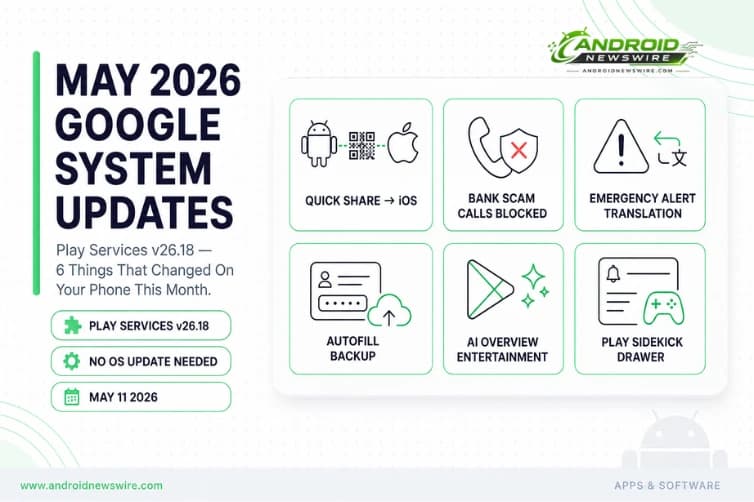
Every month, Google ships a set of updates to Android devices that have nothing to do with your Android version number. Through Play Services, the Play Store, and the Play System Update — Google’s modular delivery infrastructure — significant new capabilities reach billions of Android phones, tablets, Wear OS watches, Android Auto, and Google TV devices without requiring an OS update or even a reboot. May 2026’s update cycle is a strong one. The headliner is Quick Share finally crossing the Android wall to reach iOS users via QR code. The most important security addition is automatic call termination for calls impersonating bank phone numbers. Emergency Alert translation, Autofill backup and restore, AI-powered Play Store search for entertainment content, and Play Sidekick in the notification drawer round out a substantial month. Here is everything in the May 2026 Google System Updates, explained.
How Google System Updates Work
Before the changelog: a quick explanation of what you are actually reading. The monthly Google System Release Notes primarily detail what is new in Play services, Play Store, and Play system update across Android phones and tablets, Wear OS, Google TV and Android TV, Android Auto, and PC. Some features apply to end users, while others are aimed at developers. A feature appearing in the changelog does not mean it is widely available — some capabilities take months to fully launch.
Google Play services and Play Store update silently in the background on all Android devices with Google’s services. You do not need to manually install anything. If a feature is listed here and you do not see it yet, it is either in staged rollout or server-side activation — it will reach you automatically.
To check your current Play services version: Settings → Apps → Google Play services → App info → Version number. May’s update is Play services v26.18, released May 11.
The Big One: Quick Share Now Transfers Files From Android to iOS
With the May update, Quick Share lets you transfer content from Android to iOS with a QR code and cloud transfer.
This is Quick Share’s most significant expansion since Google unified the Nearby Share and Samsung Quick Share branding. Until now, Quick Share has been an Android-to-Android (and Android-to-Windows) file transfer tool — excellent within the Android ecosystem, but useless the moment the other person had an iPhone. The only cross-platform options were AirDrop alternatives, Bluetooth, third-party apps like Snapdrop or Send Anywhere, or old-fashioned cloud storage links.
The May 2026 implementation uses a QR code and cloud transfer model rather than direct peer-to-peer wireless transfer. The Android sender generates a QR code through Quick Share; the iPhone recipient scans it and accesses the file via cloud transfer. It is not as seamless as AirDrop’s direct device-to-device push, and it requires an internet connection on both ends. But for the everyday scenario — sharing a photo, a document, or a video with an iPhone user sitting next to you — it eliminates the “just send it to me on WhatsApp” workaround that has been the de facto cross-platform file transfer method for years.
For Android users in mixed households, mixed friend groups, or mixed workplaces — which is most Android users — this is a genuinely useful quality-of-life improvement that arrives in the background with no user action required.
Security: Android Now Auto-Terminates Bank Impersonation Calls
A scam prevention feature automatically ends calls that impersonate supported bank phone numbers.
This is the May update’s most practically impactful security addition for everyday users. Bank impersonation scams — where a caller spoofs a bank’s official phone number to appear legitimate in the call UI — are among the most financially damaging scam vectors targeting Android users globally. The spoofed number makes the call appear authentic in the dialler, bypassing the basic caller ID check that most users rely on as a first filter.
Google’s automatic call termination works by cross-referencing incoming call numbers against a database of verified bank contact numbers. When an incoming call claims to originate from a number registered to a supported bank but the call does not actually originate from that institution’s verified network, Android terminates it automatically rather than presenting it to the user as a legitimate call.
The “supported bank phone numbers” phrasing indicates this is rolling out against a specific database of financial institution numbers rather than all possible impersonation scenarios — the scope will expand over time as Google adds more supported institutions. But even at initial launch, automatic termination of bank number impersonation addresses one of the highest-value social engineering attack patterns against Android users.
This builds on earlier Android scam protection work — the Advanced Flow sideloading friction we covered in detail addresses scam app installation, while this new May feature addresses scam phone calls. Google is systematically closing scam vectors across the platform’s attack surface.
Safety: Wireless Emergency Alerts Now Translate Into Your System Language
You can now translate public safety broadcasts from Wireless Emergency Alerts into your device’s system language.
Wireless Emergency Alerts — the loud, attention-demanding alerts that government agencies broadcast for imminent threats like severe weather, AMBER alerts, and presidential alerts — have historically been delivered only in the language of the originating authority. For users whose device language differs from the local official language, those alerts arrive in a language they may not read fluently, partially defeating the purpose of an emergency broadcast system.
With this May update, Android automatically translates received WEA alerts into the device’s configured system language before displaying them. For Android’s global installed base — where a significant proportion of users in any given country are operating their device in a language other than the local majority language — this is a meaningful safety improvement. A WEA alert warning of a tornado in Spanish, received on a device set to Hindi, now arrives in Hindi.
The translation happens on-device using Android’s built-in translation infrastructure, which means it does not require an internet connection at the moment of alert delivery — appropriate for a safety feature that may need to function during infrastructure disruptions.
Utilities: Autofill With Google Can Now Be Backed Up and Restored
You can now back up and restore Autofill with Google settings.
This is a small but meaningful friction-reduction for the device setup and migration experience. Autofill with Google stores saved passwords, address information, and payment card data — the autofill data that pre-populates web forms and app login screens. Until now, this data was synchronized through your Google account but could not be explicitly backed up or restored through the system backup infrastructure.
With this May update, Autofill with Google settings are included in the Android backup and restore system. When you set up a new Android device or perform a factory reset, your Autofill data restores alongside your apps, wallpaper, and system settings — without requiring you to manually re-enter saved passwords or address information.
For users who switch devices frequently, manage multiple Android devices, or have experienced the friction of a factory reset wiping their autofill data, this is a welcome quality-of-life closure.
Account Management: Trusted Contacts Improvements for Supervised Users
Users will now get an improved Trusted Contacts feature for supervised users across Phone, TV, and Wear OS. On PC, the Family Link update expands the “Add/Remove user” setting so supervised users can grant admin access to other users on devices that support multiple admins.
The Trusted Contacts improvements address a recurring friction point in Family Link’s supervision model — the ability for supervised users (typically children or dependent adults) to maintain a list of trusted contacts through whom they can request location sharing or emergency contact in situations where direct device control is restricted. The May update delivers an improved experience for this feature across the full supervised device surface: phones, tablets, TV, and Wear OS.
The PC-specific expansion — allowing supervised users to grant admin access to other users on multi-admin-capable devices — matters most in Chromebook and Aluminum OS desktop contexts where Android accounts manage device access for education and family environments.
Wallet: New Developer APIs for Digital Wallet and Payments
New developer features for Google and third-party app developers to support Digital Wallet and Payments related processes in their apps.
Google’s Wallet developer API expansion continues its monthly cadence. The May release adds new developer features for Digital Wallet and Payments integrations — extending the surface area for apps to participate in Google Wallet’s payment, loyalty card, and credential storage infrastructure. The specific new API capabilities are detailed in the Google Pay and Wallet developer documentation for Play services v26.18.
For developers building fintech, commerce, ticketing, transit, or identity apps: review the May Play services release notes for the new Wallet API surface. Google I/O 2026 sessions — taking place May 19-20 — will include dedicated coverage of the Wallet and Payments developer platform, which may elaborate on what these May API additions enable.
Play Store v51.4: AI Overview Hits Entertainment Search
AI Overview and Ask Play now provide content-focused search results for Sports, Media and Entertainment, with access to trailers and where to watch.
Google’s AI Overview — the AI-generated summary that appears at the top of Google Search results — is now integrated into Play Store search for entertainment content. Search for a movie, TV series, sports league, or media property in the Play Store and you will now see an AI-generated overview alongside traditional app results, including trailers and streaming availability (“where to watch”) information directly in the search results.
This positions the Play Store as an entertainment discovery interface rather than purely an app distribution channel — closer to how Apple’s App Store has integrated editorial and media content discovery alongside apps. For users searching “NBA” or “Game of Thrones” in the Play Store, the experience now surfaces contextually richer results rather than a list of apps.
Samples of manga and webtoons on participating comic apps are now available directly on the app’s detail page, so users can preview and discover their favorite comics before downloading. This extends the existing book and audiobook sample preview model — which has been available in Play Books for years — to manga and webtoon content available through participating comic reader apps. Preview a chapter before committing to an app download or content purchase.
Users can now opt in to get super weekly rewards and other offers right in their inboxes through Play Store notifications and email. Google’s Play Points loyalty program expands its promotional reach into both push notifications and email — users who opt in receive weekly offers, bonus point events, and rewards opportunities through their preferred communication channel.
Play Store v51.3 (May 4): Sidekick in Notification Drawer, Gaming Community Goes Multilingual
You can now open Google Play Sidekick from the notification drawer. Play Sidekick — Google’s AI-powered gaming companion that provides tips, walkthroughs, and in-game guidance during gameplay — previously required navigating to it through the Play Store or a floating overlay. The notification drawer shortcut makes it accessible with a single swipe-and-tap during active gameplay, significantly reducing the friction of accessing AI assistance while playing without fully interrupting the game session.
The gaming community Q&A feature — which lets users ask questions and share advice about the games they play — now supports Spanish, Portuguese, Indonesian, Chinese, Japanese, and Korean, in addition to English. This six-language expansion dramatically widens the addressable user base for Play’s social gaming layer. Spanish, Portuguese, Indonesian, and Chinese alone represent the primary languages of the majority of Android’s global installed base — the multilingual expansion effectively opens community gaming discussion to the bulk of the world’s Android gamers.
Play Services v26.17 (May 4): Developer Utilities Across All Platforms
New developer features for Google and third-party app developers to support Utilities related processes in their apps, available across Android Auto, PC, Phone, Google TV, and Wear OS.
The Utilities API expansion is the broadest-platform developer addition in this month’s cycle — covering all five Google platform surfaces simultaneously. The specifics of what “Utilities related processes” encompasses in this context will be detailed in the Play services release notes for v26.17. Developers building cross-platform apps that span phone, watch, TV, and Auto should review this update for new API capabilities.
A warning screen now appears when signing in with a Dasher account on Android desktop devices. The Dasher account warning — targeting DoorDash delivery driver accounts on Aluminum OS and Android desktop environments — is a targeted UX guard against accidental worker account sign-ins on desktop devices, where the Dasher app’s functionality and context are different from the mobile delivery workflow environment.
The Month in One Take: Google’s Modular Strategy at Work
May 2026’s Google System Updates illustrate why the modular Play Services delivery model is one of the most strategically significant architectural decisions Google has made in the Android platform’s history. Quick Share crossing to iOS, automatic bank call blocking, Emergency Alert translation, and Autofill backup are all capabilities that would have required a full Android OS update to ship in 2018. Today they arrive silently in the background on every Android device with Google services — reaching Android 11 phones just as reliably as Android 17 flagships.
The implication for users: your phone is meaningfully more capable in May than it was in April, even if you have not done anything. The implication for developers: the API surface your apps can access expands monthly, and the security and privacy expectations your apps need to meet evolve on the same cadence. Staying current with Google System Update changelogs is no longer optional background reading — it is a monthly developer obligation.
Related on Android News Wire:
- Android 17 “Cinnamon Bun”: Every Confirmed Feature & Release Date
- Android’s New 24-Hour Sideloading Process: The Advanced Flow Explained
- Google Pixel April 2026 Update: Game Crashes, Quick Share & Backup Fixed
- Microsoft Outlook Lite Android Shuts Down May 25 — Migration Guide
- Top Android Stories: April 2026 Week 3 Roundup
- March 2026 Google Play Policy Changes: Lower Fees & New Billing