
Gemini Intelligence Announced: Android Becomes an AI System
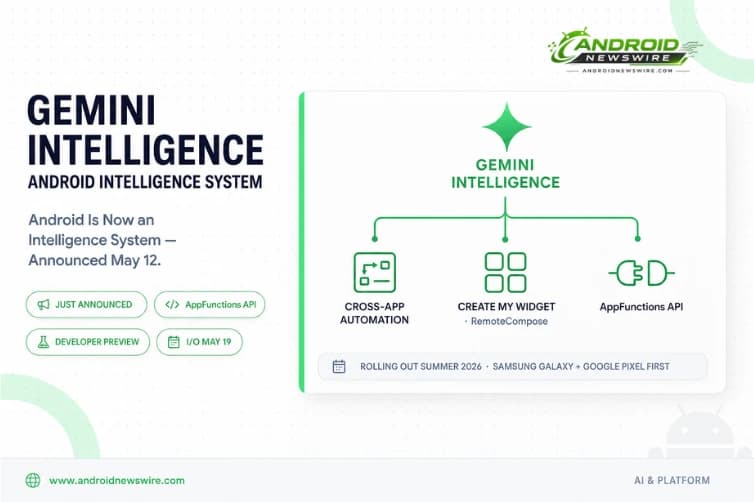
The Android Show | I/O Edition delivered its biggest moment on May 12, 2026, when Google announced Gemini Intelligence — a new suite of agentic AI capabilities for Android accompanied by a philosophical restatement of what Android actually is. Sameer Samat, who oversees Google’s Android ecosystem, told CNBC that Google is rebuilding parts of Android around Gemini Intelligence to help users complete everyday tasks more easily. “We’re transitioning from an operating system to an intelligence system,” he said.
That sentence is not marketing language. It is a genuine description of an architectural shift that has been building across every platform decision Google has made in 2026 — from the Advanced Flow for sideloading to AppFunctions to Android Studio Panda 3’s Agent Skills — and which now has a name, a product tier, and a developer API surface. Android is transitioning from an operating system to an intelligence system, creating more opportunities for engagement with your apps. Through deep integration between hardware and software, Android devices will be able to handle the heavy lifting of anticipating user needs, so your app can focus on delivering that experience at the right moment.
For developers, the shift from OS to intelligence system is not a metaphor — it is a new API contract. Here is everything announced, what it means, and what to build before and after Google I/O on May 19.
What Gemini Intelligence Actually Is
Gemini Intelligence is a suite of new features that brings the best of Gemini to our most advanced Android devices. It integrates premium hardware and innovative software to help you stay a step ahead by working proactively to get things done throughout your day — all while keeping your data private, and keeping you in control.
The key word is “suite.” Gemini Intelligence is not a single feature — it is a branded grouping of multiple interconnected capabilities that together constitute Google’s answer to the question of what an AI-native mobile operating system actually does. Each capability is distinct, but they all share the same architectural premise: Gemini operating across app boundaries on the user’s behalf, with user confirmation before consequential actions and transparent activity indicators throughout.
Gemini Intelligence features will roll out in waves starting with the latest Samsung Galaxy and Google Pixel phones this summer, and will become available across your Android devices including your watch, car, glasses and laptops later this year.
Feature 1: Cross-App Task Automation
The centrepiece of Gemini Intelligence is what Google has been building toward since the Gemini screen automation launch on Pixel 10 and Galaxy S26 in March — now formalised, expanded, and given a proper product name.
With Gemini Intelligence, we’re expanding Gemini’s ability to automate tasks across selected apps on behalf of the user with built-in transparency and control. By allowing Gemini to navigate complex, multi-step tasks — such as ordering a latte from a cafe or building a shopping cart from a grocery list — Gemini handles the logistics while you stay in the moment. App automation is even more powerful when you add screen or image context. Instead of manually switching between apps and copying data, Gemini can turn visual context into instant action. Imagine you have a long grocery list on your notes app. Just long press the power button over the list and ask Gemini to build a shopping cart with all of the items for delivery. Or, if you see a travel brochure in a hotel lobby, you can simply snap a photo of it and say: “Find a tour like this on Expedia for a group of six.”
You can track the progress live via notifications as Gemini works in the background. Most importantly, you remain in control: Gemini only acts on your command and stops the moment the task is complete. All that’s left for you is the final confirmation.
The transparency layer is central to the design. When Gemini Intelligence is running, an icon appears in the notification bar. You can watch its progress on a task in real-time by opening the app it’s automating. You will also soon be able to see on Android Privacy Dashboard which AI assistants were enabled and the apps they tapped into in the previous 24-hour period.
For developers, the automation capability has two integration paths — and the distinction between them matters significantly for how your app participates in the Gemini Intelligence ecosystem.
Feature 2: AppFunctions — The Developer API That Changes Everything
This is the announcement that every Android developer needs to read carefully. Google introduced Android AppFunctions, a new framework that gives developers more control over how AI agents interact with their apps. With AppFunctions, developers can expose app services, actions, and data directly to Android and Gemini using natural language descriptions. The system can then discover and execute these functions across devices and form factors.
Google said it has started testing the early-stage APIs in a private preview with apps including KakaoTalk, enabling actions such as sending messages and initiating voice calls through Gemini-powered interactions. AppFunctions has already enabled local execution of use cases across 25 apps from different device manufacturers. Developers can currently test the APIs locally and apply for the AppFunctions Early Access Program.
The two-path model for Gemini Integration is the key architectural concept to understand: Developers can choose between “no-code change” app automation — where Gemini navigates your app’s UI directly — or deeper integration through AppFunctions APIs for more control over how Gemini interacts with their app.
Path 1 — No-Code Automation. Gemini uses screen automation to navigate your app’s existing UI on the user’s behalf. No integration work required. Your app immediately benefits from Gemini’s automation capabilities the moment the user enables Gemini Intelligence on their device. The trade-off is that Gemini is interpreting your UI visually, which is less reliable than an explicit API contract and gives you no control over how actions are represented to the user.
Path 2 — AppFunctions APIs. You explicitly declare the actions your app can perform, the data it can provide, and the parameters each action accepts — all in natural language descriptions that Gemini uses to discover and invoke your app’s capabilities programmatically. This is more work upfront but delivers meaningfully better outcomes: Gemini can invoke your app’s actions reliably, you control the action vocabulary, you define the confirmation flows, and your app becomes a first-class participant in cross-app task orchestration rather than a passive target for screen navigation.
This creates another avenue for user engagement, driving high-intent traffic to your app without requiring major engineering work from you. For apps in the automation-friendly categories — food delivery, ride-sharing, shopping, fitness, calendar, messaging — AppFunctions is the difference between being a passive participant in Gemini automation and being an active, explicitly supported partner.
The AppFunctions Early Access Program is open for application now. Given that Google has already validated the API surface with 25 apps from different manufacturers and is expanding the program ahead of Google I/O, applying immediately positions your app ahead of the majority of the developer ecosystem.
Feature 3: Create My Widget — RemoteCompose Comes to the Home Screen
RemoteCompose is the engine behind Create My Widget, a feature where users can ask Gemini to build fully adaptive custom widgets that can be resized and optimized seamlessly for the user’s home screen or Wear OS watch.
You can create custom widgets using simple language to keep your most important information front and center. Ask Gemini to describe what you want to see on your screen — and it builds it.
For developers, Create My Widget has two dimensions worth understanding. The first is that RemoteCompose — Google’s framework for server-driven Compose UI that renders adaptive layouts defined remotely — is now a user-facing feature with genuine mainstream visibility. If your app surfaces data that users might want on their home screen, investing in RemoteCompose integration means your app’s content can be surfaced through user-created widgets without your app needing to pre-define every widget configuration.
The second is that AI-generated widget creation sets a new quality bar for widget rendering. When a user asks Gemini to “show me my next three calendar events and the weather” and Gemini builds a widget that renders that data cleanly in an adaptive layout, apps whose widgets look dated or fail to resize correctly become more obviously inadequate by comparison. Review your app’s widget implementation against Android 17’s adaptive compliance requirements and the Glance API for Compose-based widgets.
Feature 4: Rambler — Voice-to-Text Gets an Intelligence Layer
Rambler is a new voice-to-text feature built into Gboard that improves on Android’s already strong dictation by taking out the gaps with “ums,” “ahs” and “likes” if they’re not needed. Rambler will be available across apps, letting you speak naturally and have all the important parts come out on the screen. It will be available in multiple languages, understanding context and nuance so the message will still sound exactly like you — just a bit more eloquent.
Rambler is notable for what it represents as much as what it does. Rather than simply transcribing speech, it applies Gemini’s language understanding to the transcription itself — maintaining the speaker’s voice and intent while removing the linguistic debris that accumulates in natural speech. When using Rambler speech-to-text, there will be an indicator that makes it clear the feature is enabled.
For developers, Rambler is a Gboard-layer feature that requires no direct integration. Apps that accept text input will receive Rambler’s output through the standard IME interface — cleaner, more coherent text without any app-side changes. The indicator requirement is relevant for apps that surface input fields in contexts where users might be confused about whether AI processing is occurring.
Feature 5: Gemini Personal Intelligence Autofill
If you opt-in to the new Autofill, Gemini can use relevant information from your connected apps to help fill in the correct information — including finding things like a driver’s licence or passport number if you saved it or shared it in places like Messages or Drive. It will work across apps as well as Chrome to take the hassle out of filling in forms.
Starting in late June, Android devices will be getting a smarter browsing assistant for the web: Gemini in Chrome can help you research, summarize and compare content across the web.
Personal Intelligence Autofill is explicitly opt-in and designed with user control as a first-class design principle. The ability for Gemini to surface document identifiers stored in Messages or Drive for form-filling represents a fundamentally different autofill model than the password-manager-style autofill Android has offered until now. For developers building forms that require document verification — ID fields, passport numbers, application forms — the experience improvement for opted-in users will be significant.
Feature 6: Privacy Controls and Transparency Architecture
Google’s implementation of Gemini Intelligence is built around a transparency model that is worth understanding as an architectural choice rather than a compliance requirement.
Gemini Intelligence features include granular controls that enable you to opt-in, or opt-out, of entire features — or you can just opt out of specific parts at any time. You will be able to see when Gemini Intelligence is running via an icon in the notification bar, and watch its progress on a task in real-time by opening the app it’s automating. The Android Privacy Dashboard will show which AI assistants were enabled and the apps they tapped into in the previous 24-hour period.
Google’s Android push is designed to show it can bring AI deeper into the device experience while still giving users control over what Gemini can see, where it can act and when it needs confirmation.
For developers integrating AppFunctions, the transparency model has direct implications. User-facing confirmation screens before consequential actions, clear indication when Gemini is operating within your app, and audit-trail visibility in the Privacy Dashboard mean that your app’s participation in Gemini automation is visible to users. Apps that handle sensitive operations — financial transactions, health data, communications — should design their AppFunctions declarations with this transparency in mind, ensuring the action vocabulary exposed to Gemini is appropriately scoped to actions that are safe to execute on the user’s behalf.
The Developer Opportunity Map: Who Should Act Now
Immediately — Apply for AppFunctions Early Access. If your app is in food delivery, ride-sharing, shopping, fitness class booking, messaging, calendar, or any category where multi-step task completion is a core use case — apply for the AppFunctions Early Access Program today. The program is already running with 25 apps. Being in the first wave positions your app as a showcase integration ahead of Gemini Intelligence’s summer rollout on Galaxy and Pixel hardware.
Before Google I/O on May 19 — Review your app’s automation surface. Walk through your app’s most common user journeys and identify which ones involve multi-step sequences that a user might want to delegate. These are your AppFunctions candidates. Draft natural language descriptions of the actions involved. Being prepared to implement rapidly after Google I/O’s developer documentation drops puts you weeks ahead of the majority of the ecosystem.
Before Android 17 stable in June — Audit your widget implementation. Create My Widget will drive renewed user interest in home screen widgets. If your app’s current widget implementation is built on the legacy AppWidgets API rather than the Glance Compose-based framework, now is the time to evaluate a migration. Adaptive, resizable widgets built with Glance integrate naturally with RemoteCompose and will look appropriate alongside AI-generated widgets. Legacy widgets that do not resize or adapt may look increasingly out of place.
For Wear OS developers — RemoteCompose targets your platform too. Create My Widget can generate custom widgets optimized for home screens and Wear OS devices. If your app has a Wear OS companion, evaluate whether your data surfaces are appropriately structured for RemoteCompose rendering. The AI widget generation pipeline targets both phone home screens and watch faces simultaneously.
The Broader Picture: Android Intelligence and Google I/O Next Week
Gemini Intelligence is the consumer and developer story from The Android Show. The engineering story — the full AppFunctions API documentation, the SDK samples, the updated Jetpack guidance, the Android XR Developer Preview 4 details — arrives at Google I/O on May 19. Google is announcing Gemini Intelligence as part of its broader positioning of Android as a platform that transitions from an OS to an intelligence system.
Google is using its latest Android rollout to make Gemini less of a chatbot and more of an operating layer across the phone, browser, car and laptop, just weeks before Apple is expected to show its own AI reboot at WWDC. The competitive context is real. Apple’s WWDC is weeks away. Google has moved first and moved decisively — announcing a named product tier, a developer API, a partner programme, and a transparent design philosophy simultaneously.
The developers who will benefit most from Gemini Intelligence are the ones who understand it as a distribution mechanism, not just a features announcement. Gemini Intelligence creates another avenue for user engagement, driving high-intent traffic to your app without requiring code or major engineering work from you. A user who tells Gemini “order my usual from the coffee app” and has Gemini execute that against your app’s AppFunctions integration is a user who engaged with your app’s core value without friction. That is not a threat to your app’s engagement — it is an acceleration of it.
Full developer documentation, SDK releases, and the AppFunctions API reference will land at Google I/O on May 19. We will have complete coverage. Bookmark Android News Wire and check back Monday.