
Google’s Official Plan to Balance Android Openness With Safety – The Advanced Flow, Developer Verification & What It All Means
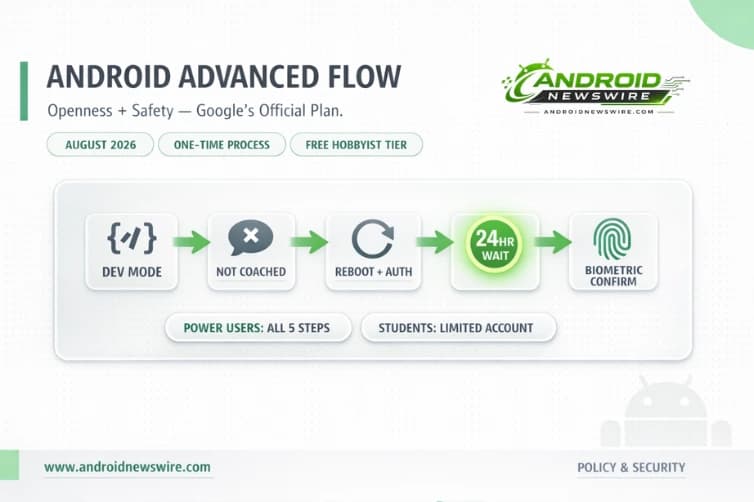
On March 19, 2026, Google published its most direct and detailed statement yet on how it plans to reconcile Android’s foundational openness with the growing threat of scam-driven malware distribution. The post, authored by Matthew Forsythe, Director of Product Management for Android App Safety, introduced the Advanced Flow – a carefully engineered five-step process designed to preserve power users’ ability to install apps from unverified developers while systematically dismantling the social engineering tactics that scammers have used to exploit that same capability. The message running through every line of it: Android proves you don’t have to choose between an open ecosystem and a secure one.
The Problem Google Is Actually Solving
Before unpacking the solution, it is worth being precise about the problem. Google’s developer verification policy – announced in August 2025 – requires all apps distributed on certified Android devices to come from developers who have registered with a verified identity, regardless of whether distribution happens through the Play Store or through sideloading. That announcement generated substantial backlash. More than 40 organizations – including Proton, AdGuard, the Tor Project, the EFF, and F-Droid – signed the Keep Android Open letter calling the policy an “alien security model” incompatible with the platform’s identity.
But the problem the policy was designed to address is real. According to a 2025 report from the Global Anti-Scam Alliance, 57% of surveyed adults experienced a scam in the past year, resulting in a global consumer loss of $442 billion. And within Android specifically, the malware vector is starkly lopsided – Google’s own data places malware from internet-sideloaded sources at 50 times the rate of malware from Google Play.
The scam pattern the Advanced Flow is specifically designed to counter works like this: scammers exploit fear – using threats of financial ruin, legal trouble, or harm to a loved one – to create a sense of extreme urgency. They stay on the phone with victims, coaching them to bypass security warnings and disable security settings before the victim has a chance to think or seek help.
The current Android sideloading warning – a generic “unknown sources” toggle and a vague disclaimer – does nothing to break that cycle. Google stated it would require all developers to verify themselves, but the original plan was broadly seen as a major step toward a safer Android environment by some, while others felt it went too far.
The Advanced Flow is Google’s attempt to resolve that tension – informed directly by community feedback.
How the Advanced Flow Works: Every Step, Explained
Since announcing updated verification requirements, Google worked with the community to ensure these protections are robust yet respectful of platform freedom. Having heard from power users that they want to take educated risks to install software from unverified developers, Google is sharing details on a new advanced flow that provides this option.
The Advanced Flow is a one-time process for power users, designed carefully to prevent those in the midst of a scam attempt from being coerced by high-pressure tactics to install malicious software.
Here is every step of the process directly from the official Android Developers Blog:
Step 1 – Enable Developer mode in system settings. Go to Settings → About phone, tap the Build number seven times until Developer options are unlocked. This prevents accidental triggers or “one-tap” bypasses often used in high-pressure scams. A scammer who is coaching a victim over the phone needs the victim to move quickly and without thinking – requiring a multi-tap Developer mode activation adds the first point of friction.
Step 2 – Confirm you are not being coached. There is a quick check to make sure that no one is talking you into turning off your security. While power users know how to vet apps, scammers often pressure victims into disabling protections. This prompt puts the question directly and explicitly to the user: is someone telling you to do this? For a scam victim who has been kept on a call for 20 minutes, that question landing on screen may be the first moment of pause.
Step 3 – Restart your phone and reauthenticate. This cuts off any remote access or active phone calls a scammer might be using to watch what you’re doing. This is a targeted countermeasure against remote access tool abuse – a common component of sophisticated mobile fraud where a scammer maintains screen visibility throughout the manipulation. Rebooting and reauthenticating severs that channel completely.
Step 4 – Return after the one-day protective waiting period and verify. There is a one-time, one-day wait and then you can confirm that this is really you who’s making this change with biometric authentication – fingerprint or face unlock – or device PIN. Scammers rely on manufactured urgency, so this breaks their spell and gives you time to think. The 24-hour wait is not a UX decision – it is an architectural one. It is the step that makes the entire flow resistant to urgency manipulation, because urgency that must survive a full day is not real urgency.
Step 5 – Install apps with persistent warning. Once you confirm you understand the risks, you’re all set to install apps from unverified developers, with the option of enabling for 7 days or indefinitely. For safety, you’ll still see a warning that the app is from an unverified developer, but you can just tap “Install Anyway.”
The persistent warning is the right design choice. Even after completing the flow, the system never stops communicating that unverified means unverified. It is not a judgment – it is information, surfaced at the moment it is most relevant.
Limited Distribution Accounts: The Solution for Students and Hobbyists
One of the most practically important additions accompanying the Advanced Flow is a new account tier that addresses a specific population the original verification policy left without a clear path: students, hobbyists, and developers who want to share apps with a small number of trusted people without submitting government ID or paying a registration fee.
Google is building free, limited distribution accounts for students and hobbyists. This allows sharing apps with a small group of up to 20 devices without needing to provide a government-issued ID or pay a registration fee. This ensures Android remains an open platform for learning and experimentation while maintaining robust protections for the broader community.
Users of limited distribution accounts will need to share a device identifier with the app developer, who then enters that ID into Google’s console and provides download instructions – creating a traceable connection that discourages misuse while keeping legitimate sharing alive.
For the Android developer community – particularly the educators, university students, and indie hobbyists who build apps as a learning exercise rather than a commercial venture – this is the provision that makes the broader policy workable. The $25 registration fee and government ID requirement that apply to verified developers publishing to the general public are appropriate for that context. They are not appropriate for a student distributing a personal project to five classmates.
Limited distribution is available with early access expected to begin in June 2026, with broader availability alongside the Advanced Flow in August.
The Verification System Itself: What Developers Need to Know
The developer verification system that the Advanced Flow is designed to complement operates independently of the flow itself. Understanding both sides is essential for developers making distribution decisions today.
Starting in 2026, Android will require all apps to be registered by verified developers in order to be installed by users on certified Android devices. This creates crucial accountability, making it much harder for malicious actors to quickly distribute another harmful app after we take the first one down. Think of it like an ID check at the airport, which confirms a traveler’s identity but is separate from the security screening of their bags – we will be confirming who the developer is, not reviewing the content of their app or where it came from.
That framing is deliberate and important. Verification is identity, not approval. Google is not reviewing apps for content or quality compliance through the verification system. It is establishing a traceable identity behind every app that reaches a certified Android device – making anonymous malware distribution structurally harder.
The verification process requires developers to provide their legal name, address, email, phone number, and in some cases government ID, mirroring Play Store rules and extending them to the wider ecosystem. Organizations additionally need a D-U-N-S number – a standard business identifier from Dun & Bradstreet, which can take up to 28 days to obtain, so organizations should begin that process now.
The requirements first take effect in September 2026 in Brazil, Indonesia, Singapore, and Thailand – markets chosen because they are experiencing higher rates of fraudulent app scams, often from repeat perpetrators. Global rollout continues through 2027.
ADB remains fully available for developers throughout. Developers and power users can still use Android Debug Bridge to build, test, and install modified or unverified apps on their own devices, which remains the standard method for development work. The verification requirements apply to distribution to end users, not to local development workflows.
The Community Response: Acknowledgment and Unresolved Tension
Matthew Forsythe, Director of Product Management and Android App Safety, said that Google has taken user and community feedback to heart, leading to new policies and measures that will ensure these protections are robust yet respectful of platform freedom, and that users won’t have to choose between an open ecosystem and a secure one.
That acknowledgment of community feedback is genuine – the Advanced Flow and the limited distribution accounts are direct responses to criticisms that the original verification announcement did not adequately address. The one-day wait was specifically designed in response to feedback that any friction mechanism could be circumvented by a sufficiently persistent scammer unless that mechanism had a mandatory time component built into it.
F-Droid has called Google’s assurances that sideloading isn’t going anywhere misleading, arguing that the new process effectively puts independent app stores and developers under Google’s control. That critique hits the core tension: can Google preserve openness while deciding who gets to create installable software?
Android chief Sameer Samat frames this as an unavoidable balancing act: if the platform doesn’t protect vulnerable users, it won’t be successful, and if it doesn’t honor openness, it also won’t be successful. This tension requires nuanced solutions rather than blanket restrictions, and the advanced flow represents Google’s attempt to preserve meaningful choice while providing genuine security benefits.
That tension is not fully resolved by the Advanced Flow – it cannot be. The structural reality is that Google is now the identity authority for app distribution on Android across every channel, not just the Play Store. Whether that is a reasonable accountability measure or an overreach of platform control depends substantially on whether the Advanced Flow in practice remains genuinely accessible to the users it claims to serve, or whether it becomes a bureaucratic obstacle that defeats its stated purpose.
The real-world test begins in August.
Developer Action Checklist
Play Store developers: No changes required. Verification is already complete through the Play Console.
Independent developers distributing via sideload or third-party stores: Registration via the Android Developer Console is open now. Complete it well before September 2026 – the window exists and the process is straightforward.
Organizations: Start the D-U-N-S number process immediately if you do not already have one. The process can take up to 28 days.
Students and hobbyists with fewer than 20 users: Apply for a limited distribution account when early access opens in June 2026. No ID, no fee, no Advanced Flow required for your users.
Power users who install unverified APKs: Complete the Advanced Flow once in August when it becomes available. Choose “indefinitely.” You will not need to repeat it.
App store operators (F-Droid, alternative stores): Review the Registered App Stores program and developer verification requirements in full. Your users in enforcement regions will face the Advanced Flow when installing unverified apps from your store after September 2026. Planning user communication around this well in advance is strongly advisable.