
Google Phone Now Shows VoIP Call Logs – Jetpack Telecom v1.1.0 Opens the System Dialer to All Apps
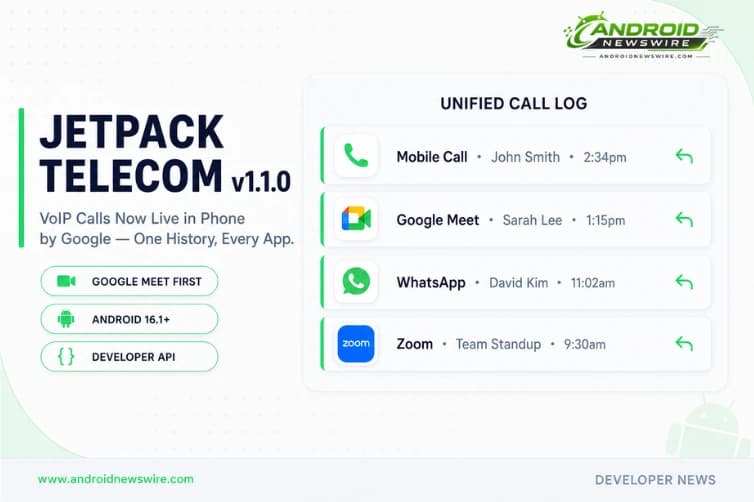
Your phone has at least two call histories and you know it. There is the regular call log in your system dialer – every mobile and landline call neatly timestamped – and then there is the entirely separate history buried inside each VoIP app you use: the Zoom tab with yesterday’s client call, WhatsApp’s call log with your family’s video chat, Google Meet’s recent history with your team standup. Switching between apps to find a number to call back, or to check when you last spoke to someone, is the kind of friction that exists because the underlying platform never provided a bridge between cellular telephony and internet-based calling. That changes with Jetpack Telecom v1.1.0, announced by the Android team today. Google is giving third-party VoIP developers the APIs to surface their call logs and enable callbacks directly inside Phone by Google and other system dialers. Google Meet is rolling out first. Here is everything developers and users need to know.
What Jetpack Telecom v1.1.0 Actually Adds
The Android team today detailed how Jetpack Telecom v1.1.0 brings native-level visibility and convenience to third-party Voice over IP applications. The integrated call logging feature allows system dialer apps, like Phone by Google, to surface call logs directly from third-party VoIP apps. Historically, users have had to open individual third-party apps to view their VoIP call history or return a missed call. Additionally, users can initiate a callback to a VoIP contact straight from their native system dialer.
Three specific capabilities are available in v1.1.0:
Integrated Call Logging. Third-party VoIP apps can now register their call history with the system dialer. When a user opens Phone by Google, they see not just their cellular calls but also calls from every integrated VoIP app – timestamped, labelled with the originating app, and presented in a unified chronological feed. A missed Zoom call appears alongside a missed mobile call. A WhatsApp voice call appears in the same list as a phone call from the same contact.
One-Tap VoIP Callback. From any VoIP call entry in the system dialer, users can initiate a callback directly – without opening the originating VoIP app first. Tap the callback button on a missed Google Meet call in Phone by Google, and Meet opens immediately to place the call. The round-trip that previously required: notice missed call → identify which app → open app → navigate to call history → find the call → tap callback, is collapsed to a single tap from the system dialer.
Call Log Exclusion. Google is also giving developers a Call Log Exclusion capability to prevent specific calls from being logged into the system call logs. Google recognises that not every VoIP call should be visible in the system’s native dialer history – whether for privacy reasons, ephemeral communication, or app-specific behaviour, developers need control over what gets surfaced.
This third capability is as important as the first two. A VoIP app that handles sensitive communications – legal consultations, therapy sessions, confidential business discussions, anonymous support lines – has legitimate reasons to keep those calls out of the system-level call log that is visible to anyone who opens the Phone app. Call Log Exclusion gives developers a programmatic, per-call control over what surfaces in the system dialer, without losing the benefits of integration for calls that should appear there.
Platform Requirement: Android 16.1 and the New SDK
Integrated logging and callback features are available for devices running Android 16.1 (SDK 36.1) and higher.
Android 16.1 – SDK level 36.1 – is a point release of Android 16 that carries the new Telecom API surface required for VoIP system dialer integration. This is separate from Android 17, which targets API 37 and is scheduled for stable release in June 2026. Android 16.1 appears to be the incremental platform update that delivers the Telecom infrastructure changes needed for Jetpack Telecom v1.1.0’s new capabilities.
For developers targeting the integrated call logging and callback features, the minimum target SDK is 36.1. Devices running Android 16 (SDK 36) without the 16.1 update will not expose the new API surface. As Android 16.1 rolls out across the Pixel lineup and eligible OEM devices, the addressable device base for integrated VoIP calling expands correspondingly.
The Rollout: Google Meet Is First, More Apps to Follow
For end users, Google is rolling out system dialer integration in phases, starting with Google Meet.
Google Meet appearing in the Phone by Google Home tab alongside cellular calls is the reference implementation – the example Google is using in its developer documentation to illustrate what integrated call logging looks like in practice. When a Google Meet call appears in your Phone by Google call history, it is labelled with the Meet icon, shows the caller name and contact information, and presents the callback option.
The phased rollout starting with Meet is a deliberate sequencing choice. Meet is Google’s own VoIP app, which means Google controls both sides of the integration – the VoIP app implementing the Jetpack Telecom v1.1.0 API and the system dialer rendering the integrated results. Using Meet as the first integration lets Google validate the complete pipeline – from VoIP app registration through system dialer display – on a controlled, first-party implementation before third-party developers begin building against the API.
Third-party VoIP developers – WhatsApp, Zoom, Microsoft Teams, Signal, Telegram, Facetime on Android via RCS, and every other app that places or receives audio or video calls over internet protocols – can implement Jetpack Telecom v1.1.0 in their Android apps now and submit for inclusion in the allowlist.
The Spam Protection Architecture: Package Allowlists
To safeguard against spam, native dialers utilise secure package allowlists to control VoIP display.
The allowlist model is the critical security boundary that prevents the integrated call logging feature from becoming a spam vector. Without a control mechanism, any app claiming to be a VoIP application could attempt to inject entries into the system dialer’s call log – a potential avenue for call spoofing, impersonation attacks, or simply cluttering the call history with unsolicited contacts.
The secure package allowlist requires VoIP apps to be explicitly approved before their calls can appear in the system dialer. The allowlist is maintained at the system dialer level – in Google’s case, by the Phone by Google team – and apps must be reviewed and added to be permitted to surface entries. This is analogous to the allowlist model Google uses for other sensitive system integrations like default SMS apps and accessibility services.
For legitimate VoIP developers, the allowlist requirement adds an approval step before users see their app’s calls in the system dialer. For the ecosystem’s integrity, it is the right trade-off. The alternative – an open API with no gatekeeping – would be exploited immediately.
Why This Has Taken So Long
The absence of unified call logging across cellular and VoIP has been one of the most consistent friction points in the Android communication experience for the duration of the smartphone era. The technical reason is structural: cellular calls are managed by the Telecom subsystem, a privileged system service with direct access to the call log database. VoIP calls are managed by individual apps through their own network stacks, with no standardised interface to the system Telecom layer.
Android’s TelecomManager API has technically allowed VoIP apps to register with the system telephony infrastructure since Android 6.0 – but the implementation complexity was significant, the API had numerous edge cases, and many VoIP developers chose to maintain their own call history rather than integrate with system telephony. The result has been fragmentation: a dozen VoIP apps, each with its own call history, none of them visible in the system dialer.
Jetpack Telecom v1.1.0 represents a cleaner, more developer-accessible path to system dialer integration than the raw TelecomManager API provided. By packaging the integration as a Jetpack library – with the abstraction layers, documentation, and sample code that Jetpack components bring – Google has significantly lowered the implementation bar. VoIP developers who previously evaluated TelecomManager integration and found it too complex have a meaningfully simpler path now.
Developer Implementation: The Key Steps
For VoIP app developers who want to integrate with Phone by Google and other system dialers via Jetpack Telecom v1.1.0:
Step 1 – Add the Jetpack Telecom dependency. Add androidx.core:core-telecom:1.1.0 to your app’s build.gradle dependencies. The full dependency details are in the AndroidX releases page for core-telecom version 1.1.0.
Step 2 – Register your VoIP app with the system. Use the CallsManager API from Jetpack Telecom to register your application’s calling capabilities with the system Telecom layer. This registration establishes your app’s identity in the system and is the prerequisite for call log integration.
Step 3 – Implement call log reporting. For each completed, missed, or declined VoIP call, use the integrated logging API to push a call record to the system call log. Include the contact identifier, call direction (incoming or outgoing), duration, timestamp, and the VoIP app identifier so the system dialer can label entries correctly.
Step 4 – Implement Call Log Exclusion where appropriate. For calls that should not appear in the system dialer – use the CallLogExclusion flag when reporting calls that meet your privacy or app-specific criteria. Document in your app’s privacy policy which call types are excluded and why.
Step 5 – Apply for allowlist inclusion. Contact Google’s Phone by Google team through the Android developer relations channel to apply for allowlist inclusion. Provide your app’s package name, a description of your VoIP implementation, and the call types your app handles. Allowlist review is required before your app’s calls appear in users’ system dialers.
Step 6 – Target Android 16.1 (SDK 36.1). Ensure your app’s minimum or target SDK declaration supports 36.1. The integrated call logging and callback APIs are only available on devices running Android 16.1 and higher.
The User Experience Transformation
For users, the end state of Jetpack Telecom v1.1.0’s widespread adoption is a Phone app that is genuinely unified. Not just cellular calls. Not just one VoIP app. Every communication channel that places a call on your Android device – Google Meet, WhatsApp, Zoom, Teams, Signal, any app that implements the API – visible in a single chronological feed with unified search, unified contact association, and unified callback.
The practical value becomes clearest in common scenarios that currently require app-hopping:
“Who called me this afternoon?” – currently requires checking Phone, then WhatsApp, then Zoom, then Teams. With unified call logging: one search in Phone by Google returns everything.
“I need to call back the number that called me from Zoom earlier.” – currently requires opening Zoom, navigating to call history, finding the call, tapping callback. With system dialer integration: one tap from the Phone app’s missed calls list.
“Did I already speak to this contact today?” – currently requires checking call history across multiple apps. With unified logging: Phone by Google’s contact detail view shows all calls from all integrated apps in one place.
This is the kind of quality-of-life improvement that does not make headlines but that meaningfully reduces daily friction for the majority of Android users who use at least one VoIP app alongside their standard phone calls.
The Bigger Picture: Android’s Communication Platform Is Consolidating
Jetpack Telecom v1.1.0 sits within a broader pattern in Android’s 2026 communication platform direction. The May 2026 Google System Update brought automatic bank impersonation call blocking to the Telecom layer. Encrypted RCS began rolling out cross-platform with iOS 26.5, unifying messaging across device ecosystems. And now VoIP apps gain access to the system dialer’s call log – unifying the voice calling experience across cellular and internet protocols.
Each of these changes moves Android’s communication platform closer to a coherent, unified model where the underlying transport – cellular network, RCS over data, SIP/WebRTC VoIP – is abstracted away from the user experience. Phone by Google becomes the place where all voice communication lives, regardless of protocol. Messages becomes the place where all text communication lives, regardless of carrier or platform. The fragmentation that has defined Android communication for a decade – where protocol determines which app you open – is the problem Google is systematically dismantling.
For developers building communication apps: the opportunity in this consolidation is entry to the system-level surface that users interact with most. Having your app’s calls appear in Phone by Google is a distribution and discoverability advantage – users are more likely to engage with a VoIP app whose presence is woven into the system’s core communication interfaces than one that exists only within its own isolated call history.
For users: the best version of this future is a Phone app that knows about every call you have made or received, regardless of whether it went over the cellular network, WhatsApp, Zoom, or Google Meet. That future is now technically possible. How quickly it arrives depends on how fast the ecosystem’s VoIP developers implement Jetpack Telecom v1.1.0 and complete the allowlist review process.
Related on Android News Wire: