
May 2026 Google System Updates Are Live — AppFunctions in Play Services Is the Big Developer Story
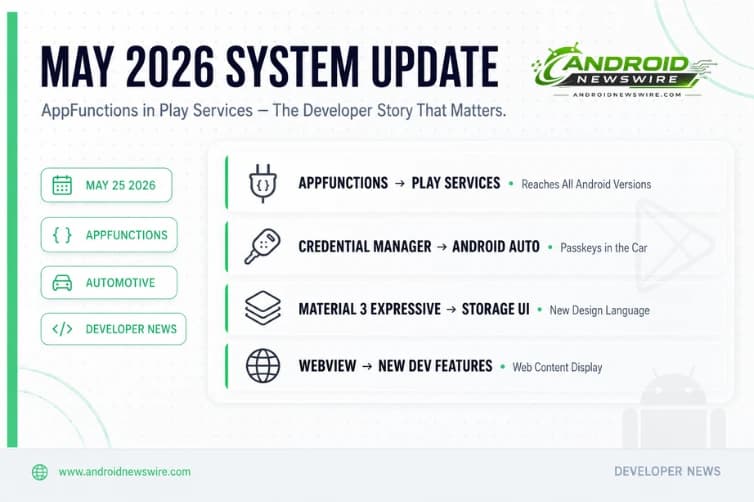
The monthly Google System Release Notes primarily detail what is new in Play Services, Play Store, and the Play System Update across Android phones and tablets, Wear OS, Google TV and Android TV, Auto, and PC. May 2026’s update, published today, is one of the more developer-consequential monthly drops in recent memory — not because of what it adds for users, but because of what it unlocks for the ecosystem.
The standout item in this month’s changelog is the AppFunctions API landing in Google Play Services. The broader system update also delivers Credential Manager support for Android Automotive, Material 3 Expressive in the storage management UI, and new WebView developer capabilities.
Here is everything in this month’s update, and why the AppFunctions delivery mechanism matters more than it might initially appear.
AppFunctions Added to Google Play Services — The Installed Base Implication
A new AppFunctions API has been added to Play Services, giving developers new building blocks for app functionality within the Google ecosystem.
This is the most significant item in the May changelog from a developer strategy perspective — and the detail that separates it from a routine Play Services update.
When Google announced AppFunctions at The Android Show on May 12, the natural assumption was that it required Android 17 — the OS release that introduced the AppFunctions framework into the platform. AppFunctions was presented as a Gemini Intelligence feature, Gemini Intelligence requires Android 17, therefore AppFunctions requires Android 17. That chain of reasoning was reasonable and widely assumed across the Android developer community.
The May Play Services update breaks that chain. AppFunctions delivered through Play Services means the API reaches devices running Android 16, Android 15, and potentially earlier Android versions where current Play Services is supported. The installed base of qualifying devices for AppFunctions integration is not the June 2026 Android 17 rollout population — it is the entire active Android ecosystem that receives Play Services updates.
The practical implications for developers evaluating when to implement AppFunctions are significant. An app that implements AppFunctions today does not need to wait for its users to upgrade to Android 17 before they benefit from Gemini Intelligence integration. The runtime infrastructure — delivered through Play Services — is already present on a much larger device population than Android 17 alone would represent even six months after stable launch.
This signals Google’s accelerating rollout of its next-generation intelligence features through the modular Play Services delivery mechanism, bypassing the OS update dependency that has historically delayed new capability adoption across the Android ecosystem.
If you have not yet applied for the AppFunctions Early Access Programme — open since Google I/O — the Play Services delivery of the API makes the case for doing so immediately stronger. The addressable user base for your AppFunctions integration is not your Android 17 users. It is your current active user base across all modern Android versions.
Credential Manager Expands to Android Automotive OS
With this update, Android Credential Manager supports Automotive devices. You can use saved passwords and passkeys with the option to use your phone for passkey authentication.
Credential Manager’s arrival on Android Automotive OS connects directly to the AAOS SDV story that has been building since Google’s March 2026 announcement extending Android beyond infotainment into vehicle core systems.
Until now, authenticating into services on an Android Automotive display required app-specific authentication flows that did not integrate with the standardised Credential Manager stack that Android phones use for passkeys and password management. That separation created friction for users who needed to sign in to apps — music services, navigation services, productivity tools — through their car’s display.
The May update closes that gap. Automotive apps can now use the Credential Manager API to authenticate users through their saved credentials, with passkey authentication flowing optionally through the paired phone for biometric verification. A user who has a passkey for a music service saved on their phone can now authenticate into that service’s Android Automotive app by tapping a confirmation on their phone rather than typing a password on a car display.
For developers building for Android Automotive OS, Credential Manager support is the authentication standard you should adopt immediately for new development. The alternative — building a custom authentication flow that does not use Credential Manager — delivers a substantially worse user experience and will increasingly diverge from the platform’s authentication model as AAOS SDV expands.
The phone-based passkey authentication path is particularly well-designed for the automotive context. Typing on an in-car display is inherently friction-heavy and safety-concerning while driving. A “confirm on your phone” biometric step maintains security without requiring the driver to interact with the car display for authentication.
Material 3 Expressive in Storage Management
Users get an updated storage management experience built with Material 3 Expressive UI design. This signals Google’s accelerating rollout of its next-generation design language across system surfaces.
Material 3 Expressive — the sweeping UI overhaul confirmed for Android 17 with springier animations, frosted glass overlays, and updated component aesthetics — is not waiting for Android 17 stable to reach system surfaces. The storage management UI update in May’s Play Services rollout brings the new design language to one of Android’s core settings areas independently of the OS version.
This continues a pattern visible throughout 2026: Google deploying Material 3 Expressive components through Play Services and system app updates rather than gating them entirely behind the Android 17 platform release. The volume panel blur effects, the Quick Settings redesign, and now storage management are all arriving through the modular update mechanism rather than through an OS upgrade.
For Android app developers: this accelerates the timeline on which your app’s UI starts looking out of step with the system. An app built against older Material Design components will increasingly appear dated against system surfaces that have already adopted Material 3 Expressive. Evaluating the Compose Material 3 Expressive component library — available through the latest Jetpack Compose 1.11 BOM — ahead of the Android 17 stable launch is now more urgent than it would be if the design system were gating entirely on OS adoption.
Account Capability Migration — Background Infrastructure Change
Migration between two account systems — from service flag to account capability — is occurring on Phone and Wear devices. This is a backend change that may affect apps using Google Account APIs.
This item is opaque in the changelog but worth flagging for developers using Google Account APIs. The migration from service flag to account capability represents a change in how account features are represented and queried within the Play Services account management stack.
Apps that use AccountManager, the Google Sign-In API, or any Google API that queries account capabilities may observe different behaviour after this migration completes on individual devices. The migration is rollout-based rather than immediate, so you may see inconsistent behaviour across device populations until the rollout completes. If your app queries Google account service flags as part of its authentication or feature-gating logic, test against devices that have received the May Play Services update to confirm expected behaviour.
WebView Developer Features — Web Content Display Improvements
New developer features for Google and third party app developers to support functionality related to displaying web content in their apps.
WebView updates are the most consistent monthly item in Google’s system update changelog, and May’s addition continues the pattern. The specific capabilities are described generically — “displaying web content” — which typically encompasses improvements to JavaScript execution, cross-origin policy handling, rendering performance, and the WebView-specific APIs that apps use for custom web content integration.
The two developer-relevant WebView additions confirmed in May: screen brightness management within WebViews — apps can now control display brightness levels when showing web content without requiring the user to change system brightness — and continued Autofill and Credential Manager coordination to prevent simultaneous dialog conflicts when web-based sign-in flows intersect with Android’s autofill system.
For developers embedding web content in native apps via WebView — a common pattern for apps with a web-first content strategy, hybrid apps, and apps using WebView for document rendering — the May update is worth testing against. Any app that uses WebView alongside Credential Manager or Google Autofill should verify the combined authentication flow still behaves correctly after the update.
Device Connectivity Developer Features
New developer features for Google and third party app developers to support Device Connectivity related processes in their apps.
Device Connectivity APIs in Play Services cover the cross-device discovery, peer-to-peer communication, and Bluetooth LE interaction surfaces that apps use to communicate with nearby devices — including the Wearable Data Layer API used in companion app discovery, the Nearby Connections API for proximity-based peer-to-peer transfer, and the underlying connectivity infrastructure for features like Android’s iOS Quick Share compatibility announced at The Android Show.
The May update’s Device Connectivity additions are not broken down by specific API in the changelog, but they are directly relevant to the iOS-to-Android Quick Share compatibility that Google confirmed is coming later this year. The infrastructure for Quick Share × AirDrop cross-platform file transfer is being deployed through exactly this kind of Play Services device connectivity update — long before the consumer-facing feature ships to users.
How to Get the May Update
To update, open the Settings app, tap your name at the very top for Google services (on Pixel), open the All Services tab, go to Privacy and Security, and tap System Services.
Note that the May system update rolls out progressively. A feature appearing in the changelog does not mean it is immediately and universally available. Some capabilities take weeks or months to reach full deployment after the system update that introduces them. The AppFunctions Play Services addition in particular is likely to deploy progressively as Google expands the Early Access Programme toward the broader developer rollout.
Play Services version 26.18 is the current stable version carrying the May 2026 changelog. Check your Play Services version via Settings → Apps → Google Play Services → App info.