
Top Android Stories: April 19–25, 2026 — Week 4 Roundup
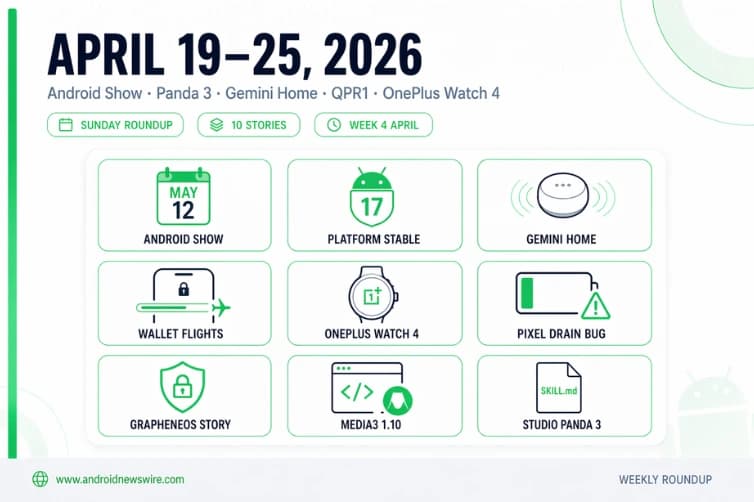
Welcome to your Sunday Android briefing. The week of April 19–25 delivered one of the most event-dense periods in Android’s 2026 calendar so far. Google confirmed The Android Show | I/O Edition for May 12 and Android 17 hit platform stability — meaning the API surface is now locked and a June stable launch is locked in. Gemini for Home got its most important feature since launch. The OnePlus Watch 4 appeared globally with Wear OS 6 and a full titanium body. Google Wallet began showing live flight tracking on Android 16 devices. And Pixel owners are dealing with a battery drain regression that Google has acknowledged and is actively investigating. Here is every story that mattered this week.
1. The Android Show | I/O Edition Confirmed for May 12 — “Biggest Year for Android Yet”
The biggest calendar news of the week dropped on April 23 when 9to5Google spotted a briefly public YouTube listing revealing that Google will host The Android Show | I/O Edition on Tuesday, May 12 at 10 a.m. PT — exactly one week before Google I/O 2026 opens on May 19. In the YouTube description, Google teased: “This is going to be one of the biggest years for Android yet. Tune in to The Android Show | I/O Edition on Tuesday May 12 at 10 AM PT and be the first to take a look at what the future holds.”
In 2025, Google announced Material 3 Expressive, Find Hub, and the Gemini expansion to Android Auto, Wear OS, and Google TV at The Android Show. Google is repeating that format for 2026 — expect consumer-facing announcements at The Android Show, with developer updates happening at I/O.
The two-event structure is deliberate: The Android Show is the consumer broadcast, Google I/O is the developer conference. What goes on May 12 — Android 17’s mainstream feature reveal, Gemini platform expansion, Android XR smart glasses moving toward product launch, and possibly the first public look at Project Aluminium, Google’s Android-based desktop OS — is the story aimed at the people who buy and use Android devices. The technical API details, SDK documentation, and platform deep dives follow the following week at Shoreline Amphitheatre.
Google’s Android Show on May 12 is expected to showcase Android 17 updates, deeper Gemini integration, and early previews of XR, AI-driven features and more. We have published a full deep editorial preview of every expected announcement:
2. Android 17 Hits Platform Stability — API Surface Is Locked, June Launch Is On
Alongside The Android Show announcement, the week delivered Android 17’s most significant milestone since Beta 1: platform stability. Android 17 has now reached platform stability, so new features will arrive later with QPR1 updates instead of the base release. Any new features from here on will likely arrive with Android 17 QPR1.
Platform Stability means the API surface is frozen — no further changes to public APIs before the stable June release. For developers, the implication is direct and time-sensitive: the surface you test against today is the surface that ships. Everything confirmed in beta is confirmed for the stable build.
On the same day, Google surprised the developer community by releasing Android 17 QPR1 Beta 1 — the first Quarterly Platform Release beta — before the base Android 17 even shipped stable. The new build arrives as CP31.260403.005.A1, carries the April 2026 security patch, and includes Google Play Services version 26.11.36. The four confirmed fixes cover a Default Print Service crash under low ink conditions, a Terminal app ANR that rendered devices unresponsive, VoIP audio distortion caused by hardware audio processing interference on the voice communication path, and a direct audio output failure on AIDL audio HAL devices for streams over five seconds.
To see the first Android 17 QPR1 Beta already seems a bit odd, but we’ll take it. The accelerated QPR cadence is consistent with Google’s 2026 approach — ship platform changes faster, iterate more frequently, and give Pixel users access to post-stability improvements before the next major Android cycle begins.
Android 17 stable is targeting June 2026 on Pixel devices. The full timeline: The Android Show on May 12, Google I/O developer deep dives on May 19-20, stable launch expected June. Developers should be running compatibility tests against Beta 4 or QPR1 Beta 1 right now, not waiting for stable.
3. Gemini for Home Gets Continued Conversation — Free, Global, No Wake Word Needed
Tuesday’s most user-relevant news was Google confirming Continued Conversation for Gemini for Home — a feature that allows a user to have a natural discussion with the Gemini platform without prefacing every follow-up request with the “Hey Google” prompt. The microphone will remain active on a smart device for a few seconds after the Gemini AI assistant provides its reply. During that window, the lights on the hardware will pulse or glow, indicating that you can keep chatting normally without needing a wake word.
Gemini retains the context as the conversation progresses, which should allow it to provide the desired information faster without the need for a user to repeat key details. The feature is rolling out for all Gemini for Home voice assistant languages and in all supported regions.
The feature’s significance is partly historical. When Google transitioned users from Google Assistant to Gemini for Home, Continued Conversation — which had been free on Assistant for years — effectively disappeared, replaced by the paywalled Gemini Live feature. Google said Continued Conversation was a top-requested feature from beta testers. Its return, free and global, closes the most frustrating regression of the Assistant-to-Gemini transition.
It remembers the context of previous exchanges, and Gemini can now better tell the difference between a follow-up question and a side conversation with someone else in the room — meaning fewer accidental activations. This improved side-talk detection is the practical fix that makes the feature usable in kitchens and living rooms without constant false triggers.
The feature is not enabled by default. Enable it at: Google Home app → Home Settings → Gemini for Home voice assistant → Continued Conversation. Full breakdown: Gemini for Home Gets Continued Conversation — Free, Global, Rolling Out Now.
4. Google Wallet Live Flight Tracking Arrives on Android 16
A quiet but genuinely useful update rolled out to Android 16 devices this week: Google Wallet is now showing a Live Update on Android 16 and later. It becomes active shortly before takeoff. The status bar icon is the Wallet logo, with Google showing the estimated arrival time and airline. Appearing on your always-on display and lock screen, the progress bar shows flight duration and uses a plane icon.
Google first mentioned this feature was coming in October 2025. Train trips and other “events” should also be supported. The implementation uses the Live Updates API that Android 17 is formalizing for lock screen and status bar chips from ride-share and delivery apps — Google Wallet’s flight tracking is an early real-world deployment of exactly that system on Android 16.
For frequent flyers, the practical value is immediate — real-time gate changes, delays, and arrival time on the lock screen without opening any app. No setup is required beyond having your boarding pass already stored in Google Wallet. The update lets users track flight progress in real time.
This also slots neatly into the broader Gemini for Home picture — the same contextual, ambient intelligence that surfaces information on your speaker without you asking for it is now surfacing your flight status on your lock screen without you opening an app. Different surfaces, same underlying philosophy.
5. Pixel Battery Drain Bug — Google Is Investigating, No Fix Yet
Pixel users across multiple device generations are experiencing a significant and frustrating regression this week: severe idle battery drain following recent updates. Pixel users report severe idle battery drain after the April 2026 update, even when not actively using their phones. The issue appears widespread, affecting multiple models from Pixel 6 to Pixel 10 with hundreds of reports online. Google has acknowledged the problem and is working on a fix. Google formally acknowledged the Pixel battery drain bug on April 14 via the Issue Tracker and has been collecting diagnostic submissions since. That acknowledgment converted a scattered complaint thread into an active engineering ticket. It did not come with a patch, a timeline, or a confirmed root cause.
The exact cause of the idle battery drain isn’t confirmed yet, but some users believe it’s linked to the CPU staying active even when the phone isn’t in use — the CPU isn’t entering a deep sleep state when the screen is off, which keeps it running and leads to battery drain. Some reports also mention that the issue persists even in airplane mode, and in some cases, battery life has been cut nearly in half.
The bug has generated nearly 600 comments on a single Google Issue Tracker thread in under ten days. If you are affected: visit the Issue Tracker thread to submit a bug report with your device model and Android build, which helps Google’s engineering team isolate the cause faster. There is currently no user-side workaround — the fix will need to come as a supplemental patch or the May update. Watch for movement in the Issue Tracker in the days ahead.
6. OnePlus Watch 4 Debuts Quietly With Wear OS 6 and a Full Titanium Body
OnePlus revealed the Watch 4 globally this week — a soft launch that appeared on the company’s website with full specs but no confirmed pricing, no global availability date, and no official announcement event. The big change this year is the physical hardware, with OnePlus Watch 4 getting an all-titanium design that uses a titanium alloy for the entire case. Watch 3 also used this material, but only in the bezel, with the rest of the case made from stainless steel. As a result, OnePlus Watch 4 is lighter at 43g — 68g with the strap — while measuring in at 47.4×47.4×11.0mm, a bit thinner. Gemini is advertised as well.
Software is the standout story here: the OnePlus Watch 4 ships with OxygenOS Watch 8, built directly on top of Google’s latest Wear OS 6 release based on Android 16. This brings Gemini integration and a more fluid experience out of the box.
The watch is powered by the Snapdragon Wear W5 SoC, paired with a BES2800 low-power chip. It has 2GB of RAM and 32GB of storage. OnePlus promises up to 16 days of battery life in power saver mode and up to five days in smart mode, thanks to the watch’s 646mAh battery which charges at 7.5W to reach a full charge in about 75 minutes. The LTPO OLED display has 466×466 resolution and 3,000-nit peak brightness.
OnePlus has skipped on Qualcomm’s latest offering, the Snapdragon Wear Elite, which would have improved the performance and efficiency of the Watch 4. The Watch 4 also lacks eSIM — no standalone cellular capability. Both are genuine limitations for a watch priced in flagship Wear OS territory. The “soft launch” nature of the reveal — listing on the website, no pricing, no confirmed regional availability, no marketing campaign — has added to the odd atmosphere around what should be a major product moment. As noted in this week’s coverage: good luck buying one before the company possibly implodes.
7. April 2026 Google System Updates: Wallet Privacy Controls and Commute Entry Point
The April 2026 Google System Updates include a message at the bottom of the screen telling the user how to add a card to Wallet, a new entry point for MyCommute, a faster way to set up your device when transferring accounts from an existing device, and the ability to control how private passes in Wallet work with other Google services like Autofill through new per-pass privacy settings.
The per-pass privacy settings in Wallet are the most substantive addition for privacy-conscious users — the ability to control, on a pass-by-pass basis, how individual Wallet items interact with Google’s Autofill and other services. This is a meaningful granularity improvement over the previous all-or-nothing approach to Wallet data sharing.
A feature appearing in the changelog does not mean it’s widely available. Some capabilities take months to fully launch. As always with Play Services updates, the changelog represents the full feature surface rather than a guaranteed same-day deployment to every device.
8. GrapheneOS Story Shines Light on Android Privacy Tensions
A WIRED deep report into GrapheneOS’s origins — tracing how the privacy-focused Android fork emerged from the 2018 collapse of CopperheadOS amid internal disputes between project founder Daniel Micay and former Copperhead CEO James Donaldson — generated significant discussion in the Android privacy community this week.
WIRED acknowledges GrapheneOS as the gold standard of mobile security, but the story leans heavily into the long-running feud between project founder Daniel Micay and former Copperhead CEO James Donaldson rather than the software itself. GrapheneOS responded with a detailed public fact-check, disputing key details including the number of co-founders, when Micay and Donaldson first met, and the scope of what Donaldson sought access to.
The story’s timing matters because GrapheneOS has moved into a much more consequential phase, with Motorola officially announcing a long-term partnership with the GrapheneOS Foundation at MWC 2026. In October 2025, GrapheneOS said it was working with a major Android OEM on future devices supporting the OS on Qualcomm Snapdragon platforms, with flagship devices expected in Q4 2026 or Q1 2027. In March 2026, it was revealed this partner is Motorola Mobility.
The broader significance: as Google’s own Android security posture hardens — developer verification requirements, anti-rollback protections, mandatory Play integrity — GrapheneOS represents a coherent alternative philosophy. GrapheneOS in 2026 is the most practical it has ever been. App compatibility has improved, the documentation is thorough, and the project has matured significantly.
9. Android Studio Panda 3 Goes Stable — Agent Skills and Granular AI Permissions
Though it dropped in the first days of April, Android Studio Panda 3’s stable release became the developer conversation of the week as teams evaluated its two headline additions. Agent Skills let developers create custom instruction files — SKILL.md — in a .skills directory to teach the AI agent organization-specific workflows, coding standards, and library usage, reducing the need for detailed prompts.
The new granular permission system gives control over file reads, shell execution, and web access. Granting high-level permissions automatically authorizes related sub-tools, while commands previously approved run automatically without interrupting workflow. Accessing sensitive files like SSH keys will always require explicit sign-off. For even more security, an optional sandbox enforces strict isolated control over the agent.
A new “Empty Car App Library App” template takes care of the required boilerplate code for a driving-optimized app on both Android Auto and Android Automotive OS. Full breakdown: Android Studio Panda 3 Is Stable — Agent Skills & Granular AI Permissions.
10. Media3 1.10 Stable — Material 3 Player Composable and VVC Codec Support
Jetpack Media3 1.10 landed as a stable release this week, delivering the most comprehensive update to Android’s media development library in years. Media3 1.10 includes new features, bug fixes and feature improvements, including Material 3-based playback widgets, expanded format support in ExoPlayer, and improved speed adjustment when exporting media with Transformer.
The media3-ui-compose-material3 module now includes a full Player Composable combining ContentFrame with customizable playback controls, a ProgressSlider for seeks and scrubs, and a PlaybackSpeedToggleButton — collectively replacing the need to hand-build a production media player UI from individual Compose primitives. On the codec side, ExoPlayer gains Dolby Vision Profile 10 and VVC (H.266) track extraction support in MP4 containers — timed precisely to Android 17’s platform-level VVC hardware decode additions landing in June.
Player.mute(), Player.unmute(), and Format.pcmEncoding have been promoted from @UnstableApi to stable — meaning apps currently using these APIs behind @OptIn annotations can remove those annotations in their next release.
Samsung and Wearable Quick Hits
Galaxy Z Fold 7 and Z Flip 7 Re-Newed Program: Samsung announced the refurbished Galaxy Z Fold 7 and Galaxy Z Flip 7 in the US on April 22. Galaxy Z Fold 7 Certified Re-Newed starts at $1,699.00 for 256GB. Galaxy Z Flip 7 Certified Re-Newed starts at $939.00 for 256GB. Samsung says its Certified Re-Newed devices have been serviced by specialists and repaired with 100% genuine parts, including a brand-new battery. The catch, widely noted in coverage: both prices are currently higher than or comparable to new open-box units available elsewhere, substantially undermining the value proposition of the program at launch.
Samsung Galaxy Connect Expands to Intel and AMD PCs: Samsung’s Galaxy Connect app — which allows users to sync data and control Galaxy phones from a connected PC — expanded this week beyond Samsung Galaxy Book laptops to all Intel and AMD Windows 11 PCs. This removes the hardware lock that previously required Samsung-branded laptop hardware to access cross-device Galaxy features from Windows, significantly expanding the feature’s addressable user base.
Wear OS 6.1 Time Zone Update: A small but genuinely useful quality-of-life update arrived for Wear OS this week: Wear OS 6.1 can now update time zones on a watch based on physical location without requiring a network connection. For travelers, the ability for a watch to correctly adjust time zone when on a plane or in a location with no data signal is a meaningful improvement over the previous behavior that could leave the watch displaying incorrect local time until network sync was available.
Developer Action Summary for the Week
Three priorities for development teams heading into the final weeks before The Android Show:
Validate against Android 17 now. Platform Stability is confirmed. The API surface you test against this week is the one that ships to users in June. If you haven’t run your app against Android 17 Beta 4 or QPR1 Beta 1 on a test Pixel, start today. The mandatory large-screen adaptive compliance deadline arrives with the stable release — no extensions, no opt-outs, no legacy exceptions for apps targeting API 37.
Audit Media3 usage. If your app uses ExoPlayer or any Media3 component, update to 1.10.0 and remove @OptIn annotations from mute/unmute and PCM encoding usages. Test VoIP and audio streaming behavior against the four QPR1 bug fixes — the VoIP audio distortion fix in particular may affect apps relying on hardware audio processing in voice communication paths.
Watch the Pixel battery drain situation. If your app has any background service, wake lock, or scheduled task that could contribute to idle CPU activity, verify your app’s behavior in the current Pixel build. Google’s investigation is active but unresolved. A supplemental patch is expected but not timed — users experiencing drain may partially attribute it to apps rather than the platform regression, so checking your app’s battery usage profile now protects your ratings and reputation.
The Week in One Sentence
April 19–25 was the week Android 17 became inevitable — platform stability locked, The Android Show countdown started, the developer tooling matured, and the only clouds on the horizon were a Pixel battery drain bug and an OnePlus Watch that nobody can actually buy yet.
Related on Android News Wire:
- The Android Show | I/O Edition: Date, Time & Format Confirmed
- Gemini for Home Gets Continued Conversation — Free and Global
- Android Studio Panda 3 Is Stable — Agent Skills & Granular AI Permissions
- Media3 1.10: Material 3 Playback Widgets, VVC & Transformer Improvements
- Top Android Stories: April Week 3 Roundup