
Wear OS 7 Is Official — Here’s Everything Google Announced at I/O 2026
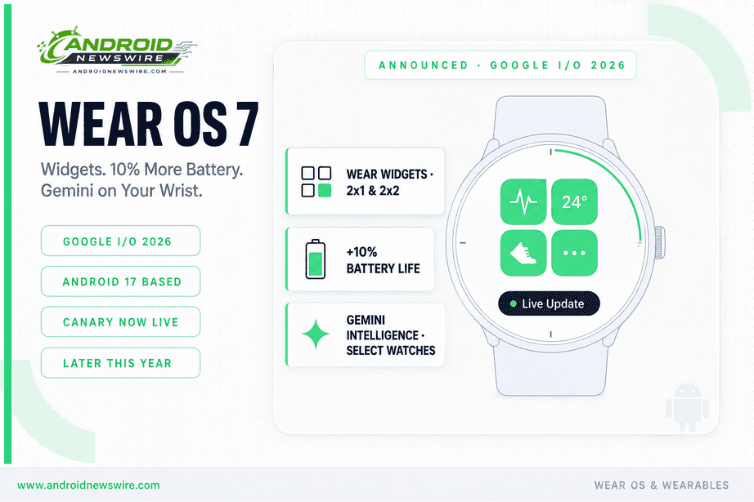
Alongside a slew of new AI-focused announcements at I/O 2026, Google announced Wear OS 7, the latest update to its wearable operating system. The software update carries over some of the design tweaks the company plans to introduce in Android 17, lays the groundwork for new Gemini Intelligence features, and adds interface elements that display glanceable information in new ways.
Google dropped a surprise update as part of the I/O 2026 festivities: Wear OS 7. The pace of Wear OS platform updates has been downright impressive lately, and Wear OS 7 brings an Android 17-based software experience to your smartwatch.
Wear OS 7 represents a platform that is actively closing the gap with Apple Watch — not by copying it, but by aligning more coherently with the broader Android ecosystem vision that Google has been executing all year. Here is everything that was announced.
Wear Widgets — The Tile Gets an Evolution
The biggest of those additions is what Google calls Wear Widgets, an evolution of the informational “tiles” that have been the bread and butter of the Wear OS experience for years. Wear Widgets are designed to be more dynamic and customisable for developers, and closely mirror what can be offered on smartphones.
Powered by Jetpack Glance and the new RemoteCompose framework, Wear Widgets offer greater expressiveness and consistency with Compose than the Tiles ProtoLayout libraries. Full-screen Tiles have been a go-to surface on Wear OS, providing users with instant, glanceable access to their essential updates. As the Android ecosystem moves further toward a unified vision for widgets, we’re bringing the watch closer to the rest of the Android family with the goal of minimising efforts for developers.
The new widgets support 2×1 and 2×2 layouts matching phone widget sizes. The shift from ProtoLayout to Jetpack Glance and RemoteCompose is significant for developers — it is the same rendering framework powering Create My Widget on phones, meaning a widget built once can serve both the home screen and the watch face. Widgets that users make with Google’s AI-powered Create My Widget tool will also be able to make the jump to smartwatches.
For developers currently maintaining Wear OS Tiles: migration to Wear Widgets is the forward path. The ProtoLayout API is not being removed immediately but Google’s development investment is clearly moving toward the Glance/RemoteCompose stack. Starting new Tile implementations in ProtoLayout is no longer the recommended approach.
10% Better Battery Life Across the Board
Google states Wear OS 7 will be 10% easier on battery than Wear OS 6 across the board.
The highlight of this year’s Wear OS update is efficiency. You can expect your smartwatch’s battery to last 10% longer thanks to the efficiency and optimisation of Wear OS 7.
A ten percent improvement in battery life is meaningful in the wearable context where the difference between a watch lasting one day versus extending into a second day can be the deciding factor for users evaluating whether to wear the device overnight for sleep tracking. The improvement comes from platform-level optimisations in Android 17’s kernel — the same AutoFDO work that benefits Android phones applies to the Wear OS stack — combined with targeted Wear-specific power management improvements in the platform layer.
Live Updates Come to Your Wrist
Android 16’s Live Updates will make their way to Wear OS 7. That means you’ll be able to follow updates in real time on your wrist.
Google details the familiar Live Updates feature in regard to what they will look like on the new version of Wear OS. Notifications will appear on the main watch face using a small notification icon.
Live Updates — the lock screen and status bar chips that surface real-time progress from ride-share, food delivery, and transit apps — was one of Android 17’s most consumer-visible additions. Its arrival on Wear OS means the same real-time status information that appears on your phone’s lock screen now surfaces natively on your watch face. For developers who have already implemented the Live Updates API for Android 17, the Wear OS 7 implementation extends that integration to the wrist without significant additional development work.
AppFunctions API Comes to Wear OS — Gemini as a Wrist Agent
The AppFunctions API allows developers to integrate their apps with agents and assistants like Gemini, enabling users to complete tasks using voice, often replacing the need for step-by-step manual navigation. For example, to start a run with Samsung Health, users can simply tell Gemini: “Start tracking my run.” Users can also order food through DoorDash without opening the app. The API essentially turns Gemini into a wrist-based agent capable of operating third-party apps through natural language.
The AppFunctions API on Wear OS is a direct extension of the AppFunctions announcement from The Android Show on May 12. Developers who implement AppFunctions for their phone app — exposing natural language-described actions to Gemini — can extend the same integrations to Wear OS with minimal additional work. The implication is that Gemini Intelligence’s cross-app task automation is not just a phone feature: it is a wrist feature for apps that declare the appropriate AppFunctions capabilities.
Gemini Intelligence on Select New Watches
Gemini Intelligence is coming to select smartwatches launching later in 2026, but requires Gemini Nano v3 support, the same hardware requirement that currently limits it to a handful of flagship Android phones, meaning only new 2026 watches will qualify. Older watches running Wear OS 7 get all the other features, but not Gemini Intelligence. The likely candidates at launch are the Pixel Watch 4 series and certain Galaxy Watch 8 models.
The hardware limitation is honest and worth communicating clearly. Wear OS 7’s full feature set — Wear Widgets, Live Updates, AppFunctions, battery improvements — is available on all supported watches. Gemini Intelligence specifically requires Gemini Nano v3, which is a hardware capability that existing watches do not have. This means Gemini Intelligence on the wrist is a 2026 flagship hardware story, not a software update story for existing device owners.
Standardised Workout Tracking and Third-Party Integration
Wear OS 7 introduced standardised workout tracking and improved third-party app integration for heart rate monitoring and media controls. The standardised workout tracking API means that fitness and health apps no longer need to implement their own proprietary exercise detection and tracking logic — they can rely on the platform layer for the sensor fusion and activity classification, and focus their development effort on the user experience built on top of that data. Chrome Unboxed
For health app developers, this reduces the barrier to building a credible fitness tracking experience on Wear OS significantly. The Health Services API has been maturing for several releases; Wear OS 7’s standardised workout tracking is its most complete expression yet.
Developer Access: Wear OS 7 Canary Emulator Available Today
You can now try out the next version of Google’s smartwatch platform, Wear OS 7 Canary Emulator, based on Android 17, arriving later this year. The new emulator allows you to get hands-on with the developer features and tools mentioned above while testing your app for compatibility with the upcoming platform.
Google says Wear OS 7 will arrive “later this year,” though Wear OS 7 Canary is available for developers starting today.
To access the Wear OS 7 Canary Emulator: open Android Studio, navigate to SDK Manager, select the Wear OS 7 system image from the Canary/Preview channel, and create a new virtual device. Run your existing Wear OS app against the new system image to identify any Tile-to-Widget migration requirements and compatibility issues before the stable release.