
FotMob Just Proved That Your Wear OS App Has an Untapped Audience Sitting Right Inside Your Phone App
The most common assumption among developers who have already built a Wear OS companion app is that their users know it exists. FotMob just published a case study that systematically dismantles that assumption — and the numbers behind it are striking enough to warrant immediate attention from any developer operating in the Android ecosystem.
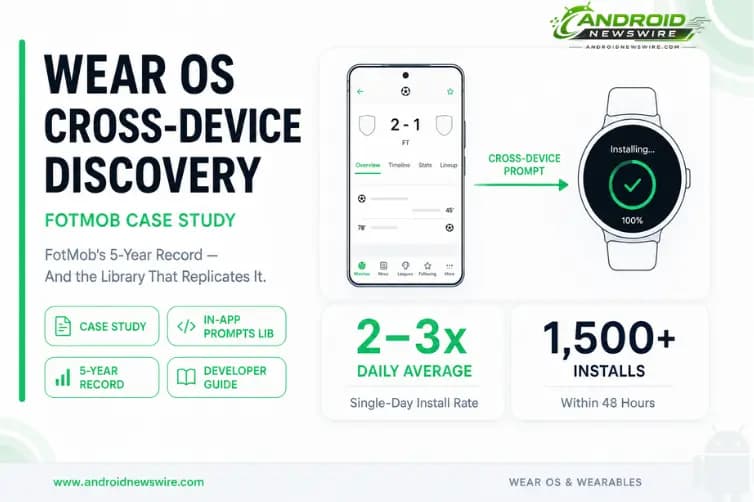
FotMob recently experienced its largest single-day increase on Wear OS among its installed audience in 5 years, at 2–3x the daily average. The secret? A simple cross-device installation flow that helps users discover their Wear OS app directly from their phone. Within 48 hours of the rollout reaching 100%, the watch app gained over 1,500 new installs.
“The watch app has been around for years,” says Roy Solberg, Android Tech Lead at FotMob, “but this confirmed that many users with compatible devices simply weren’t aware it existed.”That sentence is the key insight. Not that Wear OS has low demand. Not that users do not want a wrist experience. That users who have a Wear OS device and an installed phone app do not necessarily know the watch version exists. The discovery gap is not on Google Play — it is inside your own app, where you have the user’s attention, context about their devices, and a direct channel to tell them something useful.
Why FotMob Built a Cross-Device Prompt
FotMob is one of the world’s most popular football platforms, known for its mobile app that provides real-time scores, statistical analysis, and news. “Many FotMob users follow matches live, and that often happens when they’re not actively using their phone,” says Roy Solberg, Android Tech Lead at FotMob. “Wear OS gives fans a quick way to glance at scores, match events, and updates directly from their wrist, so we saw it as a natural extension of the FotMob experience.”
The use case is a natural fit for wearables. Live sport scores are exactly the kind of ambient, glanceable information that a smartwatch handles better than a phone — a two-second wrist raise versus navigating to an app while in a stadium or on a commute. The value proposition of the Wear OS app was clear. The problem was that the users who would benefit most from it — FotMob’s existing installed base with Wear OS devices — were not finding it.
Despite many FotMob users having a Wear OS device, FotMob realized that some users might not be aware of the Wear OS app. This led the team to consider technical options for how to educate users about and ultimately install the Wear OS app directly from within the core phone app.
The solution they chose was not a push notification, not an email, not a Play Store listing change. It was an in-app half-page educational prompt — surfaced only to phone users who had a connected Wear OS device without FotMob installed — that showed them a screenshot of the watch experience and offered a one-tap install flow.
How FotMob Built It — The Technical Implementation
The implementation used the Wearable Data Layer API — the same set of APIs that has been available in the Wearable library for several Android versions — to identify which users have a connected Wear OS device and whether the watch app is already installed. The code surface is small and the logic is straightforward.
Step 1: Find connected Wear OS devices using NodeClient.
Within the FotMob phone app, the team used the NodeClient to identify connected Wear OS devices — candidates for the Wear OS app:
val connectedNodes = nodeClient.connectedNodes.await()
This call returns a list of Node objects representing every Wear OS device currently connected to the phone. Each node includes a device identifier, a display name, and connectivity status. If the list is empty, the user has no connected watch — and the prompt should not be shown. If nodes are present, the next step checks whether the watch app is already installed.
Step 2: Check for the Wear OS app using CapabilityClient.
Additionally, the team defined a capability within the Wear OS app, indicating that FotMob was installed on the device. This is defined as an XML resource in the Wear OS package, and then queried within the phone app:
val nodesWithApp = capabilityClient .getCapability(CAPABILITY_WEAR_APP, CapabilityClient.FILTER_REACHABLE) .await() .nodes
The capability is a string identifier declared as an XML resource in the watch app’s res/values/wear.xml — a standard Wearable library convention. When the phone queries for nodes with this capability, it receives the subset of connected devices that have the FotMob watch app installed. The inverse — connected nodes without the capability — is the target audience for the prompt.
By looking for only nodes without the capability, the team ensured the FotMob phone app only lists Wear OS devices without the app.
Step 3: Show the educational prompt.
The FotMob team designed an educational half-page prompt that quickly makes the user aware of the opportunity, allowing them either to kick off the install flow, or dismiss it. This featured a prominent screenshot of the Wear OS experience, allowing the user to immediately see how the app might look on their watch.
The prompt design choices are worth noting. Half-page rather than full-screen — respectful of what the user was doing rather than demanding full attention. A real screenshot of the watch app rather than an illustration — concrete, not aspirational. Two options: install now or dismiss — no dark patterns, no forced engagement. The prompt is surfaced at the right moment in the user journey rather than on app launch, reducing interruption without reducing visibility.
The entire implementation — device detection, capability checking, conditional prompt display — runs in the background before surfacing anything to the user. The prompt only appears when the condition is met: a connected watch that does not have the app installed.
Google’s New In-App Install Prompts Library Makes This Even Simpler
The FotMob case study is published not just as a success story but as a template — and Google has simultaneously lowered the implementation barrier further by releasing a dedicated library for exactly this pattern.
In addition to the solution employed by FotMob, we’ve now launched a library to make it even easier to implement these cross-device installation journeys through the In-App Install Prompts library.
The In-App Install Prompts library abstracts the NodeClient and CapabilityClient boilerplate into a higher-level API surface with a standardised prompt UI. Rather than building the device detection, capability querying, and prompt design from scratch as FotMob did, developers can implement the same pattern with the library handling the infrastructure.
The library’s existence makes the FotMob implementation even more accessible for teams that do not have dedicated Android TV or wearable developers — the pattern is now a library dependency and a few method calls rather than a custom implementation built from the Wearable Data Layer primitives. For any developer who has already shipped a Wear OS app and has never added a cross-device install prompt to their phone app, the In-App Install Prompts library is the fastest path to the same result FotMob achieved.
The library is available through the Android Wearable library package. Add the dependency to your phone app module and follow the documentation for the prompt configuration API.
The Bigger Picture: Why Wear OS Cross-Device Discovery Is Strategically Important in 2026
The FotMob case study is compelling on its own numbers. In the context of where Google is taking the Android platform in 2026, it is even more important.
Wear OS market position is strengthening. Wear OS commands approximately 27% of advanced smartwatch shipments outside China — a figure that represents consistent growth across the Samsung Galaxy Watch series, the full Pixel Watch lineup, and an expanding roster of third-party hardware. Wear OS 6, shipping now with the OnePlus Watch 4 and expected on upcoming Samsung foldable companions, brings Gemini integration and performance improvements that make the platform more capable than any previous version.
The Android ecosystem is expanding to more surfaces. At The Android Show last week, Google made its most ambitious platform-surface announcement in years: Gemini Intelligence rolling out across Galaxy and Pixel phones this summer, then expanding to “watches, cars, glasses, and laptops later this year.” From foldables, tablets, compatible cars, XR headsets, and new Googlebook devices, the canvas for Android apps has expanded across screens and form factors. Wear OS is one of the surfaces in that expansion, and apps with coherent cross-device stories are positioned to benefit from the platform’s growing visibility investment in multi-device experiences.
Google Play increasingly rewards multi-device app presence. The Play Store’s cross-device promotion surfaces — which surface watch app availability to phone app users who have a compatible device — are only effective when your watch app exists and is correctly linked to your phone app package. The FotMob case study demonstrates that even this organic Play Store surfacing is not reaching the full eligible audience — which is why in-app promotion via the cross-device install prompt produces incremental results even when the Play Store surfaces are already in place.
The Handoff API in Android 17 raises the value of cross-device continuity. The Android 17 Handoff API — announced in the Beta 3 release notes — allows apps to specify application state to be resumed on another device, with the system surfacing a handoff suggestion in nearby devices’ launchers. Apps that have already invested in a coherent cross-device experience — phone app plus watch app, with shared data and a unified UX — are better positioned to benefit from Handoff than apps that treat the phone and watch as independent products.
RemoteCompose targets Wear OS watch faces and tiles. Create My Widget, announced at The Android Show as part of Gemini Intelligence, uses RemoteCompose to generate adaptive widgets for both phone home screens and Wear OS watch faces and complications. Apps with Wear OS presence that structure their data correctly for RemoteCompose rendering will be surfaced in AI-generated watch face customisations — a new discovery surface that did not exist before last Tuesday.
Who Should Act on This Right Now
If you have an existing Wear OS app: The FotMob implementation is your immediate action item. Add the In-App Install Prompts library to your phone app, implement the NodeClient and CapabilityClient check, and ship a cross-device prompt within your next release cycle. The implementation is small — hours of work, not weeks. The potential upside, as FotMob demonstrated, is a multi-year record in Wear OS adoption within 48 hours of rollout.
The single most important design decision is when to surface the prompt. FotMob did not show it on app launch — that is the fastest path to the user dismissing it before reading it. Surface it at a moment when the value proposition is contextually relevant: after the user performs an action that would have been better on a watch, during onboarding for a new feature that has a wrist equivalent, or in a settings screen where device management is already the user’s mindset.
If you are building a new app with a natural watch use case: The FotMob case study should inform your cross-device strategy before you ship the phone app, not after. A watch companion does not need to launch simultaneously with the phone app — but designing your data model and authentication flow to support a future watch extension from day one is significantly cheaper than retrofitting it later. And the In-App Install Prompts library means the phone-to-watch discovery mechanism is a low-effort addition to your phone app once the watch app exists.
If you have deprioritised Wear OS development: The 27% smartwatch market share figure and the FotMob results together make the case that the Wear OS audience is real, underserved by many apps, and reachable through a channel — your existing phone app’s installed base — that most developers already have. The question is not whether to invest in Wear OS. It is whether the investment is proportional to the addressable opportunity that already exists in your user base.
Action Checklist
This week:
- Add the In-App Install Prompts library to your phone app’s Gradle dependencies
- Implement NodeClient to detect connected Wear OS devices
- Implement CapabilityClient to check whether your watch app is installed on each device
- Identify the right moment in your phone app’s UX to surface the cross-device prompt
Prompt design principles from the FotMob implementation:
- Half-page, not full-screen — respect what the user was doing
- Show a real screenshot of the watch app — concrete beats abstract
- Two options only: install or dismiss — no dark patterns
- Surface at a contextually relevant moment, not on app launch
Longer term:
- Review your watch app’s data model for RemoteCompose compatibility — Create My Widget targets Wear OS complications and watch face data
- Evaluate the Android 17 Handoff API as your phone app becomes eligible — the continuity story between phone and watch is the next logical cross-device capability
- Check your Wear OS app’s standalone support declaration — standalone=true in metadata maximises discoverability on LTE-only watches and by iPhone users