
Android Monday: June 1, 2026 — System Updates, One UI 8.5 Expands and Pixel Glow Makes an Appearance
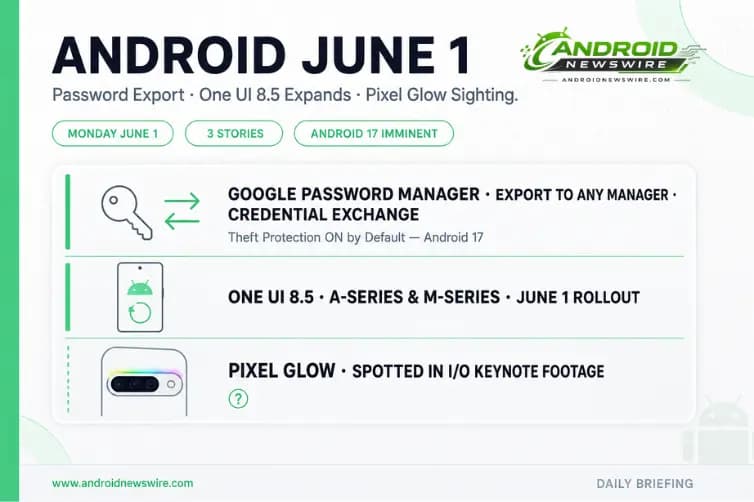
June is here — and with Android 17 stable now days away from its Pixel launch, the first Monday of the month delivered a meaningful set of updates that together signal how quickly the platform is moving before the OS drops.
1. June 2026 Google System Updates — Password Export and Theft Protection on by Default
The June 2026 Google System Updates are live, and two additions stand out above the rest.
Password and Passkey Portability Is Finally Here
You can now import and export passwords and passkeys between Google Password Manager and third-party password managers using the Credential Exchange standard.
This is one of the most practically useful additions Google has shipped in a monthly system update. Until now, leaving Google Password Manager for a third-party alternative — or the reverse — meant either manually re-entering every credential or relying on CSV export hacks that did not support passkeys and came with real security risks. The Credential Exchange standard, developed as the industry-wide portability solution, solves this properly.
The implementation is bidirectional. Users can export their full password and passkey library from Google Password Manager into any compatible third-party manager — 1Password, Bitwarden, Dashlane, and others that have adopted the Credential Exchange standard. The same import path works in reverse for users moving into Google Password Manager from a third-party service. Passkeys — the passwordless authentication credentials that Android has been standardising across apps and websites — travel with the migration rather than being stranded in the source manager.
For Android users who have felt locked into Google Password Manager due to the historical difficulty of exporting credentials, this removes the last structural barrier to switching. For users managing passwords in a third-party manager but logging in through Google due to ecosystem convenience, the import path is now clean and standard-compliant.
To use the new export feature: open Google Password Manager at passwords.google.com or within Chrome on Android, navigate to Settings, and look for the Export or Transfer passwords option. The import path is available within compatible third-party managers’ settings.
Theft Protection Turns On by Default for Android 17 Devices
Remote Lock and Theft Detection Lock turn on by default on Android 17 devices. Theft Protection support has also been added for newly set up and activated devices in the United Kingdom.
The Theft Protection suite — which uses on-device AI to detect the motion signatures of a phone being snatched and automatically locks the device — has been available as an opt-in feature since it launched in 2025. Making it the default on Android 17 devices is a meaningful policy shift. Users setting up an Android 17 device after the June system update will have Theft Detection Lock and Remote Lock active from day one without navigating to security settings and enabling them manually.
The UK addition closes a gap that existed due to regional certification requirements. UK Android users setting up new or factory-reset devices now receive Theft Protection on by default alongside every other supported market.
A survey now appears when a user attempts to disable Advanced Protection mode — a friction point designed to ensure users who turn off Google’s strongest security hardening are making an informed choice rather than an accidental one.
Play Store Gets Clearer Pricing and Refreshed Dialogs
Sales prices and discount details — including offer terms and end dates — are now clearer and more visible across the Play Store. When a developer marks an app or in-app purchase as discounted, the Play Store surfaces the discount end date and terms prominently rather than requiring users to dig into the listing.
Play Store purchase and install dialogs receive a refreshed visual design across Android phone, Auto, and TV surfaces. The pre-registration and auto-install flow merges into a single unified journey — previously two separate steps, now handled in one interaction. Monthly challenge notifications and Loyalty MAX challenge alerts are now surfaced via Play Store pop-up banners rather than relying on users to discover them independently.
App content is now surfaced directly on installed app listing pages, and a new Play Collections feature allows users to browse curated groups of similar apps from within a listing. Both additions improve the discovery surface for developers whose apps sit in categories where users frequently look for alternatives or companions.
New Maps Developer Features
New developer features for Google and third-party developers support Maps-related processes in Android applications. This addition follows the pattern of the May system update’s Device Connectivity developer API expansion — Google progressively broadening the Maps SDK surface through Play Services updates between major platform releases.
To apply the June system update: Settings → your name at the top → All Services → Privacy and Security → System Services.
2. Samsung One UI 8.5 Expands to A-Series and M-Series — Budget Galaxy Gets the Big Update
Samsung kicked off June with its broadest One UI 8.5 rollout yet, pushing the update to Galaxy A-series and M-series devices for the first time. The expansion follows May’s rollout that was limited to the Galaxy S25 series, Galaxy Z Fold 7, and Galaxy Z Flip 7.
What Devices Are Getting It
Several A-series and M-series devices received One UI 8.5 on June 1 — the first day of the month — with the rollout beginning in select countries and expanding to more regions over the coming days. Budget Galaxy smartphone users who have been waiting since the flagship rollout last month are now in the update window.
What One UI 8.5 Delivers for A and M Series
One UI 8.5 is a substantial update for the A and M series in particular. Built on Android 16 QPR2, it brings:
- Ambient Design — the blur-based visual overhaul visible across system UI
- Audio Eraser — real-time background noise reduction during calls and recordings
- Photo Assist — AI-powered image editing tools
- Improved Quick Share — the updated transfer flow the Galaxy S25 received weeks ago
- Perplexity-powered Bixby — conversational AI assistant integration
- Call Screening — automatic detection and filtering of suspected spam calls
For mid-range and budget Galaxy users, these features represent a meaningful quality-of-life improvement over the One UI 8.0 experience they have been running since launch. Perplexity integration on lower-RAM devices may operate with some capability limitations compared to the flagship experience.
How to Get the Update
Settings → Software update → Download and install. The rollout is staged by region, so if the update does not appear immediately, it will arrive over the following days.
What Comes Next for Samsung
One UI 9 — based on Android 17 and expected to debut at Galaxy Unpacked in London on July 22 — will follow a similar expansion pattern. Galaxy Z Fold 8 and Z Flip 8 receive it first, Galaxy S26 series follows in Q3, with A and M series devices in Q4 2026 and early 2027.
3. Pixel Glow Spotted in I/O Keynote Footage — The First Real-World Sighting
A detail in the Google I/O 2026 keynote footage has attracted close attention from the Pixel community this week. During the Gemini Omni reveal segment of the May 19 keynote, a device lying face-down on a desk — used as a demo prop while Gemini works through a query — appears to show a thin band of coloured light running across its rear camera bar. The hardware reads unmistakably as a Pixel, and the lighting pattern matches exactly what leakers have been describing as Pixel Glow for the past month.
What Was Spotted
The sighting is not confirmed by Google. It is a brief, partially obscured moment in keynote footage rather than an explicit product reveal. However, the convergence of details is difficult to dismiss — the device’s camera bar proportions, the position and colour of the light band, and the timing relative to the leak cycle that described Pixel Glow as an RGB LED strip in the camera bar all point in the same direction.
Why It Matters
If the identification is accurate, this would make the I/O keynote the first real-world appearance of Pixel Glow — the feature that every major Pixel 11 leak has listed as a flagship design addition. An RGB notification light embedded in the camera bar, visible from the rear when the phone is face-down, addresses the exact scenario shown in the keynote clip: Gemini working on a task while the phone lies face-down on a surface, with the light pulsing to indicate active processing without requiring the user to pick up the device.
What We Know About Pixel 11
The Pixel 11 launch is confirmed for the August 17–25 announcement window. Google’s standard practice of teasing hardware features through public appearances before formal announcement means that if this is genuinely Pixel Glow visible at I/O, it is consistent with how the company has previewed every major Pixel design element in recent years.
Full Pixel 11 context — Tensor G6, MediaTek M90 modem, Samsung OLED panels, and the full Pixel Glow leak — is in our dedicated Pixel 11 leak roundup.
Android 17 Stable: The Window Narrows Further
June 1 is here and Android 17 stable has not yet dropped — but the window is narrowing significantly. Android 16 shipped stable on June 10, 2025. Android 17 Beta 3 landed May 28. The standard post-beta-to-stable gap across recent Android releases has been seven to fourteen days, putting the most probable Android 17 stable window between June 4 and June 14.
Every day this week carries a non-trivial probability of being the day Google pushes stable Android 17 to Pixel devices. Check Settings → System → System update on your Pixel each morning this week. Android News Wire will have full breaking coverage the moment stable drops.