Google I/O 2026 Developer Keynote: The Complete Android Developer Guide
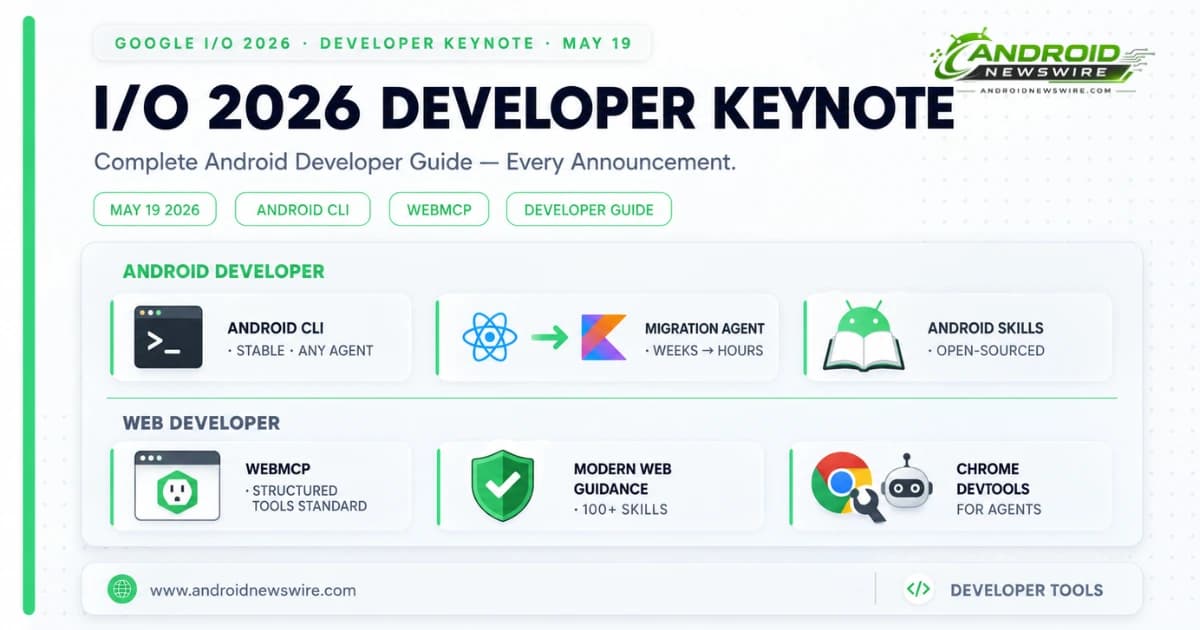
Google’s I/O 2026 Developer Keynote, delivered on May 19, set out the full technical architecture behind the Android and web platform changes that had been previewed at The Android Show one week earlier. Where The Android Show told the consumer story — Gemini Intelligence, App Bubbles, Googlebooks — the Developer Keynote told the engineering story: the APIs, frameworks, tools, and standards that developers use to build for the platform Google is creating.
The keynote organised its announcements across three areas: orchestrating and building powerful AI agents, building high-quality Android apps with agent tooling, and redefining web development in the agentic era. Several of the announcements in the second and third areas — particularly the Android CLI, the Antigravity SDK, WebMCP, Modern Web Guidance, and Chrome DevTools for Agents — deserve dedicated attention for Android developers building modern, AI-integrated applications.
Part 1: Orchestrating and Building Powerful Agents
Antigravity 2.0 and the New Antigravity CLI
Antigravity 2.0 — the agent-first development platform that Google demonstrated at the keynote by building an OS framework in 12 hours using 93 subagents — shipped alongside a new Antigravity CLI that provides two distinct surfaces for agent-driven development workflows.
The CLI surface complements the web-based Antigravity interface by allowing developers to run Antigravity agent harnesses directly from a terminal environment. Complex multi-step agentic workflows — code generation, building, testing, deployment — can now run from a command line with the same cross-platform terminal sandboxing, credential masking, and hardened Git policies that protect web-based Antigravity sessions.
For Android development teams who have established terminal-first CI/CD workflows, the Antigravity CLI integrates agentic capabilities into existing pipelines without requiring workflow changes to accommodate a new browser-based interface. Agent tasks that previously required navigating the Antigravity web interface can be triggered, parameterised, and monitored from the same terminal session as build and deployment commands.
Google AI Studio — Native Kotlin, Firebase, and Cloud Run
Google AI Studio received its most comprehensive update in its history at I/O 2026. The AI Studio now includes native Kotlin support for building Android apps from natural language prompts — generating Jetpack Compose, Kotlin-first, idiomatic Android applications directly in the browser with an integrated Android Emulator for preview and ADB-based device testing. Our dedicated Google AI Studio Android builder article covers this capability in detail.
The I/O announcement extends AI Studio beyond Android prototyping into full-stack application development. With Google Workspace integrations and a one-click deploy to Cloud Run along with support for Firebase services, AI Studio can now build and launch full-stack apps directly within the browser — combining a native Android frontend, a Firebase backend, and a Cloud Run hosting layer in a single development environment. For indie developers and startup teams who want to move from idea to deployed app without context-switching between tools, the unified AI Studio environment reduces the barrier significantly.
Project state export to Antigravity is also available, creating a seamless continuation path for developers who want to move from AI Studio’s guided prototyping environment into Antigravity’s more powerful agentic development workflow for production builds.
Managed Agents in the Gemini API
Managed Agents in the Gemini API removes the infrastructure setup friction that has historically made multi-agent orchestration an advanced engineering problem rather than a standard development pattern. A single API call now provisions a fully functional agent with a remote sandbox — handling the compute environment, session management, tool access, and execution isolation that a manually configured agent system would require custom infrastructure to provide.
For developers building AI-powered features that require agents to take sequences of actions — code generation workflows, multi-step content pipelines, autonomous testing systems — Managed Agents is the path from experimental to production without a dedicated infrastructure engineering investment. The Gemini API takes care of the agent harness. The developer provides the prompt, the tools, and the task definition.
The Antigravity SDK — Custom Agent Deployment on Your Infrastructure
Alongside the managed path, Google announced the Antigravity SDK — a programmatic interface that gives developers full control over the Antigravity agent harness for custom deployment on their own infrastructure.
The SDK is the path for teams who need agents to run inside their own security perimeter — enterprise environments with data residency requirements, organisations running air-gapped development infrastructure, or teams building agentic products where the agent itself is the deliverable and needs to operate within a customer’s environment rather than Google’s.
The distinction between Managed Agents and the Antigravity SDK maps directly to the build-vs-buy decision in enterprise software: Managed Agents for teams who want Google to handle the infrastructure, the Antigravity SDK for teams who want to own and customise the entire stack.
Part 2: Building High-Quality Android Apps With Agents
The Android CLI — Stable and Open for Any Agent
One of the most developer-consequential announcements in the keynote is the stable Android CLI — a command-line interface that enables any AI agent, LLM, or tool to tap directly into the capabilities of Android Studio without requiring Android Studio itself to be running in the foreground.
The stable Android CLI can handle tasks like downloading the Android SDK, running apps on Android devices, building projects, and executing test suites — all from a command that any AI agent can invoke. The significance is architectural: by exposing Android Studio’s capabilities through a stable CLI, Google has turned Android development tooling into a composable component that any agentic workflow can use as a building block.
An AI agent using the Android CLI can: download a specific Android SDK version, create a new Jetpack Compose project from a template, run the app on a connected physical device via ADB, execute the test suite, read the test results, generate code fixes, rebuild, and repeat — entirely autonomously, without human intervention at each step. The Antigravity agent harness, the Android CLI, and the Gemini API together create the complete agentic Android development pipeline.
Android Skills — Open-Sourced LLM Guidance for Complex Workflows
Alongside the stable Android CLI, Google open-sourced Android Skills — a set of structured guidance files that teach LLMs how to execute best practices for complex Android development workflows.
Android Skills are conceptually similar to the SKILL.md files that Android Studio Panda 3’s Agent Skills feature introduced for team-specific coding conventions. The open-sourced Android Skills are Google’s own curated guidance for platform-wide best practices — covering workflows like migrating from the View system to Jetpack Compose and migrating from Jetpack Navigation 2 to Jetpack Navigation 3.
The practical value for development teams is significant. Rather than writing custom prompt engineering to get an LLM to follow Android best practices correctly, teams can adopt Google’s open-sourced Android Skills as the baseline — inheriting Google’s tested, maintained guidance for the most common Android development transitions and using it directly in their agentic workflows via the Android CLI or Antigravity.
The open-source nature means Android Skills are community-extensible. Teams who build on the existing Android Skills for Compose migration or Navigation 3 migration can contribute skills for additional Android development patterns — creating a community library of LLM guidance for Android-specific workflows.
Android Bench — LLM Leaderboard for Android Development Tasks
Android Bench is Google’s LLM evaluation framework specifically for Android development tasks — a benchmark designed to measure how well AI coding assistants understand Android’s specific APIs, architectural patterns, and development conventions rather than general programming ability.
At I/O 2026, Google expanded Android Bench with open-weight models including Gemma 4, providing a direct comparison between Google’s own models and the broader LLM ecosystem on Android-specific tasks. The leaderboard is publicly accessible at d.android.com/bench.
For development teams evaluating which AI model to use for Android-specific agentic workflows — Android Studio’s built-in agent, Claude Code, GitHub Copilot, or any other LLM-backed tool — Android Bench provides a quantitative comparison on the tasks that matter for Android work rather than the generic coding benchmarks that do not distinguish between mobile platform expertise and general software ability.
Migration Agent — React Native, Web, and iOS to Native Kotlin
The Migration Agent for Android Studio was previewed at I/O as the capability that reduces cross-platform-to-native migrations from weeks to hours. The agent analyses source code regardless of whether the starting point is React Native, a web framework, or an iOS Swift/SwiftUI project, then performs the heavy lifting of translating the code to native Kotlin with Jetpack Compose UI.
The Migration Agent output is not production-ready code requiring no review — it is a starting point that dramatically accelerates the architectural translation work that has historically made native migrations expensive. Business logic can transfer cleanly. Platform-specific APIs require human judgment. UI translations from SwiftUI to Compose or React Native components to Compose are where the agent delivers the most acceleration.
For React Native teams evaluating a native migration — a question that the Play Store’s new fee structure and Android 17’s mandatory large-screen compliance requirements have both made more urgent in 2026 — the Migration Agent is the practical tool for understanding what a native migration would actually look like before committing to the engineering investment.
Part 3: Redefining Web Development in the Agentic Era
The web development announcements in the I/O 2026 Developer Keynote are directly relevant to Android developers for three reasons. First, Android developers frequently build web views and hybrid app experiences alongside native code. Second, the Chrome platform is the delivery vehicle for Progressive Web Apps on Android, and the announced standards affect how those apps behave. Third, the introduction of WebMCP — a structured tool exposure standard for browser AI agents — creates a web-parallel to the AppFunctions API that applies to any app with a web presence.
WebMCP — Structured Tools for Browser AI Agents
WebMCP is a proposed open web standard that allows web developers to expose structured tools — JavaScript functions, HTML forms, and other interactive elements — in a format that browser-based AI agents can discover and execute reliably.
Without WebMCP, AI agents interacting with web content must visually interpret the page — inferring what a button does from its label, guessing what a form field expects from its placeholder text, and attempting actions based on heuristics that fail unpredictably. With WebMCP, a developer explicitly declares what their page’s interactive elements do and what parameters they accept, in a machine-readable format that agents can query reliably before executing.
The practical result: browser AI agents using WebMCP-enabled sites can execute complex tasks with greater speed, reliability, and precision than agents working from visual heuristics alone. The experimental WebMCP origin trial starts in Chrome 149, with Gemini in Chrome support coming as a subsequent addition.
For Android developers with a web presence: implementing WebMCP on your web forms and interactive elements positions your site for high-fidelity AI agent interaction — both through Gemini in Chrome for Android users and through any future browser-based agent that supports the standard. Given that Gemini Intelligence’s Personal Intelligence Autofill feature operates on form content, WebMCP-enabled forms will interact more reliably with Gemini’s autofill capabilities than non-annotated forms.
Modern Web Guidance — 100+ Expert-Vetted Agent Skills for Web Development
Modern Web Guidance is Google’s web development parallel to Android Skills — a set of expert-vetted guidance files for over 100 web development use cases that teaches AI agents how to build performant, accessible, and secure web experiences correctly.
The guidance integrates directly with the Baseline standard — the cross-browser compatibility benchmark that defines which web platform features are considered universally supported — and includes fallback strategies for features outside a chosen Baseline target. Agents instructed to use Modern Web Guidance build web experiences that are not only technically correct but compatible with the browser ecosystem the developer’s users actually use.
Modern Web Guidance launches in early preview and installs with a single click in Antigravity or via npx modern-web-guidance install from any CLI. For Android developers who also maintain a web companion experience — a landing page, a web app, or a documentation site — Modern Web Guidance is worth installing in any agentic web development workflow.
Chrome DevTools for Agents — Automated Quality Assurance at Scale
Chrome DevTools for Agents extends the capabilities of Chrome’s developer tools to AI agents — allowing automated quality audits, real-world user experience emulation, debugging workflows, and session handover between human developer and agent to run without manual oversight.
The automation capability is the headline: an agent can run a full accessibility audit, emulate specific device profiles and network conditions, identify performance regressions, and hand a debugging session back to a human developer with auto-connect capability — all without requiring the developer to manually trigger each step. For teams with large web surfaces requiring regular quality checks, Chrome DevTools for Agents turns quality assurance from a manual workflow into an automated, agent-driven one.
For Android developers who build web views, Chrome Custom Tabs implementations, or Progressive Web Apps: Chrome DevTools for Agents applies to the web content your Android app surfaces. An agent that can audit a web view’s accessibility, performance, and security posture as part of a CI/CD pipeline catches issues that are otherwise discovered only when users report them.
HTML-in-Canvas — DOM Elements Inside WebGL
HTML-in-Canvas is a new browser API, available in origin trial, that allows real HTML DOM elements to be rendered inside a WebGL or WebGPU canvas context. The capability enables immersive, three-dimensional web experiences that preserve the accessibility, searchability, and interactivity of standard HTML — without requiring developers to re-implement those properties from scratch in a custom WebGL rendering context.
The combination of GPU-accelerated 3D rendering with standard HTML’s accessibility and interoperability has historically been an either-or choice. HTML-in-Canvas eliminates that trade-off at the rendering level. For Android app developers building web-based content that appears inside Android’s WebView — particularly for XR preview contexts or immersive product demonstrations — HTML-in-Canvas enables experiences that meet both the visual quality bar for modern applications and the accessibility standards that Android 17’s large-screen compliance requirements emphasise.
What Developers Should Do With All of This
The I/O 2026 Developer Keynote announcements organise into three concrete action categories.
Try Today
Android CLI: Install the stable Android CLI and run your first agent-driven build task against a real Pixel device. The easiest starting point is asking the CLI to run your existing test suite on a connected device and report results without manual intervention.
Migration Agent: If your team maintains a React Native or web-based app and has deferred a native Android migration, use the Migration Agent in Android Studio to produce a first-pass native Kotlin conversion. Review the output to understand the scope and cost of completing the migration — the agent’s output is the fastest path to an honest estimate.
Modern Web Guidance: If your team maintains a web companion alongside your Android app, install Modern Web Guidance and run it against your existing web codebase. The 100+ use case library will surface practices your current code does not follow.
Evaluate in July
Antigravity SDK: If your team operates under enterprise security requirements that preclude cloud-hosted agent infrastructure, evaluate the Antigravity SDK for on-premises deployment. The SDK documentation at the Antigravity developer portal covers deployment models and infrastructure requirements.
WebMCP: Review your web forms and interactive elements against the WebMCP specification entering origin trial in Chrome 149. Identify which forms are candidates for WebMCP annotation — starting with forms that appear in Google Search, in Android’s browser, or in your Android app’s web view implementation.
Monitor for QPR1
Android Bench: Add Android Bench to your model evaluation process before selecting an LLM for Android-specific agentic workflows. The leaderboard at d.android.com/bench is updated as new models are submitted — checking it before each major tooling decision gives a current comparison across the LLMs available for Android development tasks.
HTML-in-Canvas: The origin trial in Chrome 149 is the window to evaluate HTML-in-Canvas for any immersive web experiences your app surfaces through WebView. Submit feedback to the Chrome team through the origin trial reporting mechanism — the standard’s final form will be shaped by developer experience during the trial period.