
AI Just Became a First-Class Android Development Tool — Google I/O 2026 Developer Guide
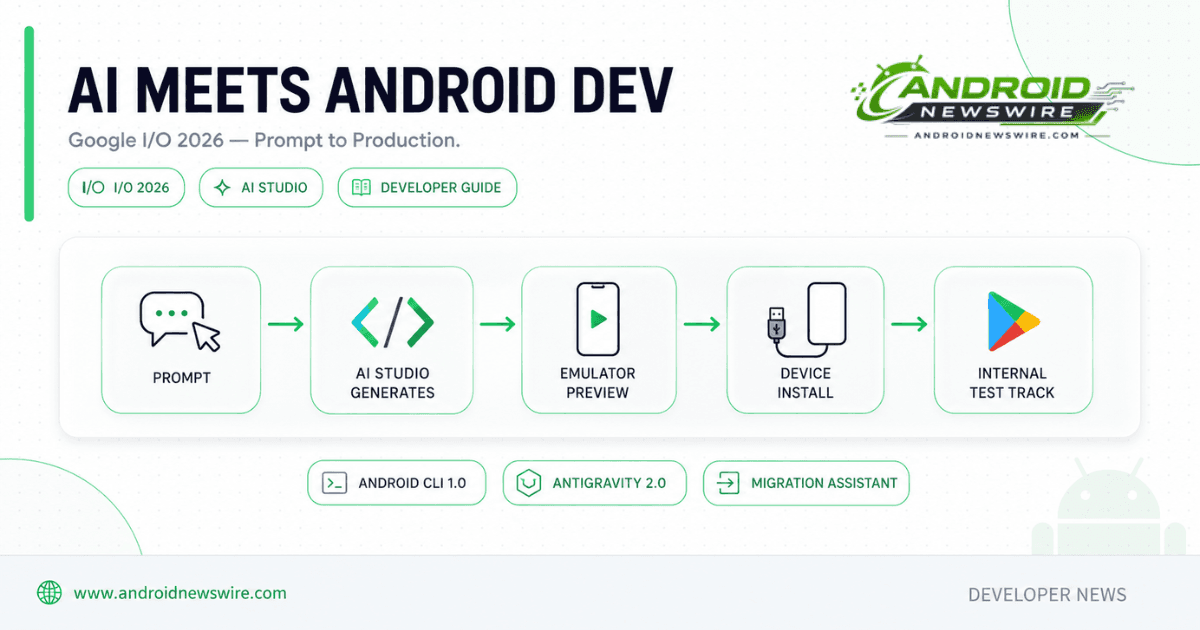
Every Google I/O makes incremental claims about AI assisting developers. I/O 2026 made a structural one: AI is not a layer on top of the Android development workflow anymore — it is being built into the workflow itself, from the first prompt to the Play Store internal test track. Google AI Studio can now generate complete native Android apps in Kotlin and Jetpack Compose from a text description, run them in a browser-based emulator, push them to a physical device, and publish them for testing — without installing the Android SDK. Android CLI reached version 1.0, giving AI agents direct, token-efficient access to the same capabilities that previously required the full Android Studio IDE. Antigravity 2.0 orchestrates multi-agent development workflows with built-in sandboxing. And a new Migration Assistant can port an entire iOS, React Native, or web app to native Android in hours instead of weeks. This is the complete developer breakdown of what changed, what it means, and how to actually use it.
The Headline: Native Android Apps From a Prompt, Inside Your Browser
While AI has made it easy to generate web-based apps, people want more on their mobile devices. They expect the beautiful and usable modern app design and capabilities that come with native Android user experiences, built with the Kotlin programming language using Jetpack Compose, the official and recommended toolkit for Android development. Native Android apps bring the reliability of offline support, continuous background services, and the deep integration of hardware sensors like GPS, Bluetooth, and NFC. Google
That framing is the entire thesis behind the most significant Android developer announcement at I/O 2026. Google has brought the technology that enables quickly creating new projects with Gemini in Android Studio directly into the web-based AI Studio. You get the best of both worlds: the ease of a prompt-based interface paired with the power of the Android SDK, all in your browser, no installation required. Google
Describe your idea and AI Studio can generate production-quality Kotlin code using the latest Jetpack Compose pattern. Go to Build mode in Google AI Studio using the left-hand navigation panel, select Android from the platform picker, and enter a prompt describing the app you want to build — for example, “Create a daily task tracker with local storage” or “Build a simple calculator.” The agent generates the project and launches it in the browser-based Android emulator. Help Net Security9to5Google
For the first time, a developer with no Android experience can ship a hardware-enabled, camera-capable, GPS-aware app directly to the Google Play Internal Test Track without touching a local SDK. This is the single most important distinction between AI Studio’s Android generation and every other prompt-to-app tool on the market. Every existing “prompt-to-app” tool — Bolt, v0, Lovable, Replit Agent — reaches for React Native via Expo because they started as web platforms. Native Android Kotlin output changes the performance floor, the hardware-sensor story, and the binary-size math in ways that React Native cannot match. Android HeadlinesAndroid Headlines
What the Generated Project Actually Looks Like
When you build an Android app, the agent generates a standard Gradle-based project with the following structure: Build configuration using build.gradle.kts files (project and app level) with Kotlin DSL, a UI layer of Jetpack Compose components with Material 3 theming, a single-activity architecture with ViewModels and data classes, and resources including AndroidManifest.xml, drawables, strings, and other Android resources. The agent automatically manages Gradle dependencies, adding packages from Maven and Google repositories as needed. 9to5Google
This is not boilerplate-with-a-prompt-wrapper. The architecture decisions — single-activity with ViewModel, Compose-based UI, Material 3 theming — are the same recommended patterns Google’s own Android team teaches in official documentation. A developer reviewing AI Studio-generated code sees a project structure they would recognize from any well-built modern Android app, not a black-box framework abstraction.
The full workflow from prompt to device:
You can go from prompt to prototype, iterate with an embedded Android Emulator in your browser, and then install the app on your Android phone over USB using the integrated Android Debug Bridge (ADB). If you have a Google Play developer account, you can also publish your app directly from AI Studio for internal testing. Gadget Hacks
You can install the built APK directly on a physical Android device connected to your computer using USB. This uses WebUSB to communicate with your device through the browser — no local ADB installation is required. Click Install on Device in the preview panel, select your Android device from the browser’s USB device picker, and the APK is transferred and installed automatically. 9to5Google
Custom asset generation and in-preview editing:
The AI Studio Build agent can automatically generate custom images on the fly using Nano Banana, helping you build tailored interfaces or mock up specialized use cases without needing external placeholder assets. A new edit tool lets you annotate right in the preview window — draw on your app, tweak components, and generate new visuals to iterate on your build, right in the flow. Help Net Security
Mobile app for building on the go:
Available for pre-registration today, the AI Studio app brings the full build-mode experience to your phone, allowing you to iterate on code and preview builds directly from your pocket. You can remix apps from the mobile gallery for inspiration and share live deployments with your friends to gather feedback and collaborate. Help Net Security
The Limitations: What AI Studio’s Android Path Cannot Do Yet
Google has been explicit about scope boundaries for this initial release, and they matter for any developer evaluating whether AI Studio fits a real project today.
Jetpack Compose only — apps use Kotlin and Jetpack Compose; Java and XML layouts are not supported. No NDK or native code — C and C++ code is not supported. No Wear OS or Android TV — only phone and tablet form factors are supported. ZIP download only — you can download the project as a ZIP file; GitHub export is not yet available for Android projects. 9to5Google
The more significant limitation is architectural: Android apps in AI Studio are client-side only. Features that require a server-side runtime, such as Firebase integration, Google Workspace APIs, secrets management, and multiplayer, are available for web apps only. 9to5Google
The browser-based emulator doesn’t support all hardware features — Google Play services such as Google Sign-In and Maps work on a real device but not in the emulator. 9to5Google
Google has scoped the initial release deliberately rather than over-promising. To ensure a safe, high-quality ecosystem from day one, the initial release focuses on specific capabilities including personal utilities and simple social apps — rapidly prototyping single or multi-screen apps such as habit trackers, study quizzes, or event itineraries — and hardware-enabled experiences that leverage device features like Camera, GPS/Location, Accelerometer and Bluetooth using native Android APIs. Google
The honest read: this is an exceptional prototyping and learning tool today, not a backend-integrated production app builder. Firebase integration is explicitly on the roadmap but not shipped — Firebase integrations (Firestore, Auth, App Check) are on the upcoming roadmap, not in the May 19 release. Android Headlines
Scaling Beyond the Prototype: Export to Antigravity, Gemini in Android Studio
AI Studio is explicitly positioned as the starting point, not the end state, for any project that grows beyond a prototype. When transitioning to a team environment or local development, you can leverage any IDE or agent you prefer. For a specialized experience, Google recommends Gemini in Android Studio, which features models designed with Android in mind, or Antigravity, which integrates Android CLI commands into Google’s agentic development platform. Google
If you want local development for faster iteration, you can now export directly to Google Antigravity. Your conversation history, project files and secrets all come with you, so you can pick up exactly where you left off, bring in your wider team and start scaling your development workflow. Help Net Security
This export continuity is the detail that separates a genuinely useful AI-assisted pipeline from a disconnected toy. A developer who prototypes in AI Studio is not starting from zero when they move to serious development — the entire conversation history that shaped the app’s design decisions travels with the project, meaning a teammate picking up the work in Antigravity has the same context the original prompt-based development session captured.
Android CLI 1.0: Giving Agents Direct Access Without Opening the IDE
The second major pillar of I/O 2026’s AI development announcements is Android CLI reaching stable 1.0 — a development that matters more for production engineering teams than AI Studio’s prompt-to-app generation does.
The stable Android CLI enables your AI agents to tap directly into the “heavy-lifting” power of Android Studio. It can handle tasks like downloading the Android SDK, running your app on Android devices, and more, so you can create high-quality Android apps using any agent, LLM, and tool of your choice. Agooka
Android CLI 1.0 gives agents access to tasks that required the full Android Studio IDE to be open: SDK management, device connectivity, semantic symbol resolution, file analysis, Compose preview rendering, and UI test execution. Samsung
The performance numbers Google shared are significant for any team running agent-based development at scale: according to Google’s internal experiments, the machine-friendly interface reduces LLM token usage by more than 70% compared to agents using standard toolsets, with tasks completing three times faster. Samsung
That 70% token reduction is not a marginal optimization — it directly affects the cost and speed of every agent-driven development task your team runs. An agent that previously needed to parse full IDE state through generic file-system and shell access can instead query Android CLI’s purpose-built, semantically-aware interface and get the same information in a fraction of the tokens. For teams running agent workflows at meaningful scale, this translates directly to lower API costs and faster iteration cycles.
We also open-sourced Android skills to help LLMs execute best practices for complex workflows and APIs, like migrating to Jetpack Compose, or Jetpack Navigation 3 migration. Android Skills are modular markdown-based instruction sets that tell LLMs how to follow best practices for specific workflows. This open-sourcing matters beyond Google’s own tools — any LLM or agent framework, including ones built by third parties, can consume these skill definitions to gain Android-specific best-practice knowledge without Google having to bake that knowledge into a proprietary model. AgookaSamsung
This release also enables official support for “Journeys” through new Android skills, which enables agents to execute end-to-end UI tests under your direction. 9to5Google
Antigravity 2.0: Multi-Agent Orchestration With Built-In Guardrails
With Antigravity 2.0 and the all-new Antigravity CLI, you now have two powerful surfaces for incredible productivity gains. You can spin up specialized subagents to tackle complex workflows, all protected by built-in cross-platform terminal sandboxing, credential masking, and hardened Git policies. Agooka
The multi-agent subagent model is a meaningful evolution from single-agent coding assistance. Subagents handle parallel tasks, such as one agent working on the UI layer while another handles API integration. Rather than a single agent sequentially working through a task list, Antigravity 2.0 enables genuinely parallel agent work on independent parts of a codebase — closer to how a human engineering team would divide labor on a feature. Samsung
The security architecture matters as much as the productivity gains. Cross-platform terminal sandboxing, credential masking, and hardened Git policies are the guardrails that make multi-agent autonomous development safe to run against real codebases rather than throwaway sandboxes. Without these protections, giving multiple autonomous agents shell and Git access to a production repository would be a significant security liability.
The new Antigravity CLI is built in Go and replaces Gemini CLI, which Google is retiring on June 18, 2026 for consumer users. Teams currently using Gemini CLI for Android-adjacent agentic workflows should plan their migration to Antigravity CLI ahead of that June 18 retirement date. Samsung
Managed Agents in the Gemini API removes the friction of infrastructure setup, delivering the power of the Antigravity agent harness via managed agents. For developers who want Antigravity’s agent capabilities without managing their own agent infrastructure, this managed offering through the Gemini API is the lower-friction entry point. Agooka
The Migration Assistant: Porting Entire Apps to Native Android in Hours
One of the more immediately practical announcements for teams with existing non-Android codebases is the Android Studio Migration Assistant.
We previewed an exciting new Android Studio feature that migrates your app code to a native Kotlin Android app, regardless of whether your source is React Native, a web framework, or iOS. Agooka
Google’s agent will take an existing project and intelligently map features, convert assets like storyboards and SVGs, and implement Android best practices using Jetpack Compose and our recommended Jetpack libraries. This will effectively transform what used to be weeks of manual porting into a streamlined agentic workflow that only takes hours. Gadget Hacks
For any team that has an iOS-first app and has been delaying an Android port due to the resourcing cost, or a React Native app that wants to move to a fully native Compose implementation for performance reasons, the Migration Assistant fundamentally changes the cost-benefit calculation. A port that previously required allocating a dedicated engineer for several weeks — manually translating UI components, re-implementing business logic, converting design assets — becomes an agent-driven workflow measured in hours of supervised execution.
This is a one-way port (to Android, not from it), and a separate tool from AI Studio’s generator. The Migration Assistant is distinct from AI Studio’s prompt-to-app generation — it is specifically for converting an existing codebase, not for generating a new app from a description. Android Headlines
Compose Becomes the Single Standard — View System Moves to Maintenance Mode
A foundational platform decision underlies all of these AI tooling announcements: Google has completed its multi-year transition to Jetpack Compose as the singular, mandatory UI paradigm for Android development.
Compose is our standard for UI development, and we are moving to a Compose-first approach for all future guidance and libraries. Building on five years of evolution, the latest releases deliver a more mature toolkit, from the highly customizable Styles API to refined shared element transitions and enhanced input support. These updates allow you to build beautiful, adaptive apps with less code and better performance. 9to5Google
Android 17 marks a shift toward a single, Compose-based development model for all widgets, with Google unifying the developer experience across mobile, Wear OS, and cars through Jetpack Glance. Teams still building UIs in XML-based View layouts should note that Google has moved View components to maintenance mode, with Compose now the standard for Android UI development — and the new agent tooling is built around that assumption. Samsung
This is the architectural decision that makes all of the AI generation tooling coherent. AI Studio generates Compose. Android CLI’s Compose preview rendering is a first-class capability. The Migration Assistant’s output target is Compose. Every AI development tool Google announced at I/O 2026 assumes Compose as the destination — which means teams still maintaining significant XML View-based codebases are increasingly working against the grain of where Google’s tooling investment is heading. If your team has been deferring a Compose migration, the AI tooling ecosystem emerging around Compose specifically is a strong additional argument to prioritize that migration now.
AppFunctions: Making Your App a Tool for Gemini and Other Agents
Beyond development tooling, I/O 2026 introduced a capability that changes what your shipped app can do once it is in users’ hands.
AppFunctions is an Android platform API with an accompanying Jetpack library to simplify building Android MCP integrations. It empowers your apps to behave like on-device MCP servers, contributing functions that act as tools for use by agents and assistants. AppFunctions integration with Gemini is currently in a private preview with trusted testers, and you can begin preparing your apps already. You can sign up for the Early Access Program and start experimenting using the API guidance, sample, and skill today. 9to5Google
This is the bridge between the Model Context Protocol ecosystem and Android’s app model. Instead of building a standalone MCP server that runs elsewhere, AppFunctions lets your existing Android app expose specific functions directly to Gemini and other on-device agents — your app becomes a tool that Gemini Intelligence (covered in our May Android Show breakdown) can invoke on the user’s behalf, with appropriate permission boundaries.
For developers building apps that perform discrete, well-defined actions — booking, ordering, calculating, retrieving — AppFunctions is worth tracking closely as it moves out of private preview. Being one of the tools Gemini Intelligence can call directly is a meaningful distribution and engagement channel as Android’s AI layer becomes more agentic.
Android Bench: A Leaderboard for AI Models on Android-Specific Tasks
You need AI that understands the nuances of Android, which is why we created Android Bench, our LLM leaderboard for Android development tasks. This week, we added open-weight models such as Gemma 4 to the leaderboard, so you can see how other LLMs measure up. Agooka
Android Bench addresses a real gap. General-purpose coding benchmarks do not capture Android-specific competency — understanding Jetpack Compose idioms, Android lifecycle management, Gradle build configuration nuances, and platform-specific API patterns. A leaderboard purpose-built for Android development tasks gives developers and teams a more reliable signal for which models actually perform well on the kind of work they need done, rather than extrapolating from general coding benchmark performance.
The inclusion of open-weight models like Gemma 4 alongside presumably Gemini models on the same leaderboard is a notable transparency choice — it allows direct comparison rather than confining the benchmark to Google’s own model family.
What This Means for Android Developers in Practice
Pulling all of this together, here is the practical guidance for how to actually use what Google announced:
For prototyping and learning: AI Studio’s Android Build mode is the fastest path from idea to a working, testable native app. Use it for personal projects, internal tools, hackathon prototypes, and as a learning tool for understanding Compose and modern Android architecture patterns. Do not expect Firebase or Workspace backend integration yet — plan for client-side-only scope at this stage.
For scaling a prototype into a real product: Export from AI Studio to Antigravity once your app needs backend integration, complex business logic, or team collaboration. The context-preserving export means you are not starting over.
For production engineering teams already using AI-assisted coding: Adopt Android CLI 1.0 as the interface layer for your agents. The 70% token reduction and 3x speed improvement are not marginal — they materially change the economics of running agent-driven development at scale. Migrate off Gemini CLI to Antigravity CLI before the June 18, 2026 retirement.
For teams with existing iOS, React Native, or web apps considering an Android port: Evaluate the Migration Assistant seriously. The hours-not-weeks timeline claim, if it holds up in practice for your codebase’s complexity, fundamentally changes the resourcing conversation for a long-deferred Android port.
For teams still on XML View-based UI: Treat the Compose-first tooling investment as additional pressure to complete your Compose migration. The AI development ecosystem Google is building is increasingly Compose-native, and that gap will only widen.
For app developers thinking about the agentic future: Watch AppFunctions move out of private preview. Sign up for the Early Access Program now if your app has well-defined, invocable actions that would benefit from Gemini Intelligence being able to call them directly.
Related on Android News Wire:
- Top Android Stories: May 2026 Week 3 — Gemini Intelligence, Googlebook & More
- Android 17 Makes Adaptive Layouts Mandatory — The Developer Compliance Guide
- Jetpack Telecom v1.1.0: VoIP Calls Now in Google Phone
- Android Canary 2603 & 2604: App Lock, Bubbles & Wi-Fi Toggle — Developer Guide
- AAOS SDV Developer Opportunity: Android Beyond the Dashboard