
Android Auto Gets Less Distracting — And Much More Is Coming
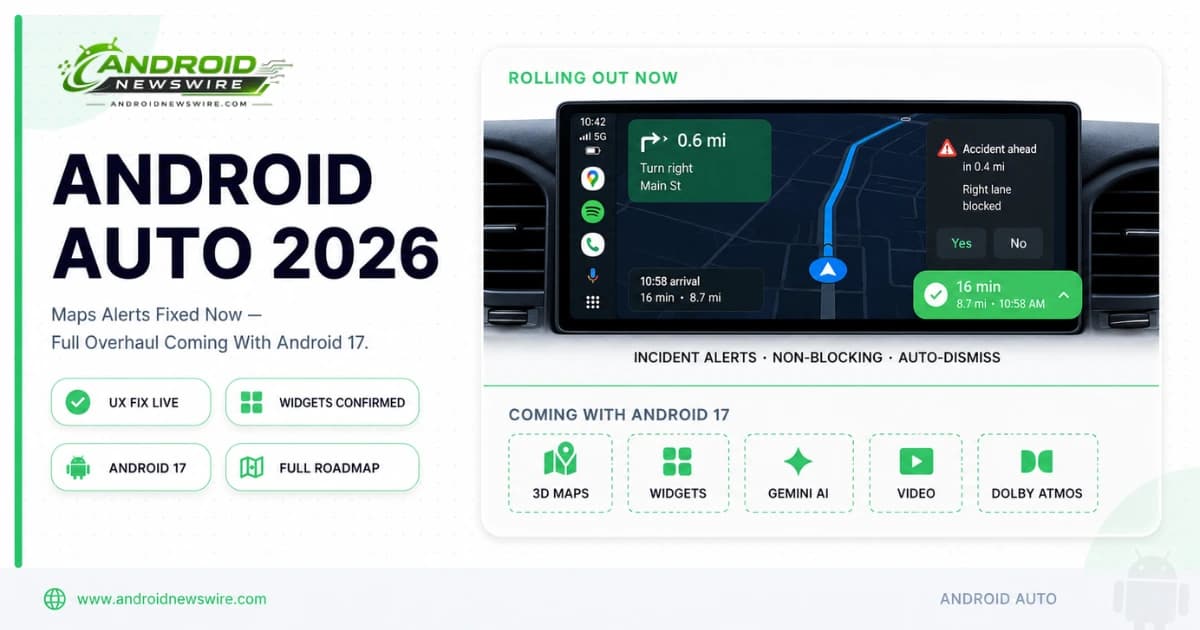
Google is rolling out a redesigned incident report interface for Google Maps on Android Auto — a targeted UX fix that addresses one of the most consistent complaints from Android Auto users since Waze-style incident reports arrived on the platform in 2024. The change is exactly the kind of low-drama improvement that makes daily driving noticeably better without requiring a major software update. And it arrives at a meaningful moment: Android Auto 17.0 stable shipped last week, Android 17 stable is days away, and the framework for a far larger Android Auto overhaul is already sitting in the code waiting to be unlocked.
The Immediate Change: Incident Alerts That Stay Out of the Way
The Problem With the Old Design
Since Google Maps brought Waze-style incident reporting to Android Auto in late 2024 — alerting drivers to lane closures, crashes, hazards, and other road events and asking them to confirm whether the incident was still present — the implementation drew consistent feedback about its design.
The original alert appeared as a large, full-width overlay that temporarily replaced the turn-by-turn direction instructions and estimated arrival time at the bottom of the screen. To clear the overlay, the driver had to actively interact with it — confirming or denying the incident. Until that interaction, the core navigation UI was partially obscured. On taller displays, the experience varied; on the more common landscape in-car screens, the obstruction was noticeable enough that a 2025 poll found most Android Auto users found the alerts at least somewhat distracting.
The design conflict was fundamental: incident reports are a useful safety feature that encourage community-maintained road awareness, but the implementation required exactly the kind of screen interaction at exactly the wrong moment that in-car UX guidelines exist to prevent.
What the New Design Does
The redesigned incident alert appears as a compact overlay positioned directly over the estimated time of arrival display — the least navigation-critical element on the Maps screen. The alert shows a simple Yes or No response option and disappears automatically after a few seconds if the driver does not interact with it.
Critically, the new overlay does not move or hide any other navigation elements. Turn-by-turn direction instructions remain fully visible. The ETA display remains readable beneath the overlay. The route line and map view are unaffected. A driver who chooses not to interact with the alert loses nothing — the navigation continues uninterrupted and the alert clears itself.
For drivers who do want to respond, the smaller, well-positioned buttons are reachable without the extended glance-and-tap interaction the old design required. The improvement is more pronounced on standard landscape in-car displays than on the taller portrait screens some vehicles use, where the original design was less obtrusive to begin with.
How to Get It
The redesign is rolling out via a Google Maps app update rather than through Android Auto itself — meaning it arrives across all Android versions that support Android Auto, not just Android 17. Check for a Google Maps update in the Play Store. The rollout is staged and may take several days to reach all devices.
The Known Bug: Night Mode Is Broken for Some Users
Alongside the incident alert improvement, a separate bug has surfaced in recent Android Auto builds that keeps Google Maps locked in day mode after dark — displaying the bright daytime colour scheme at night rather than switching to the darker night mode theme automatically.
The Night Mode bug is not connected to the incident alert redesign; the two changes arrived in proximity but are independent issues. The bug is actively discussed in the Android Auto community and has been reported to Google’s Issue Tracker. No fix has shipped as of this writing. If you are experiencing the issue, the workaround is to manually toggle the map colour scheme in Google Maps settings while connected to Android Auto. A software fix is expected in an upcoming Maps or Android Auto update.
The Bigger Picture: What Is Coming to Android Auto in 2026
The incident alert redesign is a useful improvement. It is not the Android Auto update that 2026 is ultimately about. Here is the complete picture of what Google has confirmed is coming — and the Android 17 dependency that is holding most of it back.
Widgets — Confirmed in Code, Not Yet Live
Evidence of widget support has been discovered in Android Auto beta builds — and the framework for three-pane split-screen mode including a dedicated widget pane is confirmed in the code. The implementation allows users to swipe to a split-screen mode that keeps the existing app — such as navigation — running in one pane while accessing the app drawer and a widget strip in the adjacent pane.
The widget pane mirrors the approach Google is taking with Android 17’s home screen widget system — the same RemoteCompose foundation that powers Create My Widget on phones is the architecture that Android Auto widgets will build on. The framework is in place. The features have not yet dropped into the live interface — likely because Google is coordinating the full rollout with the Android 17 stable launch rather than shipping them incrementally.
3D Immersive Google Maps Navigation
The biggest single visual improvement confirmed for Android Auto in 2026 is the transition from Google Maps’ current flat 2D navigation view to a fully rendered 3D navigation environment. Navigation now looks far more detailed, with 3D visuals showing buildings, flyovers, and road layouts in a much more realistic way while driving.
The 3D view includes rendered buildings along the route, overpasses, terrain elevation, and critical detail overlays for lanes and traffic lights. On supported vehicle models with front-facing cameras, the system can use the camera feed to identify the current lane and provide more accurate lane-change and exit guidance than GPS-only lane detection allows.
Google Maps has been reworked with an edge-to-edge design to help fit the many different types of car screens. The edge-to-edge implementation addresses one of the most common criticisms of Android Auto’s current Maps interface — the letterboxed presentation on non-standard display ratios that leaves black bars on wider or taller screens.
Gemini Intelligence in the Car
Gemini Intelligence is coming to Android Auto for qualifying devices — the same hardware requirements that apply on phones (Gemini Nano v3, 12GB RAM) apply in the car. The automotive Gemini features focus on context-awareness: understanding what is on your calendar, what messages are pending, and what your typical driving patterns are to surface relevant information and actions without requiring the driver to ask.
The Android Show confirmed a one-tap garage door opener shortcut, favourite contacts directly on the Android Auto home screen, and Gemini-powered context-aware message summaries and replies as the first wave of intelligence features. These are designed around the principle that the best in-car AI interaction is one the driver initiates with a single tap or voice command, not one that requires navigating a menu.
Video Playback for Parked Vehicles
Video app support — YouTube and other streaming services available on the in-car display when the vehicle is parked — is confirmed for Android Auto in 2026. This feature requires Android 17 on the connected phone, making it a staged rollout: Pixel owners who receive Android 17 stable first can expect video playback capability within weeks of the stable launch. Samsung, OnePlus, and other OEM users follow as their Android 17 updates ship through Q3 and Q4.
When the vehicle starts moving, video automatically switches to audio playback without stopping the content — a thoughtful safety implementation that preserves the session without requiring the driver to manually switch apps.
Material 3 Expressive Visual Redesign
The full Android Auto interface redesign based on Google’s Material 3 Expressive design language — the same visual system rolling out across Android 17 system surfaces — is confirmed for 2026. The updated interface introduces a dock-style app bar positioned on the left side of the screen, replacing the current bottom navigation bar. The dock-style layout is distinctly Google in character rather than CarPlay-inspired, which is a deliberate design choice consistent with Android Auto’s 2026 identity as a Google-built platform.
Dolby Atmos Audio
Dolby Atmos support for audio playback in Android Auto is confirmed for 2026 on supported vehicles and apps. The spatial audio implementation brings the same audio quality improvement that Dolby Atmos delivers in home theatre and headphone contexts to the in-car environment — a meaningful upgrade for users who spend significant time driving with music or podcasts.
The Android 17 Dependency — Why the Big Features Are Waiting
The framework is in place for widgets, 3D Maps, Gemini features, and video playback. None of them have yet dropped into the live Android Auto interface. That timing is intentional.
Google is waiting for the Android 17 push, with Android Auto expected to get a lot of new features once the stable OS arrives. Android 17 stable is currently expected within the next one to two weeks for Pixel devices. The coordination makes sense: shipping Android Auto’s largest feature update in years alongside Android 17 stable creates a coherent platform moment rather than a fragmented drip of individual features. Video playback specifically requires Android 17 on the connected phone — without the platform dependency resolved, partial rollout would create a confusing split experience where some users have the feature and most do not.
For Android Auto users eager for the full 2026 update: the Android 17 stable launch is the trigger. Within weeks of Pixel devices receiving Android 17 stable, the full Android Auto feature set should begin arriving in Google Maps and Android Auto app updates. Samsung and other OEM users follow as their Android 17 updates roll out through Q3.
Developer Roadmap: What to Build and When
Automotive App Category Targets
The confirmed 2026 Android Auto roadmap defines the app categories that will benefit most from the expanded platform capabilities. Media apps supporting background audio with video playback on parked screens, navigation companion apps building on the new Maps API surfaces, communication apps integrating with Gemini’s context-aware reply system, and productivity apps exposing relevant shortcuts to the Android Auto home screen are all directly addressed by announced features.
The Widget API
The confirmed widget third-pane in Android Auto’s split-screen mode is the most significant new developer surface. Building on RemoteCompose for Android Auto widgets follows the same pattern as building Create My Widget content for the phone home screen — the rendering model is shared. Developers who have already invested in RemoteCompose for phone widgets have a head start on the Android Auto widget surface.
AppFunctions for the Car
The AppFunctions API — which landed in Google Play Services in the May 2026 update and is no longer gated on Android 17 — applies to automotive contexts as well as phone contexts. Exposing your app’s actions as AppFunctions allows Gemini in Android Auto to invoke those actions via voice or context-awareness, without the driver needing to open your app. For automotive-relevant app categories — food ordering, parking, fuel, navigation, communication — AppFunctions integration is the path to being a first-class participant in Gemini’s in-car intelligence layer.
AAOS SDV for the Full Vehicle Platform
For developers targeting Android Automotive OS rather than Android Auto, the AAOS SDV platform — which extends Android beyond the infotainment screen into climate, lighting, seating, and vehicle management — is the expanding surface to watch. Our full AAOS SDV developer guide at Android Automotive Full Vehicle OS — The AAOS SDV Developer Opportunity covers the complete developer opportunity in the automotive platform beyond Android Auto.
Related on Android News Wire:
- Android Auto 17.0 Stable Rolls Out — Big Features Still Coming
- Android Is Moving Beyond Your Car’s Dashboard — AAOS SDV Explained
- Android Automotive Full Vehicle OS — The Developer Opportunity
- Gemini Intelligence: Android Becomes an Intelligence System
- May 2026 Google System Updates: AppFunctions in Play Services