
Android Auto 17.0 Is Stable and Rolling Out – Here’s What Changed and What Is Still Coming
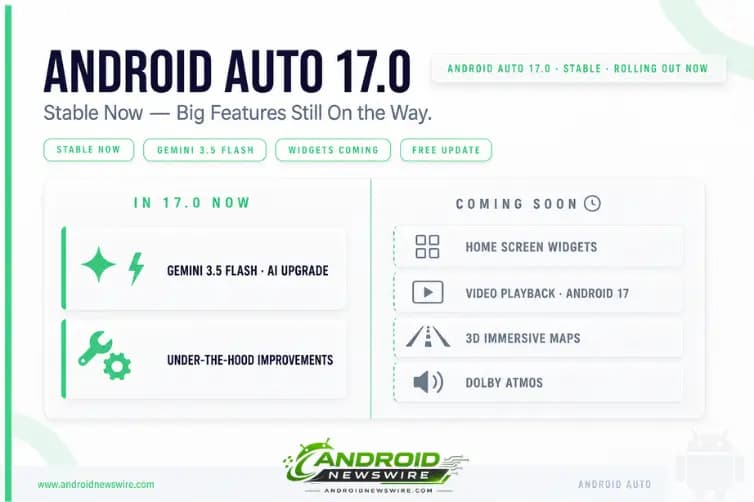
Android Auto 17.0 is now live for all users. The stable version followed the beta programme’s release by approximately ten days – which is exactly the window Google typically uses to validate that no widespread bugs or performance issues emerged from broad beta testing before pushing to the production channel.
Android Auto 17.0 is now available for download for the first users, and while the build number could make some people’s excitement go through the roof, it’s probably better to temper your rush to download the update. Google has never cared about version numbers as far as Android Auto updates were concerned, and this time, it really makes sense. The company has already promised a major update coming later this year, so all releases that receive the go-ahead in the meantime are supposed to pave the way for all its features.
That framing – “paving the way” – is the honest summary of what version 17.0 delivers. This is not the Android Auto overhaul that Google demonstrated at The Android Show and confirmed at Google I/O 2026. That overhaul is coming. Version 17.0 is the infrastructure release that makes it possible.
What Android Auto 17.0 Actually Contains
The major Android Auto 17 beta update rolled out right after Google I/O 2026 concluded. It features the new Gemini 3.5 Flash powering the AI in your phone and Android Auto.
The most substantive confirmed change in 17.0 is the Gemini 3.5 Flash integration. Gemini 3.5 Flash – announced at Google I/O on May 19 and confirmed to outperform Gemini 3.1 Pro across almost all benchmarks at four times the speed – is now the engine powering Gemini’s voice assistant capabilities in Android Auto. The practical effect for drivers who use Gemini in the car: faster, more accurate responses to voice queries, better contextual understanding of follow-up questions, and improved handling of complex multi-part requests while driving.
This update mostly brings behind-the-scenes improvements, with most of the major changes coming to Android Auto reserved for future updates. Beyond the Gemini 3.5 Flash upgrade, the changelog for 17.0 is consistent with Google’s standard approach to Android Auto version releases – stability improvements, performance optimisations, and compatibility preparations for the features that follow in subsequent builds.
What Is NOT in 17.0 – But Is Confirmed and Coming
This is the section that most coverage has led with, and for good reason. The gap between what Google announced at I/O and what 17.0 actually delivers is significant.
Customisable Home Screen Widgets
Android Auto will finally get widgets. While evidence of this feature was previously discovered in beta builds, Google confirmed at I/O earlier this month that this feature is on its way to users. Widgets will be part of the main Android Auto UI, without getting a dedicated screen, like on CarPlay.
While Google has been teasing widget support within the Android Auto interface, you won’t find the feature in 17.0. Like recent updates to Apple CarPlay widgets, Android Auto plans to integrate these customisable glanceable information tiles directly into the main interface. The widget implementation Google previewed at I/O places widgets within the main Android Auto home screen rather than on a separate dedicated panel – a more integrated approach than Apple’s CarPlay widget implementation.
Video App Support for Parked Vehicles
One major upcoming feature that you won’t find in 17.0 is support for video apps like YouTube. Google says that parked vehicles will soon be able to stream video content directly through compatible high-resolution displays, but it’s not included in this beta.
Video support is only expected on phones running Android 17, so for most people that’s going to mean waiting for another update before video playback will be supported. For Pixel owners who will get Android 17 first that might not be a cause for concern, but other brands could be waiting for months before it’s supported.
The Android 17 dependency for video playback is the most important detail for users who were specifically interested in YouTube and streaming app support in the car. The feature requires the Android 17 platform – meaning Pixel devices will be the first to access it once Android 17 stable lands, with Samsung, OnePlus, and other OEM users following as their Android 17 updates roll out in Q3 and Q4 2026.
3D Immersive Google Maps Navigation
The 3D Immersive Navigation that Google demonstrated at The Android Show – with fully rendered 3D environmental models, improved lane guidance, and a navigational experience qualitatively similar to Google Earth – is not in 17.0. This feature was listed in Google’s Android Auto I/O announcement as part of the broader 2026 overhaul, and it will arrive in a subsequent update later this year.
Dolby Atmos Audio
Dolby Atmos support for Android Auto – announced at The Android Show as part of the audio overhaul alongside the interface redesign – is also not present in 17.0. The audio improvement requires both compatible head unit hardware and the updated Android Auto software layer, making it a phased rollout tied to both software updates and vehicle model support.
Material 3 Expressive Visual Redesign
Android Auto is also about to receive a visual redesign and new features. Google showcased its new and improved Material 3 Expressive design, enhanced with Gemini Intelligence. It will possibly come to Android Auto for cars, but selected models only. The visual overhaul – bringing Android Auto’s interface into alignment with the Material 3 Expressive design language shipping in Android 17 – is not yet visible in 17.0.
Why Google Releases Updates This Way
The pattern of a major version number arriving with under-the-hood improvements rather than headline features is not unique to Android Auto 17.0. Google doesn’t consider these big version changes as major milestones, so they’re considered regular releases. This means they don’t include breaking changes, and they continue to focus on under-the-hood refinements and optimizations.
The approach has a deliberate logic. Every major feature – video playback, widgets, 3D Maps, Dolby Atmos, Material 3 Expressive – requires a stable, tested foundation to run on. Shipping that foundation as a standalone update, validating it across the breadth of Android Auto’s head unit compatibility surface, and then layering the visible features on top of it is the responsible engineering sequence. It is less exciting to write about than a feature launch. It is more reliable than shipping everything simultaneously.
The Gemini 3.5 Flash integration is the exception – a meaningful capability improvement that arrives in 17.0 precisely because it is an AI model upgrade that does not require new system-level platform dependencies. Upgrading the model is a back-end change that the existing Android Auto architecture can absorb cleanly. The features that require platform changes – video playback’s Android 17 dependency being the clearest example – wait for the conditions that make them stable.
How to Get Android Auto 17.0 Right Now
Option 1 – Automatic Play Store Update (easiest) Open the Google Play Store, search for Android Auto, and check for updates. The 17.0 stable rollout is staged, so if the update is not yet showing, check again in the next few days.
Option 2 – Join the Beta Programme Open the Play Store listing for Android Auto, scroll to the bottom of the app page, and join the beta programme. Beta users received 17.0 approximately ten days before stable and will continue to receive subsequent updates first.
Option 3 – Manual APK Install You can skip the wait and install the update right now if you don’t mind downloading and updating manually. The Android Auto 17.0.1621 APK is available on APKMirror. Download, install, and Android Auto updates immediately to 17.0 without waiting for the staged Play Store rollout to reach your device. Note that manual APK installation requires enabling installation from unknown sources in your Android settings.
Users who rely heavily on their Android Auto software might want to wait for the stable build. If you use Android Auto as your primary in-car navigation and communication system, the Play Store stable update – which is already rolling out – is the safest path. It carries the same build as the manually installable APK with the benefit of Google’s staged rollout validation.
The Full Android Auto 2026 Roadmap
Connecting 17.0 to the broader picture: Google’s announcement at The Android Show and Google I/O described an Android Auto overhaul that arrives in phases, not in a single update.
Version 17.0 delivers Gemini 3.5 Flash integration and infrastructure preparation. The next phase – widgets and the interface redesign – is the most immediately anticipated and most likely to arrive in an update closely following Android 17 stable in June. Video playback requires Android 17 on the phone, making it accessible to Pixel users first and broadening across the Android ecosystem as OEM updates roll out through Q3 and Q4. 3D Immersive Maps and Dolby Atmos follow on compatible head unit hardware.
The complete picture of what Google demonstrated at I/O – the full interface redesign with widgets, video, 3D Maps, Gemini Intelligence context-awareness, and Dolby Atmos – is a 2026 H2 story rather than a single update moment. Version 17.0 is the first visible step in that rollout. The steps that follow will be considerably more dramatic.
We covered the full Android Auto 2026 overhaul in detail in our Android Auto 2026 deep dive in the I/O week wrap-up and the broader automotive platform story in our AAOS SDV developer opportunity piece.
Related on Android News Wire:
- Android I/O 2026 Week Wrap-Up – Android Auto Overhaul, Samsung Unpacked & More
- Android Automotive Full Vehicle OS – The AAOS SDV Developer Opportunity
- Android Is Moving Beyond Your Car’s Dashboard – AAOS SDV Explained
- May 2026 Google System Updates – AppFunctions, Credential Manager & More
- Android 17: Every Phone Getting It and When