
Android Per-App Backup Controls Are Rolling Out – How to Find Them and What to Know Before You Use Them
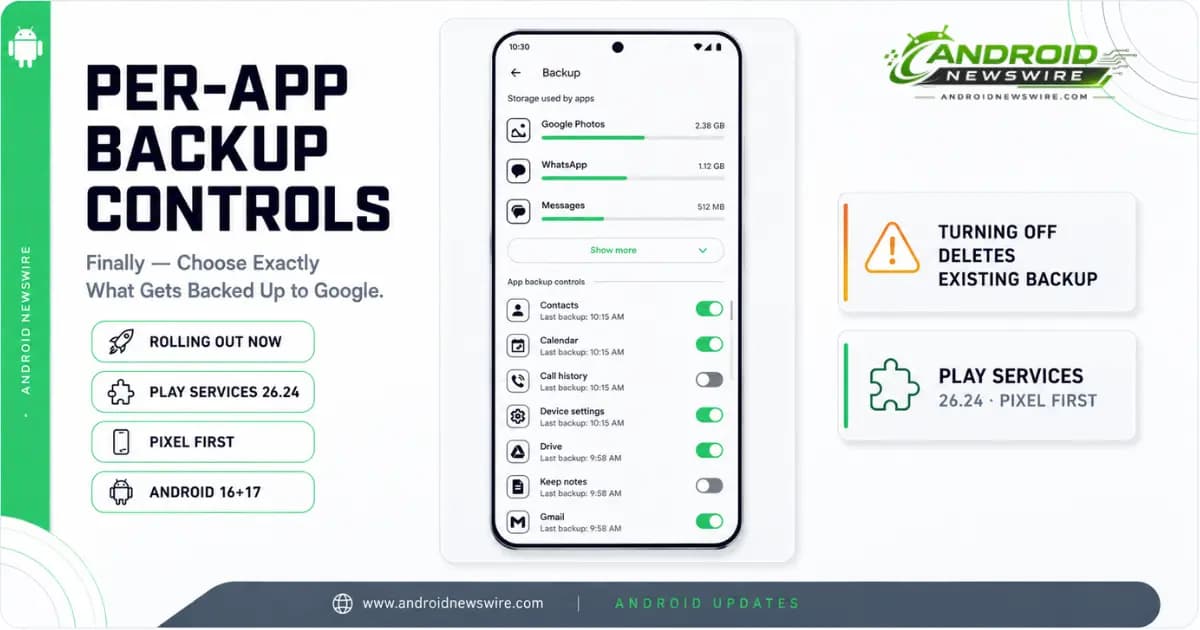
Google is rolling out per-app backup controls for Android, giving users granular visibility and individual toggle control over which apps are included in their Google account backups. The feature, delivered via Google Play Services 26.24, arrives on Pixel devices running Android 16 and Android 17 first. Other manufacturers are expected to follow in the coming weeks.
The rollout ends a situation that has existed since Android 6.0 in 2015: Auto Backup has been automatically enrolling apps in cloud backup with no mechanism for users to audit what was stored, understand how much space each app was consuming, or exclude individual apps without disabling the entire backup system. All of that changes with Play Services 26.24.
What Was Wrong With the Old Backup Interface
Before this update, the backup settings screen showed a single aggregate line – “Apps and app data” – with a count of participating apps and a combined storage figure. There was no breakdown, no participant list, and no way to exclude any individual app from the backup without flipping the master backup toggle and stopping everything.
The consequence was invisible accumulation. Apps installed years ago, games played for two days and forgotten, utilities never opened after setup – all were quietly contributing to Google account storage usage with no user awareness and no mechanism to stop them individually. Users who ran low on Google storage had no path to targeted cleanup short of deleting apps or upgrading their storage tier.
What the New Interface Looks Like
The new backup settings restructure the app data section completely. Navigating to the backup menu now exposes a dedicated App data submenu that shows your top three data-consuming apps with the amount of cloud storage each is using. A Show more option expands the complete list of every application on the device with backup access.
Each app in the list has its own on/off toggle. The layout makes the storage footprint of individual apps visible at a glance – a feature that should have existed from the beginning of Android’s cloud backup system.
Where to Find It
The setting is currently available at two paths depending on your device and Android version:
Path 1: Settings → Accounts and backup → Google Backup → Other device data
Path 2: Settings → Google → Manage backup → Other device data – then scroll down to the App data section and tap Show more.
If the App data section is not visible at either path, the rollout has not yet reached your device. The feature requires Google Play Services 26.24. To check your current Play Services version: Settings → Apps → All apps → Google Play Services → Version.
The Critical Detail: Turning Off a Toggle Deletes the Existing Backup
This is the most important thing to understand before you start using the new controls. Turning off backup for a specific app does two things simultaneously – it stops future cloud uploads for that app, and it permanently wipes that app’s existing archive from your Google account.
The confirmation prompt that appears when you flip a toggle off makes this explicit. If you disable backup for an app, any backup data that app has previously stored in your Google account is deleted immediately. There is no separate “delete backup” step – disabling the toggle is both the stop and the wipe in one action.
For most apps where backup data is not critical – old games, unused utilities, apps whose data you would not need on a new device – this is straightforward cleanup. For apps where the backup represents meaningful data – productivity tools, apps with local settings that took time to configure, communication apps – verify that you have an alternative restore path before disabling the backup toggle and deleting the existing archive.
What the Per-App Controls Do Not Cover
The per-app backup toggles apply specifically to third-party app data. The Device data section – which covers SMS and MMS messages, call history, and phone settings – remains managed as a single block without individual controls. If you want to include or exclude call history or SMS from your backup, that is still handled at the aggregate Device data level rather than through the new per-app interface.
WhatsApp backup is also separate. WhatsApp backup management in Android device settings, which arrived in the June 2026 Play Services update, uses a distinct integration path and is not part of the per-app App data toggles.
Three Practical Uses for the New Controls
Cloud storage cleanup. If you are close to your Google account storage limit, the new interface is the fastest way to identify which apps are consuming the most backup space and eliminate the ones whose data you no longer need. The top-three storage display on the main screen makes the biggest offenders visible immediately.
Privacy control. Some apps store data locally that you may not want replicated in Google’s cloud – sensitive documents, private notes, apps handling financial or health information that you would prefer to remain on-device only. The per-app toggles give you individual control over exactly which apps’ data leaves your device.
New device prep. Before a device switch, the per-app controls let you audit your backup contents and ensure that the apps whose data you genuinely need on your new device are backed up, while clearing out apps you will not reinstall. A curated backup restores more cleanly and faster than an indiscriminate one.
Availability – Pixel First, Others Following
The feature is currently rolling out to Pixel devices running Android 16 and Android 17 via Google Play Services 26.24. The rollout is staged – if the App data submenu is not appearing in your settings today, it will arrive automatically as the rollout expands. No manual update or action is required.
The feature was also spotted on a Nothing Phone (4a) Pro enrolled in the Google Play Services beta, suggesting that non-Pixel devices will receive it through the standard Play Services update channel rather than requiring a full system update. Samsung devices had not received the feature at the time of the initial rollout. Other manufacturers are expected to follow in the coming weeks as Play Services 26.24 reaches broader distribution.
Developer Implications
For developers who have already configured backup behaviour in their app’s manifest, the per-app backup controls add a user-side layer on top of developer-side declarations without changing the developer API surface.
Apps that declare android:allowBackup=”false” in their manifest opt out of Auto Backup at the system level – those apps do not appear as toggleable in the new per-app backup controls because no backup data is stored in the first place. Apps that use android:fullBackupContent or android:dataExtractionRules to specify which data is included in backup continue to follow those rules; the user toggle controls whether any backup runs for the app at all, not which data is included when it runs.
The practical advice for developers: if your app handles sensitive data and your manifest does not already opt out of Auto Backup, review whether per-app backup controls change how your users are likely to manage your app’s backup data. Users who are now aware of how much space each app is consuming in their backup may be more likely to disable backup for data-heavy apps – which is a legitimate user choice, but one that affects data continuity when those users switch devices.