Gemini Now Finds and Installs Play Store Apps – No Browsing
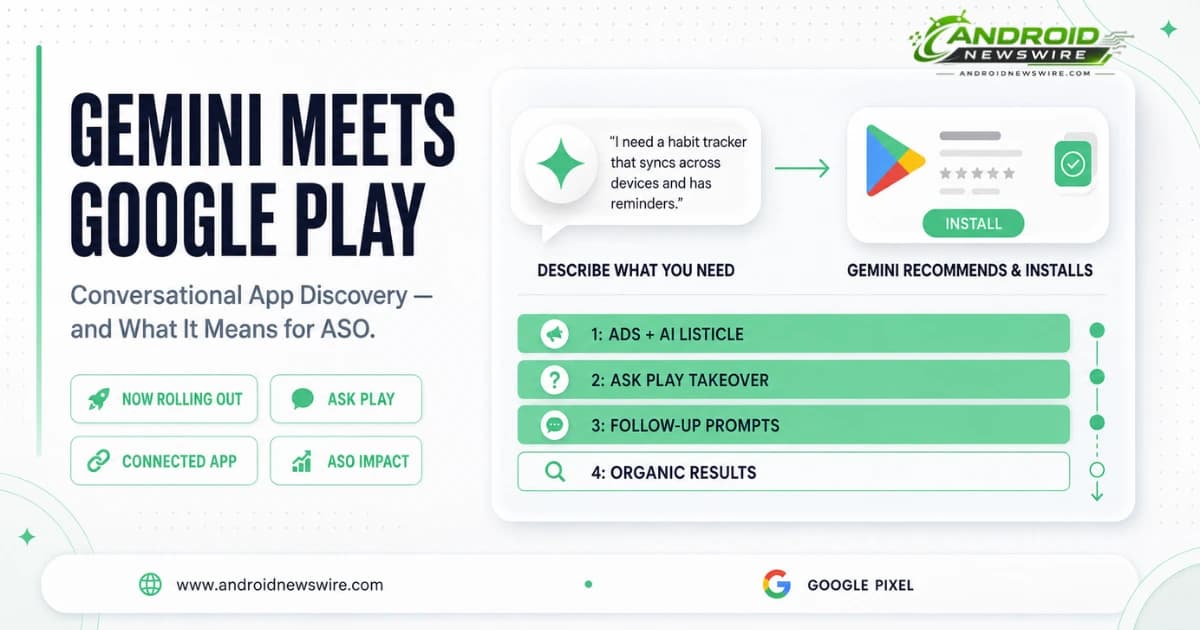
The Google Play connected app for Gemini – previewed at Google I/O 2026 in May – is now rolling out broadly to Android users. The feature connects the Play Store directly into a Gemini conversation, letting the AI describe, recommend, and trigger the install of apps and games based on a plain-language description of what you need, rather than requiring you to navigate to the Play Store and type a search query yourself.
The rollout extends Google’s multi-month pattern of folding Gemini into every corner of the Android experience – Chrome, Google Wallet, Messages, Phone, and now Google Play. The underlying direction is consistent: instead of opening individual apps to complete a task, Google wants users to ask Gemini and let it handle the rest.
How the Gemini Play Store Integration Works
Describing What You Need, Not Searching for It
The integration works through natural language description rather than keyword search. Example prompts Google has demonstrated include asking Gemini to recommend an app that shows what fish you might see on an upcoming scuba dive trip, asking for an app to recreate a specific aesthetic for photos, or asking for a productivity app to help with meal planning.
This is a meaningfully different discovery model from typing a search term into the Play Store. A keyword search requires the user to already know roughly what category of app they want and to phrase a query that matches how developers have described their apps. A conversational prompt to Gemini allows the user to describe an outcome or a need, with Gemini handling the translation from that description into specific app recommendations.
From Recommendation to Install in One Tap
Some results display a Play Store card directly inside the Gemini conversation, listing applications with ratings and download counts alongside a link to view more in Google Play. Tapping on an app slides up the listing to an Install button – completing the install without leaving the Gemini conversation. Other prompts return a traditional Gemini text response describing various app options rather than a structured card, depending on how specific and actionable the query is.
Purchases Beyond Just Installs
The integration extends into commerce as well as discovery. Users can purchase Google Play gift cards directly through Gemini, and can search for and buy select in-app items for apps already installed on the device – completing a transaction conversationally rather than navigating into the specific app’s purchase flow.
For now, in-app purchase functionality works best with apps already installed on the device. Discovery and installation of new apps works regardless of what is currently on the device.
How to Set It Up
Setting up the integration requires linking Gemini to your Play Store account through a guided flow. The connection is managed through Gemini’s Apps Activity settings – accessible by tapping the menu icon in Gemini, then the settings cog, then Gemini Apps Activity. The Keep Activity setting must be enabled for Gemini to connect to Google Play and personalise recommendations based on conversation history; disabling Keep Activity blocks the Google Play connection.
The Bigger Discovery Shift: Gemini Standalone App Recommendations
Beyond the connected app inside Gemini conversations, Google has confirmed a broader rollout plan for AI-driven app discovery across the platform. In the coming weeks, Gemini will begin surfacing apps and games to users on the web and within the Android experience more broadly – not just when a user explicitly opens a conversation about app discovery.
Later this year, Google plans to expand the reach further, including more than 450,000 movie and TV show recommendations, live sports streaming information, and deep links directly into app content. The direction is toward Gemini becoming a general content and app discovery layer that sits above the Play Store rather than a feature confined within it.
Ask Play – The Companion Feature Already Live in the Play Store Itself
Separate from the standalone Gemini integration, Ask Play is the Gemini-powered conversational overlay embedded directly within the Play Store app – first introduced in December 2025 as a chat interface on individual store listing pages, then substantially expanded at Google I/O 2026.
Ask Play builds on Google’s existing AI-generated Q&A system, which Google says already answers 95 percent of user queries about specific apps. The expanded version adds a Highlights feature that surfaces AI-generated summaries at the top of search results, and a dedicated Ask Play button in the Play Store search bar that opens a full-screen conversational search experience for broader discovery journeys – described by Google as designed for “deeper search journeys” rather than quick lookups.
Ask Play works for both installed and non-installed apps. The detail matters for how the feature should be understood: it is not purely a retention tool for existing users, but a discovery and evaluation tool that lets prospective users get questions answered about an app before ever tapping install.
The Consequential Shift for Developers: Organic Results Pushed to Screen Four
The most significant practical implication of these changes has received comparatively little mainstream coverage, but it represents one of the most material platform shifts for app discoverability in years.
What the New Search Results Page Actually Looks Like
For longer, conversational search queries on the Play Store, the typical results page structure has changed substantially. The first screen shows paid ads at the top, followed by a “Researched with Gemini” section featuring an AI-generated list of recommended apps with short descriptions. The second screen is occupied entirely by an expanded Ask Play listicle, with no organic results visible at all. The third screen surfaces “Dive deeper with Ask Play” prompts – suggested follow-up questions designed to keep the user engaged in the AI conversation rather than scrolling further. Traditional organic search results do not appear until the fourth screen and beyond.
This sequencing applies specifically to longer, conversational, and broad queries. Short and mid-tail keyword searches still return more traditional results layouts, with organic listings appearing closer to the top as they always have. The distinction between query types is the critical detail for developers assessing how exposed their app’s discoverability is to this change.
Why This Matters for App Store Optimisation
For developers whose app discovery strategy has relied heavily on ranking well for specific, well-defined keywords, the immediate impact is limited – that search behaviour still surfaces traditional results in a familiar position. The exposure is concentrated in conversational and broad-intent queries, where a user describes a need rather than naming a specific category or app type.
If an app’s most valuable search terms fall into the conversational or broad category – phrases like “an app for tracking my mood” rather than “mood tracker” – high keyword rankings may no longer translate into the install volume they previously did, because the ranking position is now buried behind three full screens of AI-generated content before a user reaches it.
The practical response is not to abandon keyword optimisation, but to recognise that App Store Optimisation now serves two distinct audiences simultaneously: human searchers typing keywords, and the AI systems – Ask Play, Gemini’s connected app, Guided Search – that interpret broader conversational intent and decide which apps to recommend. The inputs that matter for both audiences substantially overlap: a Play Store description that clearly and specifically explains what an app does, in language that matches how real users would describe their need rather than purely keyword-optimised phrasing.
What AI Discovery Systems Actually Draw From
Ask Play and Gemini’s app recommendations draw primarily from an app’s Play Store description and key features listing, but not exclusively. The AI systems also reference the app’s own website content and user reviews when constructing answers and recommendations. Consistency between an app’s Play Store description and its website matters directly – a mismatch between what the store listing claims and what the website describes can degrade how accurately and favourably an app is represented when an AI system synthesises an answer about it.
For developers, the practical implication is that Play Store optimisation and website content strategy are no longer separable concerns. An app with a polished Play Store listing but a thin or inconsistent website presence is leaving information gaps that AI discovery systems may fill incorrectly or unfavourably.
Developer-Facing Tools Announced Alongside the Discovery Changes
Google paired the consumer-facing AI discovery features with a set of developer tools aimed at reducing the operational burden of maintaining Play Store listings across markets and languages.
AI-Powered Localisation
Developers can now upload structured files – CSVs or Google Sheets – and have Gemini automatically localise store listings across multiple languages, including generating translated subscription benefit descriptions for review before publishing. For developers managing listings across dozens of markets, this removes a substantial portion of the manual translation and review overhead that multi-market Play Store presence has historically required.
Custom Store Listings Tied to Keyword Recommendations
AI-generated custom store listings, tied to keyword recommendations Google’s systems identify as relevant for an app’s category and audience, are also part of the developer tooling rollout. This positions Google’s AI directly inside the ASO workflow – not just consuming a developer’s existing listing content for AI-driven discovery, but actively suggesting how that content should be structured in the first place.
Reporting and Fraud Protection Improvements
Google Play Console gains broader visibility metrics, cart conversion tracking, subscriber churn insights, and Gemini-powered analytics explanations that can answer natural-language questions about shifting performance trends in a developer’s own data. A new Protected with Play dashboard centralises fraud prevention, integrity checks, and monetisation protections in one view. Google states its automated anti-spam systems blocked 160 million spam ratings and reviews over the past year, and that Play Billing fraud protections prevented $3.2 billion in fraud and abuse.
Subscription Retention Changes
Two backend changes target subscription churn specifically. Delayed charging temporarily grants users continued access to paid content when a low-risk payment failure occurs, allowing Google to retry the payment in the background rather than immediately revoking access. The default payment recovery period for failed subscriptions has expanded from 30 to 60 days. Google states this combination has already reduced involuntary churn by up to 18 percent for top developers in early testing.
What Developers Should Do Now
Audit Your Play Store Description for Conversational Language
Review whether your Play Store description and key features section would answer a plain-language question about what your app does and who it is for – not just whether it contains the right keywords. Ask Play and Gemini’s recommendations draw directly from this content when constructing answers to conversational queries.
Align Your Website Content With Your Store Listing
If your app has a marketing website, audit it for consistency with your Play Store listing. Discrepancies between the two are a direct input into how accurately AI discovery systems represent your app, and inconsistency is now a discoverability risk rather than just a brand presentation issue.
Monitor Conversational Query Performance Separately
In Google Play Console, distinguish between traffic and conversions arriving from short keyword searches versus longer, conversational search terms if your reporting allows that segmentation. If your app’s top-ranking search terms fall predominantly into the conversational category, monitor whether install volume from those terms has changed as the new search results layout has rolled out – high rankings on a term that now appears on screen four may no longer deliver the traffic they once did.
Evaluate the AI-Powered Localisation Tooling
If your app maintains listings across multiple language markets, the new Gemini-powered localisation tooling in Play Console is worth testing for at least a subset of your less actively maintained market listings. The time savings on routine translation maintenance are likely to be significant even if a human review pass remains necessary before publishing.
Watch for AppFunctions and ContextSDK Adoption as a Discoverability Signal
Although Google has not explicitly confirmed the mechanism, evidence suggests that apps which adopt the AppFunctions API and Google’s ContextSDK may receive preferential treatment in Gemini’s deeper, content-availability-driven recommendations – the kind of recommendation that surfaces an app not because a user searched for it by name, but because Gemini determined the app could fulfil a broader query. Apps already integrating with AppFunctions for Gemini Intelligence’s cross-app automation have an additional reason to prioritise that work: it may also be feeding the discovery layer that determines whether your app gets recommended at all.