
Top Android Stories: March 2026 — Week 4 Sunday Roundup (March 22–28)
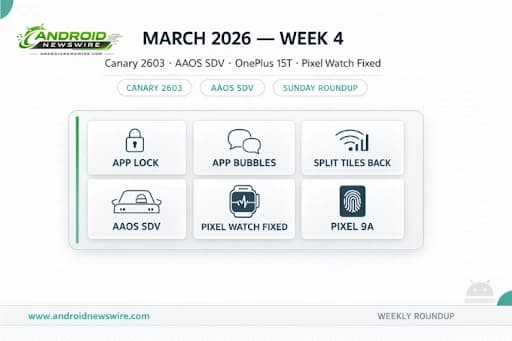
Welcome to your Sunday Android briefing — everything that mattered in the Android world this week, in one place. Week 4 of March 2026 delivered Android’s most revealing Canary build in months, a transformative announcement about Android’s future in the car, a quiet flagship feature sneaking onto a mid-range Pixel, a much-needed Pixel Watch fix, fresh OEM hardware news, and a March update that gave with one hand and broke things with the other. Here is every story you need to know before the new week begins.
1. Android Canary 2603: Native App Lock, App Bubbles, Wi-Fi Split & System Blur
The biggest Android story of the week for developers and power users is one that carries a critical caveat — Canary builds are experimental and features can be pulled before stable release. With that said, Android Canary 2603 is one of the most significant monthly drops since the Canary program launched last summer, and it signals clearly where Android’s UI and privacy direction is heading.
Google rolled out Android Canary 2603 with a number of user-facing changes compared to the latest Android 17 Beta 2. The build is available for Pixel 6 through Pixel 10a and the Pixel Tablet.
Here is everything confirmed in the build:
Native App Lock. App lock allows you to lock an app with a PIN, password, or fingerprint. When locked, notifications, widgets, and shortcuts are hidden. You activate app lock by long-pressing an app icon. This is a feature that Samsung, Xiaomi, and virtually every major Android skin has offered for years — and that iOS added in iOS 18. Its arrival in a Google-led Canary build strongly suggests it is finally heading to stock Android and Pixel devices. The privacy value is straightforward: guests, family members, or anyone who briefly handles your phone cannot access locked apps even if the device is already unlocked.
App Bubbles for Any App. The bubbles feature lets you open apps in floating windows by long-pressing an app icon and selecting the bubble option. These bubbles can be moved around the screen and, when tapped, expand into a floating window similar to picture-in-picture mode. You can dismiss them by dragging them to the bottom or using a dedicated dismiss option. Previously, Android’s bubble system was limited to conversation threads from messaging apps. Canary 2603 extends it to any app on the home screen — a significant multitasking upgrade that brings Android closer to the windowed multitasking experience of its own desktop mode.
Separate Wi-Fi and Mobile Data Quick Settings Tiles. Until Android 11, Google offered separate switches for both Wi-Fi and mobile data, but later merged them into a single Internet toggle. That change made it a two-step process to disable Wi-Fi or mobile data. With this Canary build, Google appears to be bringing back the simpler one-step controls. This reversal has been one of the most consistently requested changes in Android feedback forums for years. If you have the current Internet Tile set, it becomes Wi-Fi and you can manually add Mobile Data as a separate tile.
System-Wide Blur Expansion. The new Canary build adds more blur effects to various parts of the system UI. This is the “Liquid Glass” UI direction that has been appearing in Android 17 leak builds — a pervasive frosted-glass aesthetic across Quick Settings, notification shade, and system overlays that represents Android’s most significant visual shift in several generations.
Redesigned Long-Press App Menu. App shortcuts are now hidden by default inside a new “Shortcuts” submenu. Tapping the expand button reveals them. Apps with just one shortcut are spared this change. The redesign makes room for the new App Lock and Bubble options while reducing visual clutter in the long-press menu for everyday users.
Screen Recording Overhaul. When you stop recording your screen, a new page now appears with options to see the recording, start a new one, edit it in Google Photos, delete it, or share it. This replaces the previous status bar notification approach with a dedicated post-recording flow.
Updated Linux Terminal UI. The build delivers a modernized Linux Terminal interface with expanded advanced settings, refreshing the Terminal’s layout and surfacing more advanced controls than prior releases offered — just as the Terminal is becoming capable of running GPU-accelerated graphical Linux apps like GIMP, LibreOffice, and Chromium using VirGL.
Important reminder: Google hasn’t confirmed which of these features will land in Android 17 or when they might reach stable devices. The next step is to watch what shows up in beta builds — that’s usually where experimental ideas start turning into features you’ll actually use.
2. Google Announces Android Automotive OS for Software-Defined Vehicles
On March 24, Google made one of its most ambitious announcements in the automotive space. Android Automotive OS for Software Defined Vehicles — AAOS SDV — extends Android’s role in cars far beyond the infotainment touchscreen and into the non-safety core computing systems that govern climate control, lighting, seating, digital key management, and proactive vehicle maintenance.
The platform is built on a “headless” Android native stack — invisible to drivers, operating inside the vehicle’s computing fabric, enabling service-level over-the-air updates for individual vehicle functions without requiring full OS reflashes. Renault is already deploying it in the Trafic e-Tech commercial van, with production beginning late 2026. Qualcomm is providing a turnkey hardware path via Snapdragon Digital Chassis. Open-source availability is planned for later this year.
For the automotive industry, AAOS SDV addresses the foundational problem of software fragmentation — dozens of incompatible supplier modules per vehicle model — with a unified Android layer that makes software development and OTA updates dramatically more efficient. For Android developers, it signals that the platform is expanding beyond phones, tablets, and watches into yet another device category with a growing and standardized API surface.
Full breakdown in our dedicated article: Google Is Moving Android From Your Car’s Dashboard Into Its Brain.
3. Pixel Watch SpO2 and Step Tracking Fixed — After a Week of Broken Health Data
Good news for Pixel Watch owners who were living without reliable health metrics all week. Following a few days where Pixel Watch owners would run into wonky step counts and other stats, Google says the issue behind the scenes is now fixed in the Fitbit app. T3
The SpO2 blood oxygen sensor, skin temperature readings, and Fitbit step tracking had all stopped functioning correctly after the March 2026 update rolled out — a frustrating regression that affected a core health tracking use case on devices people specifically chose for wellness monitoring. Google resolved it server-side through a Fitbit app fix rather than requiring a full firmware update, which is the fastest resolution path for these kinds of software-layer regressions.
If you are still seeing inaccurate step counts or missing SpO2 readings on your Pixel Watch 2 or newer, force-stopping the Fitbit app from Settings → Apps → Fitbit → Force Stop, then reopening it, should pull the corrected behavior. If issues persist, check for a pending Fitbit app update in the Play Store.
4. Pixel 9a Quietly Gets Screen-Off Fingerprint Unlock
One of the week’s most pleasant surprises arrived without any announcement from Google. Pixel 9a users on Reddit noticed that a new fingerprint option arrived with the March update — a “When using Fingerprint Unlock” section in settings that now houses a Screen-off Fingerprint Unlock toggle. According to users, the feature works great on the Pixel 9a.
With this, Pixel 9a users catch up to Google’s flagships — the Pixel 9 and Pixel 10 series — with a feature that lets users unlock their phones without waking their display. Place your finger roughly where the fingerprint icon normally appears, and the phone unlocks without pressing the power button first. Find the toggle at Settings → Security & Privacy → Fingerprint Unlock → When using Fingerprint Unlock.
One caveat worth noting: one user reported that their Pixel 7 Pro lost this capability with the same March update — which would be a strange move since Google hasn’t mentioned removing support. If you had screen-off fingerprint on a Pixel 7 Pro and it has disappeared, check your settings after the March update and report your experience on the Pixel community forum.
Full story: Google Quietly Gave the Pixel 9a Screen-Off Fingerprint Unlock.
5. March Update Is Still Breaking Pixel Automations — Rules Not Triggering
The good news / bad news pattern of the March 2026 update continued this week. Users are experiencing issues with location-based Rules — a feature designed to simplify everyday tasks. Automations tied to location are no longer functioning as expected across multiple Pixel models. The affected feature allows Pixel users to automate actions based on location or Wi-Fi — for example, a phone switching to silent mode at work or restoring sound settings when leaving home. Despite correct settings and permissions being enabled, users report that these automations simply are not working.
A small number of users have reported a temporary fix by deleting and re-adding their Rules. Google has not officially addressed the problem yet.
This is the third significant regression tied to the March update — following the AOD freezing issue and the Pixel Watch sensor failures. Google has not yet published a supplemental patch addressing these regressions, but the pattern of reports is consistent enough that an acknowledgment and fix should be expected in the coming days. Keep an eye on the Pixel Community forum for official acknowledgment
.
6. Android 16 QPR3 Beta 2 Released — Easier Settings Navigation and Bug Fixes
For developers running the Android 16 QPR3 beta track, Google pushed Beta 2 this week with a focused quality release. Android 16 QPR3 Beta 2 makes Settings easier to navigate and squashes plenty of bugs Google accumulated from the Beta 1 build. No new headline features — this is the stabilization release that typically precedes QPR3 going stable, which would make the current stable QPR3 the last major Android 16 milestone before the Android 17 beta cycle takes full focus.
For developers: if you have been testing apps against Android 16 QPR3 Beta and found issues in Beta 1, re-run your test suite against Beta 2. The Settings reorganization changes in Beta 2 may affect apps that deep-link into Settings pages or use Settings intents.
7. Samsung March 2026 Security Update Rolls Out Globally
Samsung’s March 2026 security update for the Galaxy S25 series has landed globally, including Europe and India, following the initial South Korea release. Users of Galaxy S25, S25+, and S25 Ultra can identify the March 2026 update via PDA build number ending with BZC1.
The Galaxy S24 series is also now getting the March 2026 Android security update, with initial rollout starting in South Korea and global expansion expected to follow. The March patch includes fixes for 60 Android vulnerabilities and 7 One UI SVE items.
For Galaxy device owners: Settings → Software update → Download and install. The rollout is staged, so if the update is not immediately available, check again within a few days. Samsung’s next major feature update — One UI 8.5 — is the next milestone after the March security patch lands across the Galaxy lineup. One UI 8.5 Beta testing is already underway for Galaxy Z Fold 7 and Z Flip 7, as covered in our Samsung One UI 8.5 Beta article.
8. OnePlus 15T Is Now Official
The OnePlus 15T is finally official after a lot of teasers from the company. OnePlus has been building anticipation for its next compact flagship for several weeks, and this week the device broke cover officially. The 15T is positioned as a more performance-focused, compact counterpart to the OnePlus 15 — targeting users who want flagship specifications in a form factor that does not require two hands to operate.
Full specifications and pricing details are becoming available this weekend. Watch for our dedicated OnePlus 15T coverage as launch details solidify.
9. OPPO Find X9 Ultra Confirmed for Global April Launch
OPPO puts the Find X9 Ultra and “global” in the same sentence, teasing an April debut. The Find X9 Ultra — OPPO’s top-tier flagship, featuring a Hasselblad-tuned quad-camera system and Snapdragon 8 Elite — will make its global market debut in April 2026. This marks a significant expansion of OPPO’s global ambitions following the Find X9 series’ China launch earlier this year.
For Android enthusiasts outside China, the Find X9 Ultra’s April arrival opens up one of the most compelling camera phones of 2026 to global purchase. The Hasselblad partnership and the device’s periscope telephoto system make it a direct challenger to the Galaxy S26 Ultra in camera performance terms.
10. Samsung Galaxy Z Fold 8 and Z Flip 8 Confirmed for 45W Charging
Both of Samsung’s flagship book-style foldables will get 45W charging this year — the Galaxy Z Fold 8 and Z Flip 8. This is a meaningful upgrade from the Galaxy Z Fold 7 and Z Flip 7, which topped out at 25W and 15W respectively — charging speeds that have been a persistent point of criticism against Samsung’s foldable lineup relative to Chinese competitors.
45W charging brings Samsung’s foldables into competitive territory with devices like the OPPO Find N6, which supports significantly faster charging. For users who use their foldable as a primary device — and therefore charge it more frequently — this is a practical improvement that justifies the annual upgrade for some users.
Samsung’s foldable announcement window is expected around late June/July 2026, ahead of the typical summer Unpacked event. The Galaxy Z Fold 8 and Z Flip 8 will also be the first Samsung foldables shipping with Android 17 and One UI 8.5 as their launch OS.
11. Gemini 3D Avatar “Digital Twin” Tool Is in Development
Recent developments within the Google ecosystem suggest a “digital twin” might soon live directly within Gemini — a 3D Avatar tool designed to digitally clone your appearance. While details remain limited and the feature is in early development, the direction reflects Google’s broader push to make Gemini a more personalized, visually present AI assistant rather than a purely text-and-voice interface.
A photorealistic Gemini avatar that represents the user — usable in video calls, AR experiences, or creative contexts — would be a significant capability addition. It also raises the kinds of identity and consent questions that come with any digital clone technology. Keep this one on the radar as Google I/O in May 2026 approaches — that would be the natural venue for a more formal announcement.
Developer Quick Hits for the Week
Android Canary 2603 developer checklist: If you are monitoring the Canary channel, audit these app behaviors now: network state change handling (split Wi-Fi/data tiles change the connectivity broadcast model), permission request flow UI (redesigned permission dialogs may affect how your permission rationale screens appear), app shortcut accessibility (collapsed by default in the new long-press menu — consider which shortcuts are truly essential), and bubble rendering (if your app uses conversation bubbles, test against the expanded bubble model).
Platform Stability for Android 17 is approaching fast. Beta 3 is expected in April. The adaptive compliance deadline is June 2026. Full developer timeline in our Android 17 Beta Cycle guide.
Android Automotive opportunity: AAOS SDV’s open-source release later this year creates a new developer surface. The Qualcomm Snapdragon Digital Chassis provides a standardized hardware target. If your app has a potential automotive use case — navigation, media, productivity, health monitoring — now is the time to evaluate the AAOS SDV SDK as it becomes available.
The Week in One Sentence
Week 4 of March 2026 was the week Android showed its future most clearly — native App Lock and floating app bubbles in Canary, Android’s biggest automotive move yet with AAOS SDV, the first confirmation of Canary-era UI direction with system-wide blur and split connectivity tiles, and a Pixel Watch fix that reminded everyone that even the best monthly updates can ship with unintended regressions.
Related on Android News Wire: