
Android 17 Foldable Gaming Mode Turns Your Phone Into a Nintendo DS – Here Is Everything We Know
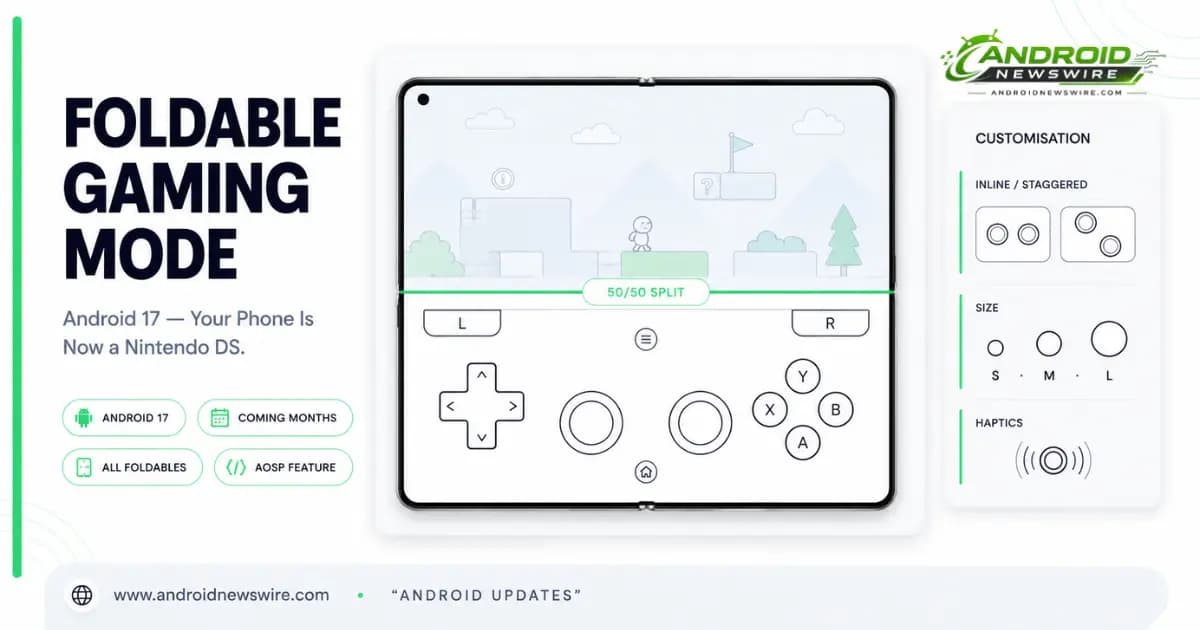
Google’s Android Community Engagement Manager Mishaal Rahman has given a full sneak peek at Android 17’s upcoming foldable gaming mode on Reddit, revealing a system-level feature that splits a foldable’s inner screen during gameplay – featuring the game on the top half and a full virtual gamepad below.
The preview arrives at a meaningful moment. The stable Android 17 build is rolling out to supported Pixel devices now, with broader Android device support expected throughout 2026. But foldable gaming mode is not included in that initial stable release. Google stated directly that the mode is “enabled in Android 17 and will be available in the coming months.” Rahman’s Reddit preview is a detailed look at what is coming rather than a setup guide for what is available today.
The comparison writing itself is the Nintendo DS. If this reminds you of old handheld gaming devices like the Nintendo DS, you’re spot on. Nintendo made that layout iconic with the original DS in 2004. Google is applying the same spatial logic to a device that can fold into a standard phone and unfold into something closer to a handheld console.
Why Foldables Need This
Rahman framed the problem plainly. Foldables have largely been sold on productivity and media consumption – bigger screens for multitasking, better for watching video, useful for reading. Gaming has been an afterthought, partly because the extra screen real estate created an awkward middle ground: too big to hold comfortably for touch controls, not designed to accept a physical gamepad.
In Rahman’s own words: “Android allows you to play a wide variety of games on the go. While touch controls work incredibly well for many titles, certain games are better enjoyed with physical gamepads. The problem is that carrying a Bluetooth controller or a snap-on gamepad with you everywhere isn’t always convenient. We want to bridge that gap, and we’re addressing it with a new feature in the Android 17 platform release that’s specifically tailored for foldable devices.”
The foldable gaming mode is Google’s attempt to close that gap using hardware already in people’s pockets.
How the Feature Works
Activation – As Simple as Unfolding
Activation requires no setup. “As simple as unfolding your device, either before or after launching a compatible game,” Rahman said. Android 17 will automatically split the inner display right down the middle the moment you open the device during a game.
Google described the arrangement as an “optimized 50/50 layout with a game view on top and a dynamic gamepad below to maximize the view and button-mashing spaces.” The gameplay runs completely unobstructed on the top half of the screen, while the entire bottom surface transforms into the dedicated gamepad interface.
System-Level Hardware Emulation – Not Touch Simulation
The most important technical detail of the implementation is how the virtual gamepad actually sends input to the game.
The virtual gamepad simulates hardware button presses at the system level rather than mimicking normal screen touches. It works natively with any game that already has standard controller support because it tricks the software into believing that you have a physical controller attached.
This distinction separates foldable gaming mode from every third-party key-mapping app that has attempted the same thing on Android. Traditional key-mapping overlays simulate finger taps at specific screen coordinates – they work only if the game’s touch interface happens to have the right button in the right place, and they break whenever a UI change moves those positions. Foldable gaming mode sends hardware gamepad events at the OS level, bypassing the touch layer entirely. Any game that supports physical controllers will work on an Android 17 foldable.
Rahman confirmed the developer implications directly: “If a game supports physical gamepads and has an adaptive UI, then foldable gaming mode should work with it with no additional effort from the developer.”
The Virtual Gamepad – Complete Button Layout and Customisation
The Full Controller Complement
The virtual gamepad currently supports the usual controller inputs: D-pad, left and right thumbsticks, A, B, X, Y face buttons, L1/L2/L3, R1/R2/R3, and Start. Nothing has been stripped out relative to a full console controller. Users familiar with PlayStation, Xbox, or Nintendo Switch controllers will recognise the complete layout immediately.
Two Stick Configurations
Android 17 will let foldable users customise their virtual gamepad’s layout. You can have the sticks together in the middle, more like a PlayStation 5 controller, or staggered, similar to a Nintendo Switch 2 or Xbox controller.
The two options are labelled in the settings as “Twin stick, Inline” for the default centred configuration, and “Twin stick, Staggered” which shifts the left thumbstick, D-pad, and shoulder buttons into an offset arrangement preferred by users coming from Xbox or Switch layouts. The staggered option is particularly relevant for games designed with Xbox-style input in mind, where the left thumbstick sitting above the D-pad is an ergonomic expectation.
Size, Theme and Haptics
Players can customise the controller layout, size, theme, button positioning, and haptic feedback to better fit different hand sizes and play styles. Button size adjusts across three settings – Small, Medium, and Large – accommodating different hand sizes and the different physical dimensions of various foldable devices. A dark mode toggle changes the gamepad’s visual theme. Haptic feedback is a separately toggleable option that adds tactile response to button presses for games that would benefit from it.
All customisation options are accessible by tapping the controller icon in the overlay while in gaming mode – reachable without interrupting gameplay or exiting to settings.
Smart Behaviour – When the Gamepad Stays Out of the Way
The implementation handles context switching intelligently rather than requiring the user to manually manage the gamepad across different games and situations.
Touch-Only Games
The gamepad itself is optional. It knows to stay hidden when you play touch-only games. If a game relies entirely on full-screen touch gestures and does not implement controller support, the virtual gamepad does not appear – the full unfolded display remains available for the game’s native touch interface.
Physical Controller Detection
The virtual gamepad is smart enough to move out of the way on its own the second you connect a real controller with Bluetooth or USB-C. Connecting a physical Bluetooth gamepad or a USB-C wired controller automatically hides the virtual gamepad and restores the full inner display to the game. Disconnecting the physical controller brings the virtual gamepad back without requiring any user intervention.
Manual Control
If you prefer to play a touch-only title that utilises the whole inner screen, you can easily minimise the pad with a “Hide Gamepad” button built into the built-in menu or just turn it off completely through your main system settings, Rahman notes. The Hide Gamepad button provides quick access without navigating away from the game. Full disabling through system settings removes the feature entirely for users who prefer to manage gaming input themselves.
AOSP Integration – What OEMs Can Do With It
Since this is a platform-level feature built into AOSP itself, individual phone manufacturers can take this base code and customise it to their specific hardware dimensions.
Samsung, Google, OnePlus, Honor, and other foldable makers could potentially tailor the experience to their own hardware. A Galaxy Z Fold, Pixel Fold, or other large-screen foldable could each treat the feature a little differently.
The AOSP foundation means that the feature’s availability and quality are not dependent on each OEM building it from scratch – every Android foldable benefits from the baseline implementation that ships in AOSP, while each manufacturer can optimise for their device’s specific screen ratio, hinge behaviour, and physical dimensions. For the Galaxy Z Fold 8 arriving at Samsung Unpacked on July 22 – less than four weeks away – this means Samsung can deliver a Galaxy-optimised version of foldable gaming mode out of the box when One UI 9 ships with the device.
Current Limitations and What Is Still Missing
The preview from Rahman is comprehensive, but specific capabilities are absent from the current implementation that may arrive in later updates.
No Split Ratio Adjustment
The 50/50 split between the game view and the virtual gamepad is fixed. Users cannot adjust the proportion – for example, giving the game 60% of the screen and the gamepad 40%, or vice versa. The inability to adjust the split is the limitation most likely to affect users playing games where the game view’s aspect ratio at 50% creates a sub-optimal presentation. Device makers could potentially add their own changes because the feature is part of AOSP.
No Transparent Overlay Mode
The virtual gamepad occupies the bottom half of the screen as an opaque interface rather than as a transparent overlay. Users cannot choose to have the game extend across the full inner display with a semi-transparent gamepad rendered over it. This is a deliberate design choice rather than a missing feature – the 50/50 split ensures the game view is never partially obscured by gamepad elements.
Game Compatibility Requirements
The catch is that games still need to be adaptive to properly use the 50/50 layout when the device is unfolded. Games that force a fixed resolution or do not handle arbitrary window sizing gracefully may not present correctly at the game view’s constrained dimensions. The system-level controller emulation handles input without developer changes, but the game still needs to render correctly at a non-standard aspect ratio for the visual experience to match the feature’s intent.
What This Means for Developers
Compatible Games Require Nothing New
For games that already implement physical controller support and handle adaptive window sizing correctly, foldable gaming mode works without any code changes. The developer work that makes a game compatible with foldable gaming mode is the same developer work that makes it compatible with Android’s existing gamepad APIs and the existing large-screen adaptive compliance requirements in Android 17. Teams that have already invested in gamepad support and adaptive layouts have nothing additional to do.
Games Without Controller Support Need It Added
Games that rely entirely on touch controls – with no existing gamepad implementation – will not benefit from foldable gaming mode’s system-level controller emulation. Adding gamepad support is the prerequisite, and it is worth prioritising for games in genres where controller input significantly improves the experience: action RPGs, fighting games, platformers, and the kinds of titles mentioned by Rahman – “Think Wuthering Waves or Zenless Zone Zero. Quick button inputs, rapid movements.”
Large-Screen Adaptive Compliance Matters More Than Ever
Android 17’s mandatory adaptive layout requirements – which we covered in detail in our Android 17 mandatory adaptive layouts developer guide – are directly connected to foldable gaming mode compatibility. A game that handles arbitrary window sizes correctly will render properly in the 50/50 game view context. A game that forces a specific resolution or aspect ratio will produce a sub-optimal visual experience in the game half of the split screen even if controller support is present.
When It Arrives
Rahman says, “Foldable gaming mode is part of the Android 17 platform release and will be available in the coming months.” No specific date has been provided. The most likely delivery vehicles are an Android 17 QPR1 build – expected in September 2026 – or an Android 17 system update pushed through Play Services or a direct OTA patch earlier than the QPR1 stable release.
For Galaxy Z Fold 8 owners – whose device arrives at Unpacked on July 22 and launches with One UI 9 and Android 17 – foldable gaming mode’s arrival timeline is also the timeline for Samsung’s first opportunity to deliver the feature in its OEM-customised form.
Related on Android News Wire:
- Android 17 Is Live: Every Feature Rolling Out to Pixel Right Now
- Android 17 Makes Adaptive Layouts Mandatory – The Developer Compliance Guide
- Android 17: The 5 Changes Worth Getting Excited About
- Android Week Review: June 22–27 – Unpacked Countdown
- Android XR Glasses: XREAL Aura and Samsung Fall 2026