July 2026 Google System Updates Are Live — Every Change Explained
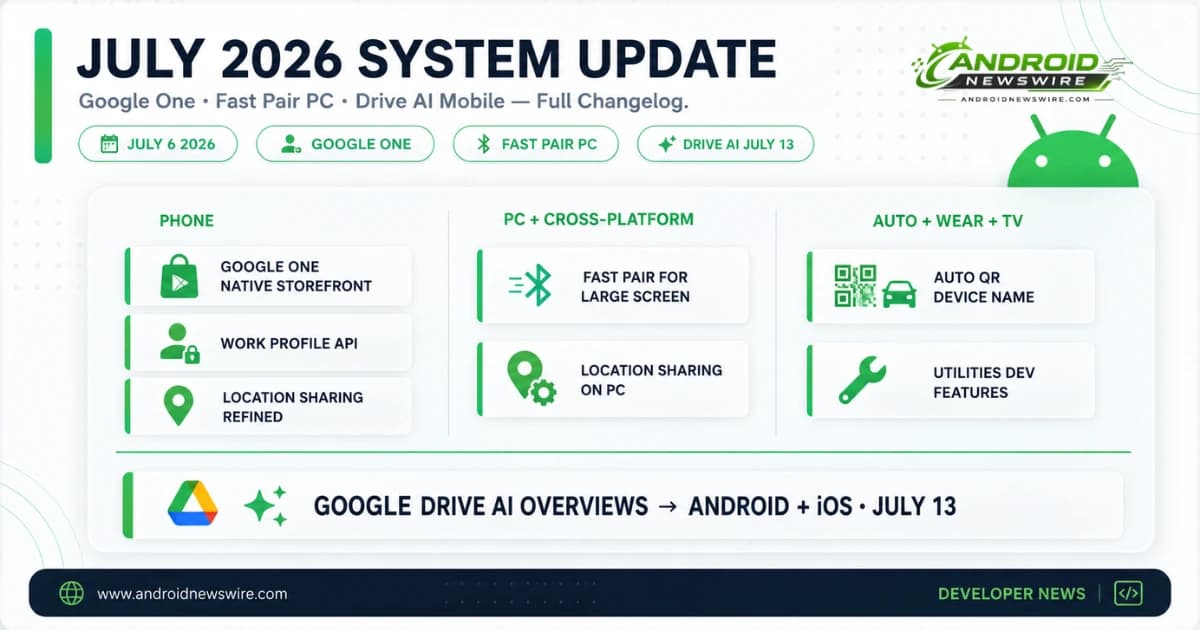
Google’s July 2026 system updates began rolling out on July 6, 2026, delivering the month’s additions to Play Services, the Play Store, and the Play System Update across every Android platform surface — phone, tablet, Wear OS, Android Automotive, PC, and TV. The July changelog is a tightly focused set of improvements: a meaningful Google One commerce upgrade, a Fast Pair capability expansion that benefits PC users specifically, developer API additions for Maps, Location Sharing, Device Connectivity, and Utilities, and a significant Google Drive AI update arriving this month.
As with every monthly Google System release, a feature appearing in the changelog does not mean it is immediately and universally available. Some capabilities arrive broadly on the update’s publication date; others roll out progressively over weeks or months following the initial changelog entry.
To apply the July update manually: Settings → your name at the top → All Services → Privacy and Security → System Services.
The Complete July 2026 Changelog
Google One Native Storefront — Faster In-App Purchases
The July update delivers an upgraded native storefront for Google One, producing a faster and more seamless in-app purchase experience for users buying storage upgrades, Gemini AI Ultra subscriptions, and other Google One products directly within the Google One app.
The native storefront upgrade replaces the previous web-based checkout flow that appeared when users initiated purchases from within the Google One app with a fully native purchase interface. Native checkout reduces latency — there is no web page to load before the purchase dialog appears — and provides a more consistent experience with the rest of the app’s interface.
The change is relevant for Google One subscribers across the platform. For users upgrading storage, adding family plan members, or subscribing to Gemini AI Ultra from the app, the July update makes that transaction feel meaningfully faster and more polished than before.
For developers building subscription or in-app purchase flows: the native storefront approach Google is applying to its own first-party products is the same standard the Play Store’s billing documentation recommends for third-party apps. If your app’s in-app purchase flow still routes users through a web overlay rather than a native purchase sheet, the Google One upgrade is a useful reference for the experience gap your users are comparing against.
Fast Pair for Large Screen — Bluetooth Pairing Comes to PC
With updates to Fast Pair, users can now use Fast Pair for Large Screen to quickly connect Bluetooth devices to a desktop computer.
Fast Pair has been the quick-connect Bluetooth pairing system for Android phones and Wear OS devices since it launched — detecting nearby devices in pairing mode and surfacing a one-tap connection prompt rather than requiring users to navigate into Bluetooth settings and manually search for devices. The July extension of Fast Pair to large screen and PC contexts brings that same one-tap pairing experience to desktop computers running compatible Google software.
The practical benefit is most obvious for users who move Bluetooth accessories — headphones, keyboards, mice, earbuds — between a phone and a desktop computer. Fast Pair for Large Screen means the PC-side pairing for a compatible accessory is as quick as the phone-side pairing, without navigating the Bluetooth device management panel on a desktop operating system.
For the Android ecosystem, this expansion is meaningful for two overlapping audiences: Googlebooks users — the Android-based laptop category announced at The Android Show — and users who pair Android phones with Windows or ChromeOS desktops through Google’s cross-device services. In both contexts, Fast Pair for Large Screen reduces the friction of moving audio and peripheral accessories across device boundaries.
Work Profile Setup Reliability API
This update adds a new API to improve the reliability of work profile setup on Android phone devices.
Work Profile — the Android feature that creates a separate, IT-managed partition on a personal device for work applications and data — has historically had a complex setup flow that produced inconsistent success rates across device models, Android versions, and enterprise MDM configurations. The new API introduced in the July Play Services update provides a more reliable signal to MDM providers about the work profile setup state, allowing the setup flow to handle edge cases and failures more gracefully.
For enterprise IT administrators and developers working with managed device deployments: this is a maintenance improvement rather than a new capability. The Work Profile feature itself does not change. The new API reduces the probability of setup failures appearing as success, or success appearing as failure, across the device fleet — producing more accurate provisioning status reporting in MDM consoles.
For enterprise apps that check work profile status as part of their own authentication or feature gating logic — particularly apps that need to confirm a work profile is successfully established before enabling corporate feature sets — testing against the July Play Services update is worthwhile. The new API may change the timing or sequence of status callbacks in ways that affect apps with assumptions about exact provisioning event ordering.
Location Sharing API Refinements and Store Visits
Two location-related additions land in the July update: Location Sharing APIs are refined with new location request types introduced, and On-Device Location History Store Visits now processes more frequently.
The Location Sharing API refinements expand the types of location sharing requests that third-party applications can make through the Play Services location stack. New request types provide developers with more granular control over the sharing duration, the update frequency, and the precision level of shared locations — building on the one-time precise location permission that Android 17 introduced at the OS level earlier this year.
The Store Visits frequency increase is a change to how frequently the on-device system checks whether a user has visited a physical retail location. Store Visits is part of Google’s on-device location history processing — used for Google Maps Timeline and location-based features — and the more frequent processing means the feature’s accuracy for shorter visits improves. Users who visit a store briefly and previously found that visit not reflected in their location history should see better detection after the July update.
For developers building location-sharing features: the new API types in the July update are worth reviewing if your application currently uses the Fused Location Provider for sustained location sharing. The refined APIs provide cleaner implementation paths for specific sharing scenarios — particularly time-limited precise sharing and recipient-specific sharing — than the previous API surface required workarounds to achieve.
Google Location Sharing Management on PC
You can now manage Google Location Sharing settings and compatibility for supported device types from a PC.
This addition extends the Google Location Sharing management interface — previously available only from Android and the web — to the PC surface, allowing users on Googlebooks or ChromeOS devices to view, manage, and stop location sharing sessions directly from their desktop without picking up a phone or opening a browser tab.
The timing is directly connected to Googlebooks — the new Android-based laptop category that Google announced at The Android Show in May. As Googlebooks reach users in Fall 2026, feature parity between the phone and PC surfaces for core Google services becomes practically important rather than aspirational. Location Sharing management on PC is one of the first explicit examples of that parity being built into the system update cadence.
Android Automotive QR Sign-In Shows Device Name
When a user signs in to their Google account on an Android Automotive OS device via QR code, the sign-in confirmation now displays the name of the requesting device.
Android Automotive QR sign-in — where users scan a code displayed on the in-car screen with their phone to authenticate their Google account on the vehicle’s system — previously showed a generic confirmation prompt without identifying which vehicle was requesting access. The July update adds the device name to that confirmation, so the prompt on the phone explicitly shows which car is requesting Google account access before the user approves.
The change is a security improvement in the clearest sense: users who have multiple Android Automotive devices, or who share vehicles in a household, now have an unambiguous identifier in the approval prompt rather than a generic request. The device name confirmation is consistent with the security transparency principle applied to OAuth and account permission flows generally — the user should always know specifically what is requesting access before approving.
Utilities Developer Features Across All Platforms
New developer features for Google and third-party app developers support Utilities-related processes across Android Automotive, PC, Phone, TV, and Wear OS.
Utilities in the Play Services context covers the broad infrastructure of system utility APIs — device state management, battery optimisation signals, notification infrastructure, alarm scheduling, and related system services that apps interact with across all Android platform surfaces. The July additions to the Utilities developer API surface are described at the framework level in the official changelog without specific feature enumeration — consistent with Google’s practice of grouping infrastructure-level API additions under the Utilities category.
Device Connectivity Developer Features on Phone
New developer features for Google and third-party app developers to support Device Connectivity-related processes on Android phone devices.
Device Connectivity continues to receive monthly additions — this is the fourth consecutive month in which the category has received new developer APIs. The July addition follows the pattern of the June update’s Quick Share × AirDrop cross-platform infrastructure preparation. With Samsung Unpacked on July 22 bringing Galaxy Z Fold 8 and Galaxy Glasses, and the full Quick Share × AirDrop cross-platform feature expected later in 2026, the consistent Device Connectivity additions each month are building the infrastructure for these consumer-facing features before they ship.
Bug Fixes for Developer Services
Bug fixes for Developer Services-related components land across Android Automotive, PC, Phone, and Wear OS. These maintenance fixes address regressions in the developer-facing infrastructure — the APIs, SDKs, and service interfaces that third-party app developers use — without introducing new capabilities.
For developers who have encountered unexpected behaviour in developer service APIs in recent weeks, the July update is worth applying to test devices and retesting against affected functionality.
Google Drive AI Overviews Comes to Android and iOS — July 13
Outside the core system update changelog, the most significant July development for Android users is Google Drive AI Overviews expanding from the web to the Android and iOS apps, beginning July 13, 2026.
Drive AI Overviews — which launched on the web earlier this year — surfaces instant AI-generated answers at the top of Drive search results. Rather than opening individual files and reading through them to find a specific piece of information, users see Gemini-generated summaries pulled from across their stored documents, with the relevant source files linked below the summary.
The mobile expansion carries particular relevance for Android users. Drive on mobile is frequently the access point for on-the-go document lookup — quickly checking a figure from a spreadsheet, finding a date from a proposal, or confirming a detail from a contract without sitting down at a desk. AI Overviews on mobile means Gemini handles that lookup and surfaces the answer directly in the Drive search results, reducing the sequence of steps from Drive → open file → scan for information → close file to a single search with an immediate answer at the top.
The Android Drive app update delivering AI Overviews is available through the Play Store update channel. Drive AI Overviews begins rolling out to Android and iOS apps on July 13, 2026 — one week from today.
How to Apply the July Update
Check your current Play Services version at Settings → Apps → All apps → Google Play Services → Version number. The July system updates roll out progressively over several weeks — most features will reach all eligible devices within three to four weeks of the July 6 publication date.
For Mainline module updates (Play System updates): Settings → Security and privacy → System and updates → Google Play system update → Check for update.
The July Update in Context
July’s system update is a consolidation month rather than a feature expansion month. Coming directly after June’s three-phase rollout that brought WhatsApp backup integration into device settings, per-app backup controls via Play Services 26.24, and the Credential Exchange password portability standard, July’s additions are more focused — refining specific surfaces rather than introducing new platform-wide capabilities.
The Fast Pair for Large Screen addition and the Google One native storefront improvement are the most consumer-visible changes. The Work Profile API, Location Sharing API refinements, and Device Connectivity additions are the most consequential for enterprise developers and app teams building against the affected surfaces. And Drive AI Overviews on mobile — arriving July 13 — is the most impactful Gemini expansion of the month for everyday Android users.
The next major platform moment is Samsung Unpacked on July 22 in London — 15 days away. Galaxy Z Fold 8, Galaxy Z Fold 8 Ultra, Galaxy Z Flip 8, Galaxy Watch 9, Galaxy Watch Ultra 2, Galaxy Glasses, and One UI 9 stable all arrive on that date. The July system update is the last Google-side platform update before the biggest Samsung hardware event of the year.
Related on Android News Wire:
- June 2026 Android System Updates: Complete Three-Phase Changelog
- May 2026 Google System Updates: AppFunctions in Play Services
- Android Per-App Backup Controls Rolling Out via Play Services
- Gemini Google Play Conversational Search: How It Changes App Discovery
- Android 17 Is Live: Every Feature Rolling Out to Pixel Right Now